
A few days ago, I wrote my full review of the Mijia Smart Air Purifier 6. Overall, I was quite impressed with the device, but since I needed to purify the air across our whole home, I also picked up another purifier – the Xiaomi Smart Air Purifier 4 Lite. This device is the lower-cost and slightly less performant model compared to the Xiaomi Smart Air Purifier 4 (now replaced by the Smart Air Purifier 6) and is designed for smaller areas such as studio-style apartments or bedrooms.
As I mentioned in my previous article, I decided to purchase the Smart Air Purifier 6 to handle most of the heavy lifting in our living area, and to place the Smart Air Purifier 4 Lite in the master bedroom to ensure we have clean air while we sleep. It’s been over one month now, and we’ve had both devices running every day. That is to say, this review is written by someone who actively relies on these devices day-to-day.
Anyway, considering how well the Smart Air Purifier 6 performed, I was very curious to dive deeper into the Smart Air Purifier 4 Lite. This device is considerably less expensive (especially when it’s on sale) than its larger sibling, and it also has a few fewer features. On the flip side, it’s also a surprisingly performant device for the relatively low price tag. However, we’ll discuss all of these aspects in more detail soon!
Before diving fully into this review, I want to point out that I live in the Philippines and I picked up the Smart Air Purifier 4 Lite for its normal price here. However, from what I’ve been able to find online, the device tends to be much cheaper here and in other Southeast Asian countries than it is elsewhere. Therefore, please keep in mind that pricing may vary from region to region and that my opinions are all formed considering the price I paid for it. While the performance and features won’t change regardless of local pricing, the cost-effectiveness of the device might.

I independently review air quality monitors with a focus on accuracy. I’ve tested well over 50 devices, compared some of them against reference instruments, and rely on peer-reviewed research and third-party studies wherever possible.
I don’t accept sponsored posts or paid reviews, and I don’t run ads on BreatheSafeAir. When I receive a free product, the company has no say in what I write. Affiliate links don’t influence my views and never increase the price you pay.
I’m constantly learning about how these sensors work – from opening them up, discussing with researchers in the field and examining the hardware inside. That ongoing learning process helps me write reviews that are grounded in how the technology actually behaves, not just what the spec sheet says.
You can read my full Disclaimers & Ethics page for complete details. And as with any review, even mine, I always encourage checking multiple independent sources before making a decision.
This post contains affiliate links. For more information, please refer to my affiliate disclaimer. I was NOT sent a product for review; I purchased this product myself. All opinions expressed in this post are my honest thoughts. I only recommend products that I believe in.
Informational Purposes: Information on this blog is for informational purposes only. Readers are encouraged to confirm the information herein with other sources. This website assumes no responsibility for the accuracy of the information, which is subject to change without notice. Products mentioned on this website are not medical devices and do not guarantee protection.
If you notice any errors or inconsistencies in this article, please contact me so I can update the information accordingly.
Contents
Xiaomi Air Purifier Lineup

I discussed the Xiaomi air purifier lineup in more detail in my review of the Smart Air Purifier 6, but I wanted to discuss it again here as it’s very important for understanding exactly where the Smart Air Purifier 4 Lite sits within its product series.
At the bottom of the lineup is the Xiaomi Smart Air Purifier 4 Compact, and this is a significantly less powerful device than the 4 Lite. While it’s potentially still a good deal – you can find my full review of the 4 Compact here – at around half the price of the Smart Air Purifier 4 Lite, you get a massive performance increase by stepping up to the more expensive device. Considering that the 4 Lite is around half the price of the Smart Air Purifier 6 but the performance gap between those two devices is significantly smaller, the 4 Lite seems like the sweet spot for many people.
Based on my experience, I think the 4 Lite is a great device for small one-room/studio apartments, or a large bedroom or small living area. While Xiaomi rates it as being intended for a ‘second bedroom,’ I think the CADR lends itself more towards being the perfect air purifier for a master bedroom or small apartment.
Now, you are losing out on a few features by opting for the 4 Lite instead of the 6, but these aren’t really due to its position in the lineup, but rather to the 6 being a very new device from a new generation of Xiaomi air purifiers. If you compare the 4 Lite to the 6’s predecessor – the 4 – there are very few feature advantages you gain by going to the larger model. Sure, you get the negative ion ‘feature’, but I don’t think you’re missing out on much by losing this (we’ll discuss this more in the performance section). In the future, I expect a 6 Lite will be released, and there will likely be more feature parity then. However, that should also lead to price discounts for the 4 Lite.
While it really depends on use-case, I think the pricing of the 4 Lite makes it a great device among Xiaomi’s lineup. When on sale, you can get two of these for the price of the Smart Air Purifier 6, and for many people, two of these will be a better investment. If you only need a single device, this is perfect as long as you don’t expect it to handle a large open-plan living space or purify the air across an entire home.
Performance
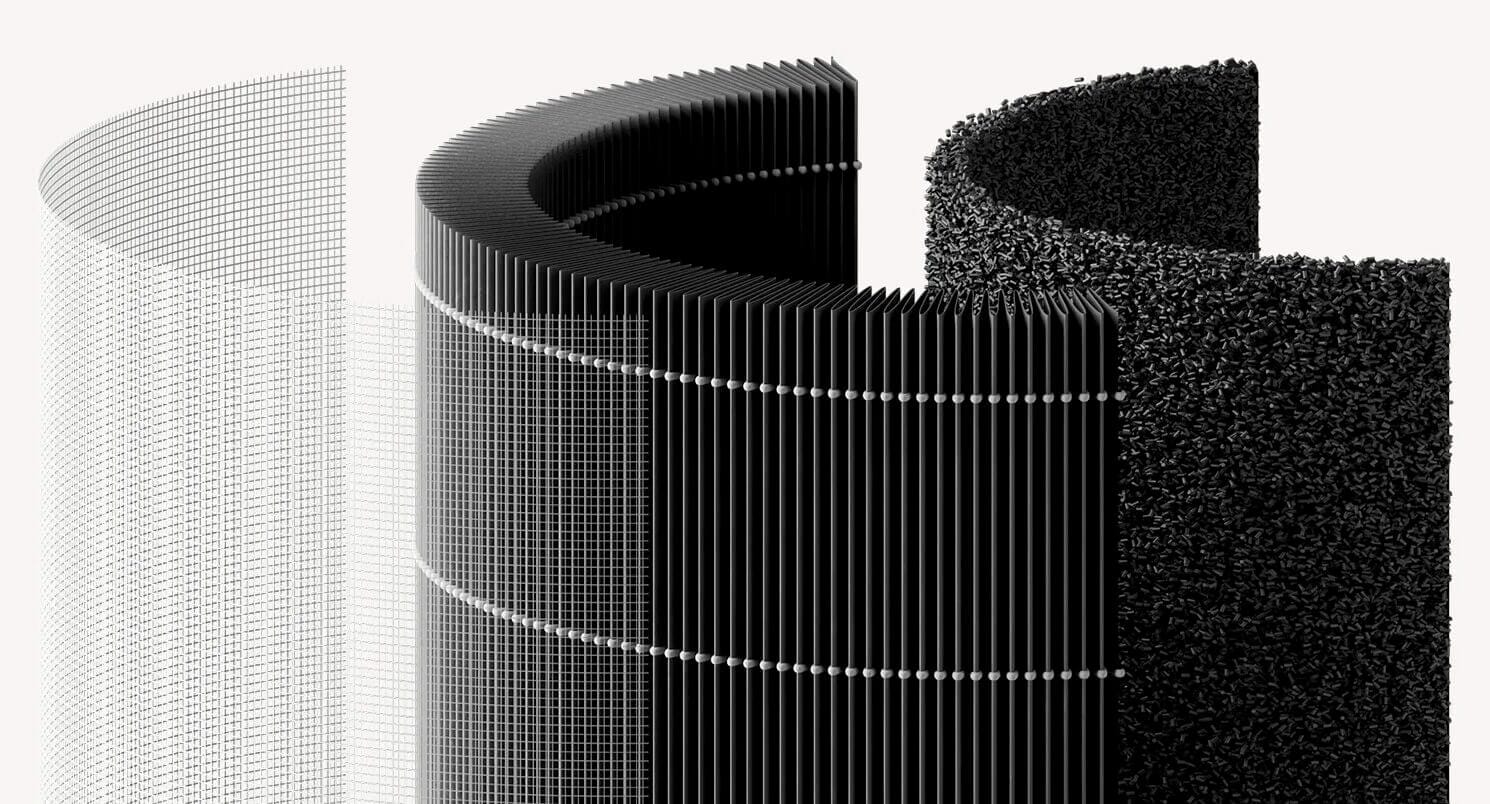
Xiaomi’s official word on the Smart Air Purifier 4 Lite is that it has a CADR of 360 m³/h, a formaldehyde CADR of 120 m³/h, and that the device is suited for spaces 25-43 m². On top of this, they also advertise 99.97% filtration (the same as the filters for their other purifiers too). Xiaomi also provides the source for most of these claims, which appears to be based on testing by the China Testing & Inspection Institute for Household Electric Appliances. I appreciate how Xiaomi gives the source for its claims.
Now, the 4 Lite filter is not technically a HEPA filter, but it does have filtration comparable to one. The rounded design also allows it to have quite a large surface area while still fitting into a relatively compact device. Interestingly, the 4 Lite filter also uses activated carbon, which gives it limited filtration via adsorption of VOCs (volatile organic compounds). I say limited because, while the filter itself is specified to have a lifespan of 6-12 months, the carbon will reach its maximum adsorption capacity well before then, rendering it far less effective – if effective at all – compared to when it is new. With that said, I am glad to see a carbon filter included.
On the outer edge of the filter is a large, net-like pre-filter that does the job of catching larger particles and objects before they reach the high-efficiency filter. Think things like cat fur, hair, and the like. It’s a decent filter setup – simple, but effective. Honestly, I think that phrase summarises the performance and filtration technology of the Xiaomi Smart Air Purifier 4 Lite very well.
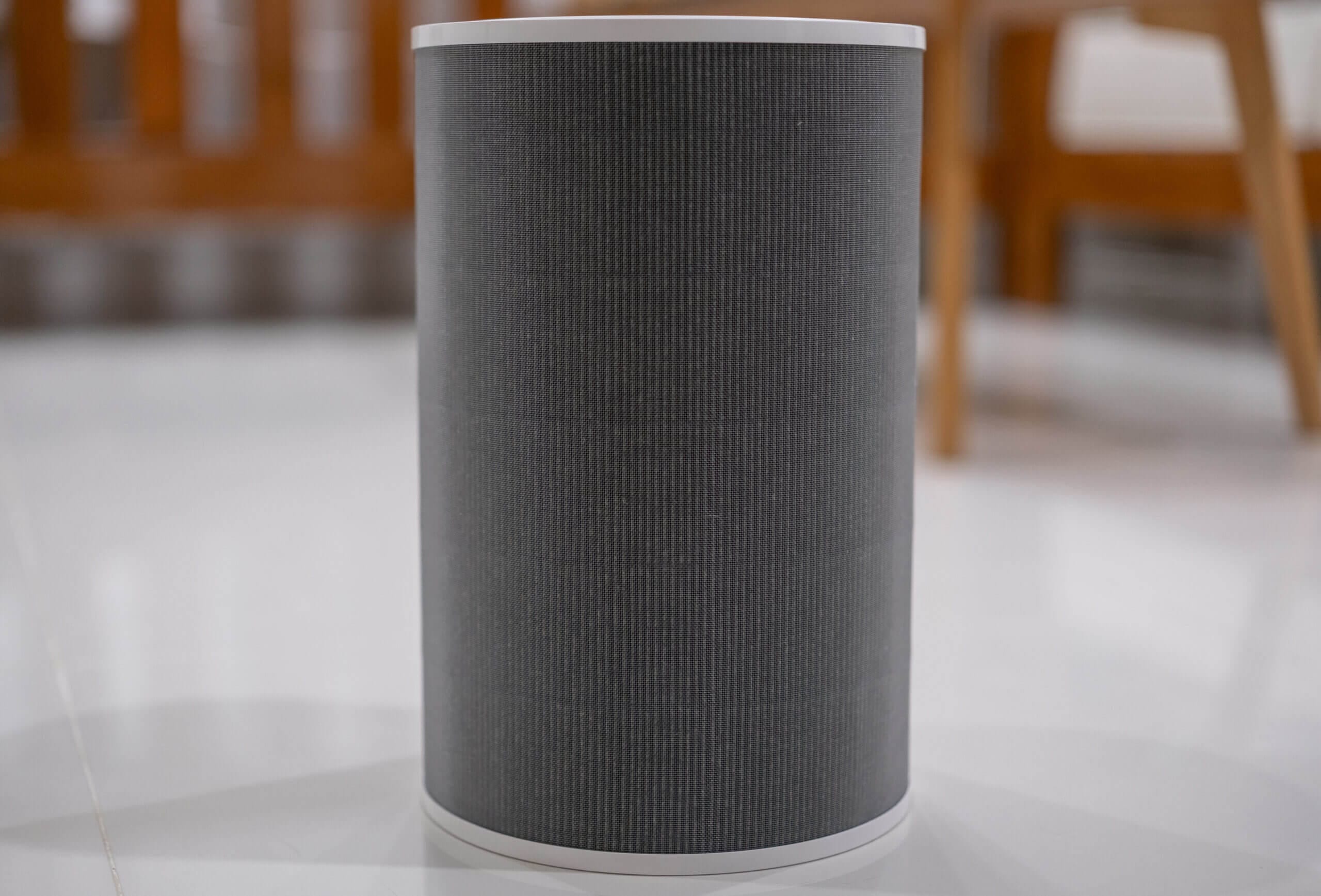
Unlike higher-end models of air purifiers both from Xiaomi itself and other companies, there is no usage of other technologies such as UV sterilisation or negative ions here. However, I don’t think this is a downside – while both can help performance somewhat, they’re also both limited and mechanical filters still do the bulk of the heavy lifting. On top of this, both of these techniques can cause ozone concerns, making the 4 Lite an attractive device for anyone wanting to avoid ozone-emitting purifiers.
Curious to see how the device would perform in my own home, I decided to put the device in one of our spare bedrooms to see just how quickly it could purify the area. The room is roughly 30 m³ (29.4 m³ to be exact) and I burned incense to reach roughly 500 µg/m³ of PM2.5. From here, I extinguished the incense and remotely triggered the purifier at max speed, then again at half speed, both through manual mode. I let it run while recording how long the concentration took to fall below 5 µg/m³, and I repeated each speed three times. The 4 Lite has its own particle sensor, but every reading here comes from a single AirGradient ONE I-9PSL sitting in the room with it. I didn’t time sleep or auto against a spike this round. Neither mode is built to pull a room down from a peak, so most of what you’d be measuring is the room itself.
| Series | Runs | Measured CADR | To 50% | To 90% | To 99% |
|---|---|---|---|---|---|
| Max speed | 3 | 350 m³/h | 3:56 | 11:36 | 21:02 |
| Half speed | 3 | 155 m³/h | 8:17 | 23:54 | 45:03 |
Measured CADR is the median of 3 runs, fitted to the exponential part of each decay curve in a 29.4 m³ room. The manufacturer states 360 m³/h. A real room isn't a sealed test chamber, so my figures won't line up exactly with a lab result, and a difference here doesn't mean the manufacturer is wrong.
29.4 m³ · AirGradient ONE I-9PSL (factory calibrated) · Download max speed data (CSV) · Download half speed data (CSV) · Download room alone data (CSV)
Please note that the above test took place in a relatively small room and is a significantly smaller area than this device is designed for.
Starting at 500 µg/m³, the 4 Lite pulled the room under 5 µg/m³ in 21 minutes at max speed. Half speed took 45. That works out to 350 m³/h of measured clean air delivery flat out and 155 at half, so you give up well over half the throughput for the quieter setting. From my earlier round of testing, auto mode tracked max speed closely once the built-in sensor caught up, and sleep barely beat leaving the room alone.
When I first ran these tests I had the 4 Lite more or less level with the Mijia Smart Air Purifier 6 at max speed. Retesting both on fresh filters put a clearer gap between them. The 6 measures 453 m³/h against the 4 Lite’s 350, and clears 90% of the room in 8:30 where the Lite needs 11:36. For a device that costs a good deal less, I’m still happy with that.
| Series | Runs | Measured CADR | To 50% | To 90% | To 99% |
|---|---|---|---|---|---|
| Xiaomi 4 Lite, max speed | 3 | 350 m³/h | 3:56 | 11:36 | 21:02 |
| Mijia 6, max speed | 3 | 453 m³/h | 2:45 | 8:30 | 15:26 |
| Levoit Vital 200S-P, max speed | 3 | 387 m³/h | 3:29 | 10:02 | 19:31 |
| Xiaomi 4 Compact, max speed | 3 | 216 m³/h | 6:12 | 18:01 | 32:01 |
Measured CADR is the median of 3 runs, fitted to the exponential part of each decay curve in a 29.4 m³ room. A real room isn't a sealed test chamber, so my figures won't line up exactly with a lab result, and a difference here doesn't mean the manufacturer is wrong.
29.4 m³ · AirGradient ONE I-9PSL (factory calibrated) · Download xiaomi 4 lite, max speed data (CSV) · Download mijia 6, max speed data (CSV) · Download levoit vital 200s-p, max speed data (CSV) · Download xiaomi 4 compact, max speed data (CSV) · Download no purifier, room alone data (CSV)
The Levoit Vital 200S-P lands between the two Xiaomis at 387 m³/h, and it is the unit that eventually replaced the 4 Lite in my own bedroom. Further down sits the 4 Compact, the smaller sibling in Xiaomi’s own lineup, which manages 216 m³/h and needs 18:01 to clear 90% of the same room. That gap is the clearest argument for spending the extra on the Lite.
With that said, I also noticed two other things – firstly, the sleep mode is essentially useless for bringing particle levels down from a peak. While it might hold some value in keeping levels consistently low, it’s not very powerful at all, and I doubt it would have much impact even in a medium-sized bedroom. Secondly, automatic mode is almost useless in my eyes because the trigger thresholds are too lenient. Even after 40 minutes, it wasn’t able to get the particle concentration to 1 µg/m³. I mentioned a similar finding in my Mijia Smart Air Purifier 6 as the PM levels there were also simply too lenient and the fan speeds associated with each level were too slow. It looks to be the same here, unfortunately.
Overall, the Smart Air Purifier 4 Lite is a strong performer if the speed is manually controlled through the app. Unfortunately, the Auto and Sleep modes are not particularly useful and, while I might use the Sleep mode at times, the Automatic mode is useless for me. Now, with that said, you can create your own ‘Auto’ mode with automations if you want. However, you can’t toggle the exact speed – just the mode. That is to say, you can set the device to turn to Manual mode when the concentration is > 15 µg/m³, but you will need to pre-set Manual mode to max speed and you can’t edit this via automations.
Sound is the other thing you live with, and I measured 58 dBA at max and 44 dBA at half speed. Xiaomi quote 33.4 dBA for night mode and I’ll take their word for it, because my room’s own noise floor sits above that and my meter can’t separate the two. Max speed carries across a room and I wouldn’t sleep beside it. Half speed vanishes into background noise once you stop listening for it.
Sleep is left out: every unit read within a couple of dBA of the room’s own noise floor at its lowest setting, which measures the room rather than the purifier.
There isn’t much between any of them. The 4 Compact is the quietest at full speed by 2 dBA, and the Levoit edges the others at half. Differences that small won’t decide a purchase.
BreatheSafeAir is a one-person publication. Every share and every subscriber is important to me.
I don’t have a marketing budget or a team behind me. Just a lot of test equipment and a genuine interest in helping you make sense of your air quality. If you find this useful, subscribing to my newsletter is the best free way to support the work. You’ll get information on what I’m currently testing, findings that don’t make it into the full reviews, and the kind of detail you only get from someone who thoroughly tests these devices.
Sensor Performance
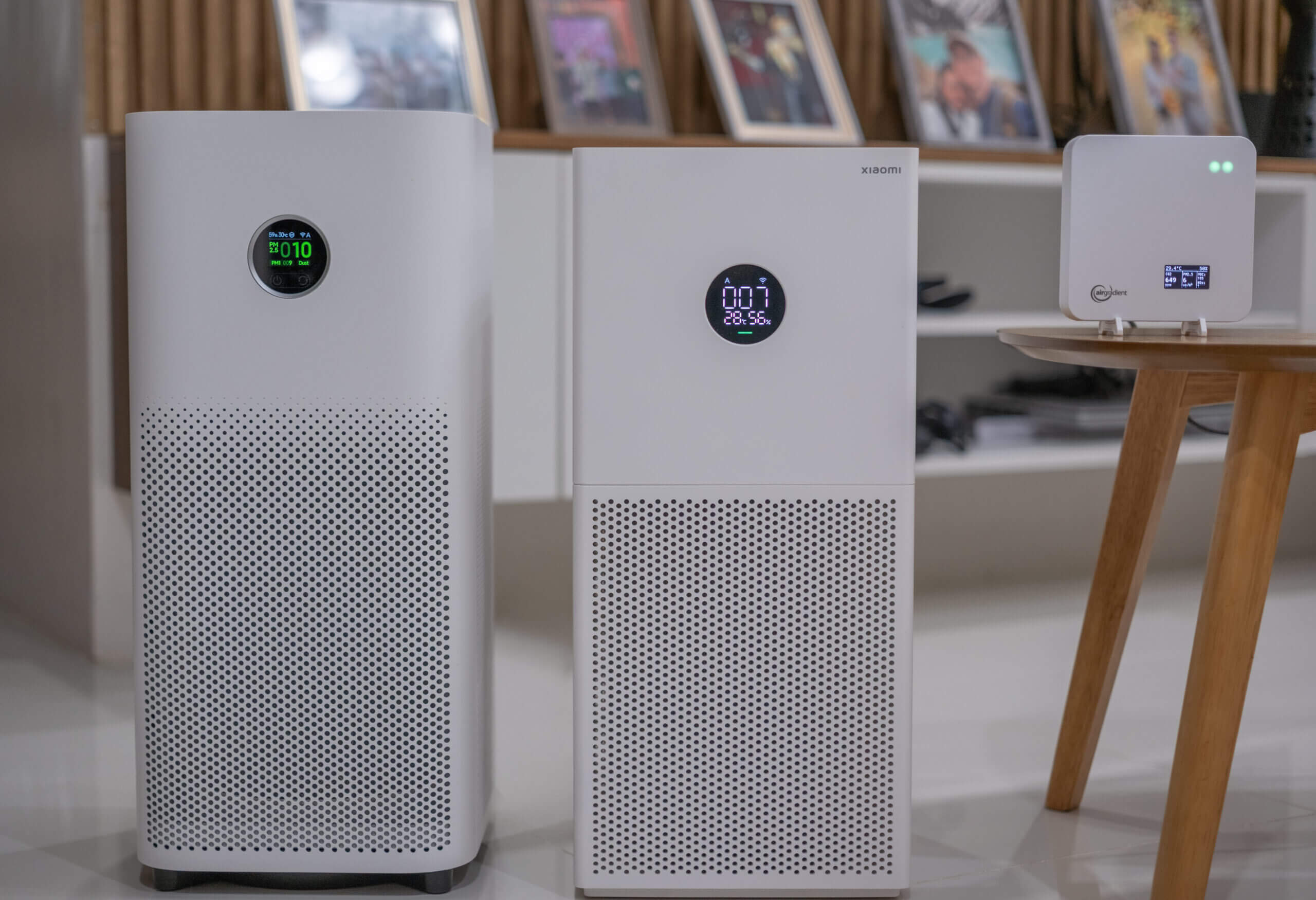
The Mijia Smart Air Purifier 6 reports 10 µg/m³, while the 4 Lite reports 7 µg/m³ and the AirGradient ONE reports 6 µg/m³.
One of the biggest complaints that I’ve heard about with the Xiaomi Smart Air Purifier 4 Lite is the performance of the built-in PM2.5 sensor. Before purchasing this device, I read a lot of Reddit threads and even blog articles criticising how bad the PM2.5 accuracy of this device is and I expected, going into this review, to be knocking the Smart Air Purifier 4 Lite for this aspect.
However, after a lot of side-by-side testing, I’ve come to a more unexpected conclusion. Both the Mijia Smart Air Purifier 6 and the 4 Lite appear to use relatively capable low-cost particle sensors that perform better than I initially expected based on online discussions. In general, both devices tracked trends reasonably well when compared to my dedicated indoor air quality monitors, including the AirGradient ONE, PurpleAir Zen, and Atmotube Pro 2.
With that said, during repeated testing I noticed an odd behaviour from both Xiaomi units: sporadic and sometimes dramatic short-term spikes. For example, readings might sit steadily around 30-35 µg/m³ for several measurements, briefly jump to 70-80 µg/m³ for a few readings, and then quickly settle back to the low 30s without any obvious environmental change. I observed this behaviour on both the 6 and the 4 Lite, suggesting it’s likely related to sensor noise as this didn’t occur on the monitors I was using for comparison.
Across multiple incense smoke tests and real-world scenarios, both Xiaomi purifiers generally reported slightly higher values than my calibrated AirGradient ONE monitors. I did notice however, that at higher concentrations, the Smart Air Purifier 6 also read significantly higher than the 4 Lite and my other comparison monitors – just see the image above! I don’t think this to be a major issue, though, as at these concentrations your device should be on maximum speed regardless.
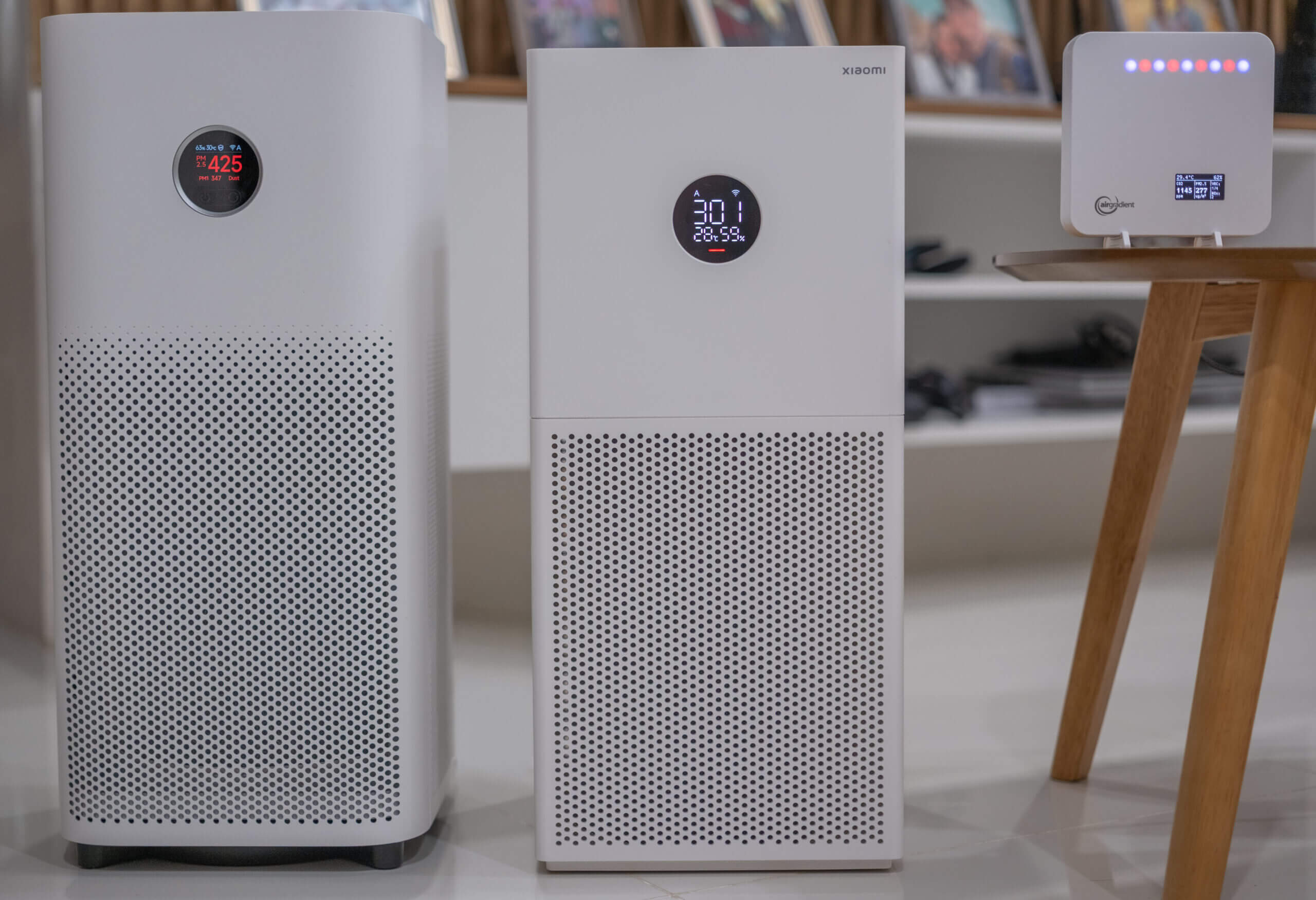
The Mijia Smart Air Purifier 6 reports 425 µg/m³, while the 4 Lite reports 301 µg/m³ and the AirGradient ONE reports 277 µg/m³.
Both of my AirGradient ONE units are calibrated devices (calibrated using incense smoke, which is also what I used for these comparisons), so they provide a useful reference point. While low-cost optical sensors often overreport to some degree, the Xiaomi units were typically in the same overall range, just shifted somewhat upward.
Both the Mijia Smart Air Purifier 6 and the 4 Lite effectively double as basic indoor air quality monitors (except for at higher concentrations > 200 µg/m³ where the Smart Air Purifier 6 looks to overreport significantly). They won’t replace a well-calibrated, dedicated air quality monitor, but they’re good enough to be useful. In fact, based on my testing, they perform better than I expected and are suitable for trend monitoring in a home environment.
One final note: unlike the 6, the 4 Lite does not display PM1 or PM10 (“Dust”) values. However, this is not necessarily a major loss. PM10 readings from low-cost optical sensors are often unreliable, and PM1 is typically estimated from the same underlying measurement as PM2.5, meaning it closely tracks PM2.5 trends anyway.
Design
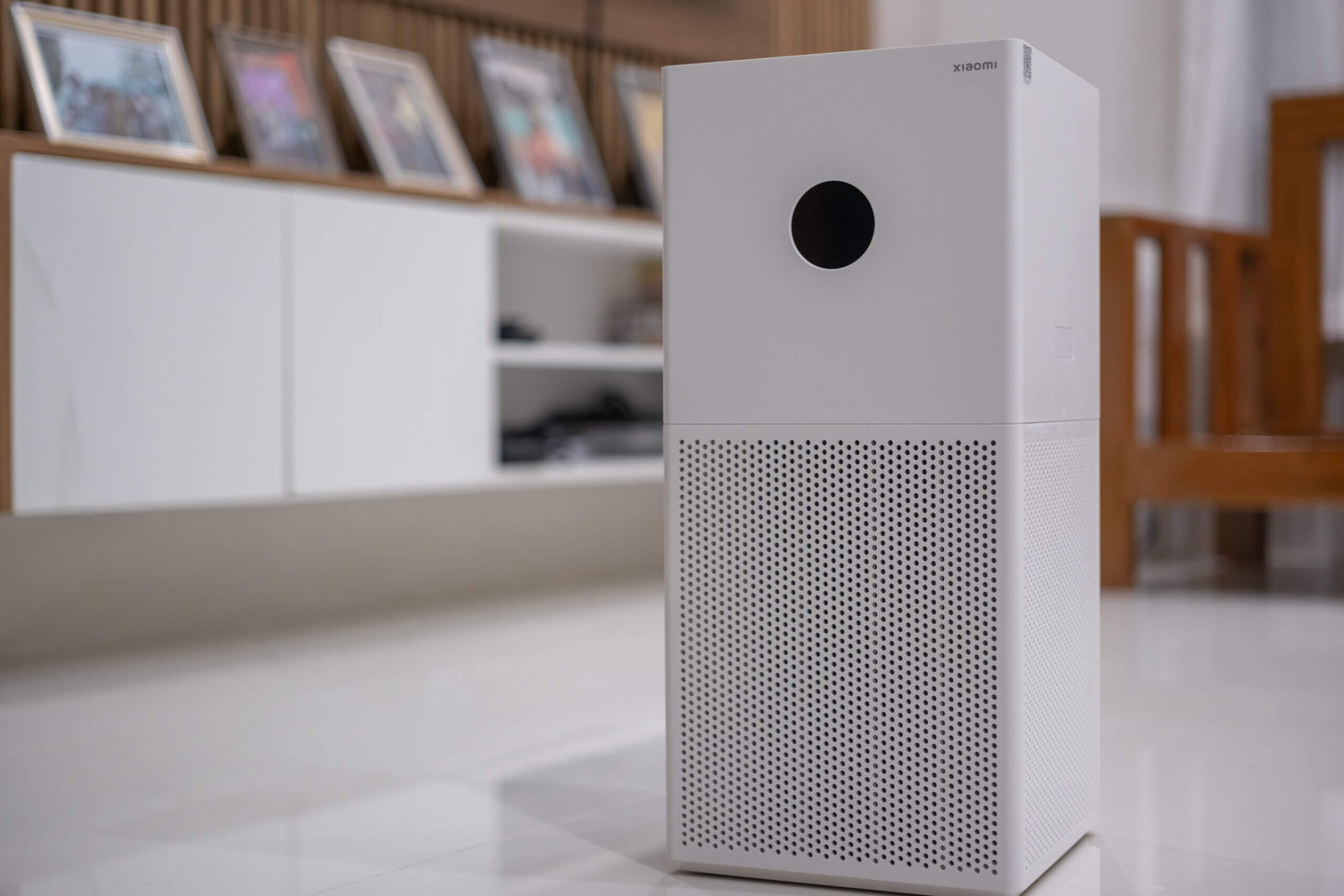
The Xiaomi Smart Air Purifier 4 Lite has a very simple, minimalist design. While it’s probably expected – but I want to mention it anyway – it feels a lot less premium than the higher-end purifiers in Xiaomi’s lineup. I also think the design doesn’t quite look as nice as some other purifiers in the same price range. With that said, I can’t fault the design for its functionality, with a few minor caveats.
The Smart Air Purifier 4 Lite can be split in half when the two buttons on either side of the top half of the purifier are pressed in. This will release the top (fan) component, and allow you to access the bottom half of the device to change filters. The filters used here are cylindrical, and they are unique to the 4 Lite. This means that even if you already have a Smart Air Purifier 4, 4 Pro, or 6, you can’t use the same filters here. I’m not a very big fan of this decision, especially considering that the filters between the devices are very similarly sized and seem like they should almost be interchangeable. I understand that a larger filter size allows for more airflow, and that the larger devices likely benefit from the larger filters, but I wish they could’ve found a way to use a universal filter size across the devices.
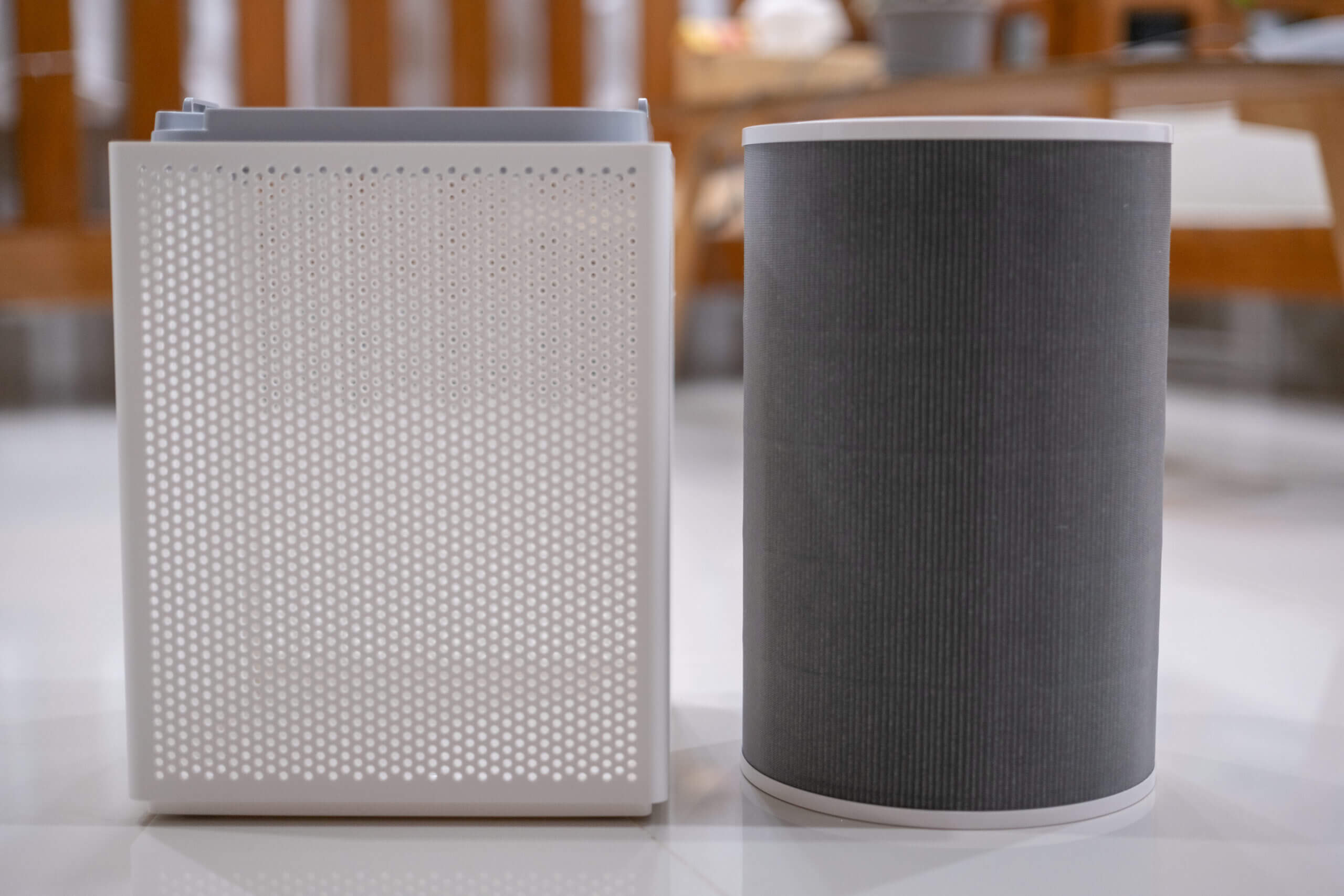
With that said, the cylindrical filters are very easy to replace and there is absolutely no difficulty in replacing filters – you can do it in 30 seconds. Once you remove the filter from the bottom half of the device, you will see just how simple it is, it’s just a plastic cube with an outer mesh-like texture to pull air through. Interestingly – and perhaps because there are no electronics in the bottom of the device – there is also no RFID tag on the filters like there are with the Mijia Smart Air Purifier 6.
One small thing I did notice when placing the filter into the bottom of the device is that there is a very small gap around the case and the edges of the filter. It’s just a few millimetres, but it was noticeable. However, there is also a seal in the top of the device that looks to cover this very small gap when the purifier is fully assembled. As such, I don’t believe much (if any) unfiltered air will be exhausted out of the top of the device.
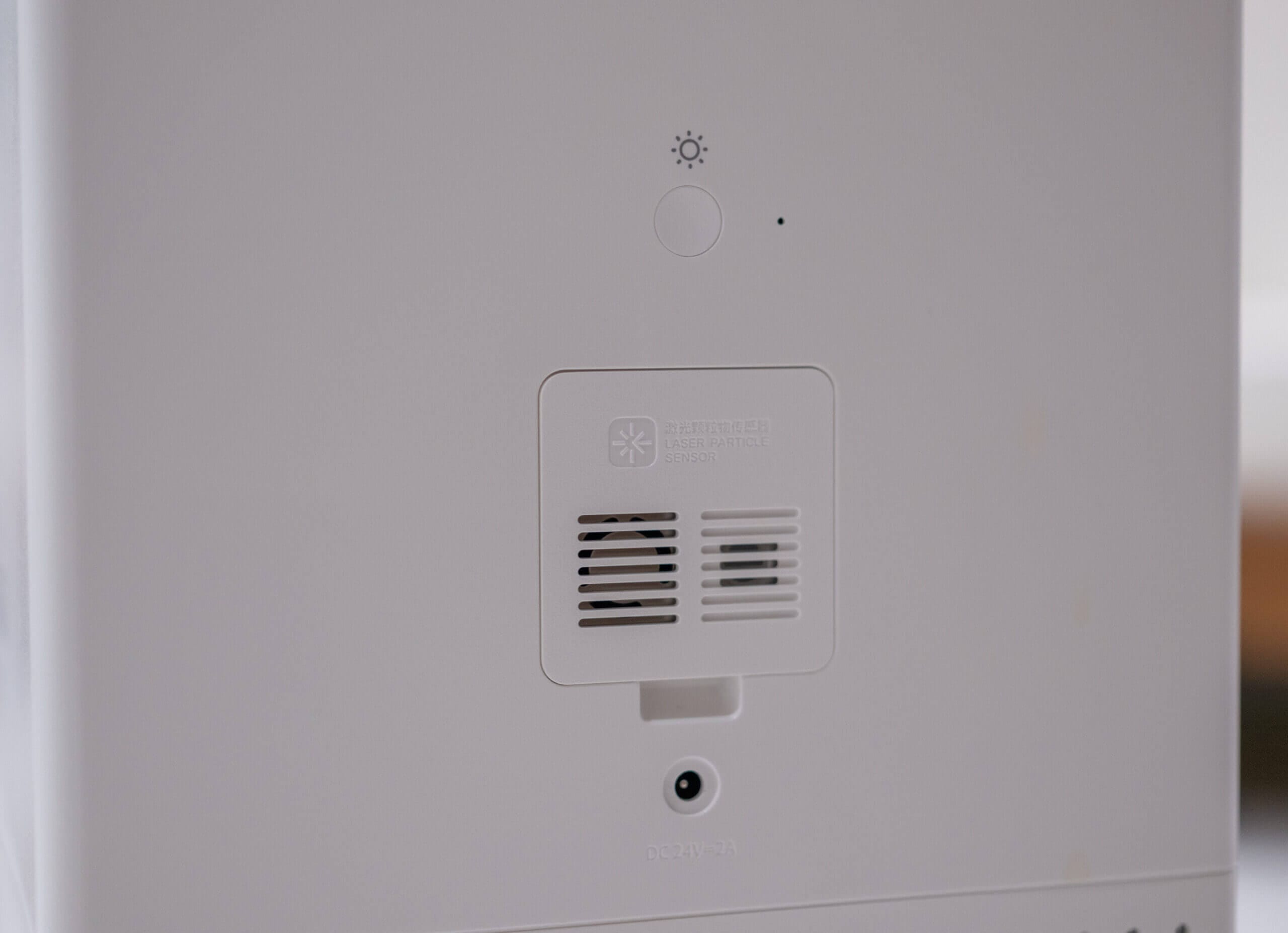
Moving on to the top half of the device, this is where everything interesting is located. Here, you will find an AC port for the power adapter, a laser particle sensor to monitor PM, a screen brightness button, a small recessed reset button, a small rounded screen, and a couple of buttons to turn the device on and off and switch modes. Of course, inside the upper half is also the fan which will be pulling air through the filter.
To put the device back together, you can just line up the top and bottom halves and ensure you have them both in the correct orientation. They will quite easily slot back together and give you a full, working device. While the locking mechanism feels solid enough and I’ve never had a worry that the bottom and top halves of the device will split when I’m carrying it, it definitely doesn’t feel (nor look) quite as nice as the higher-end purifiers in the lineup.
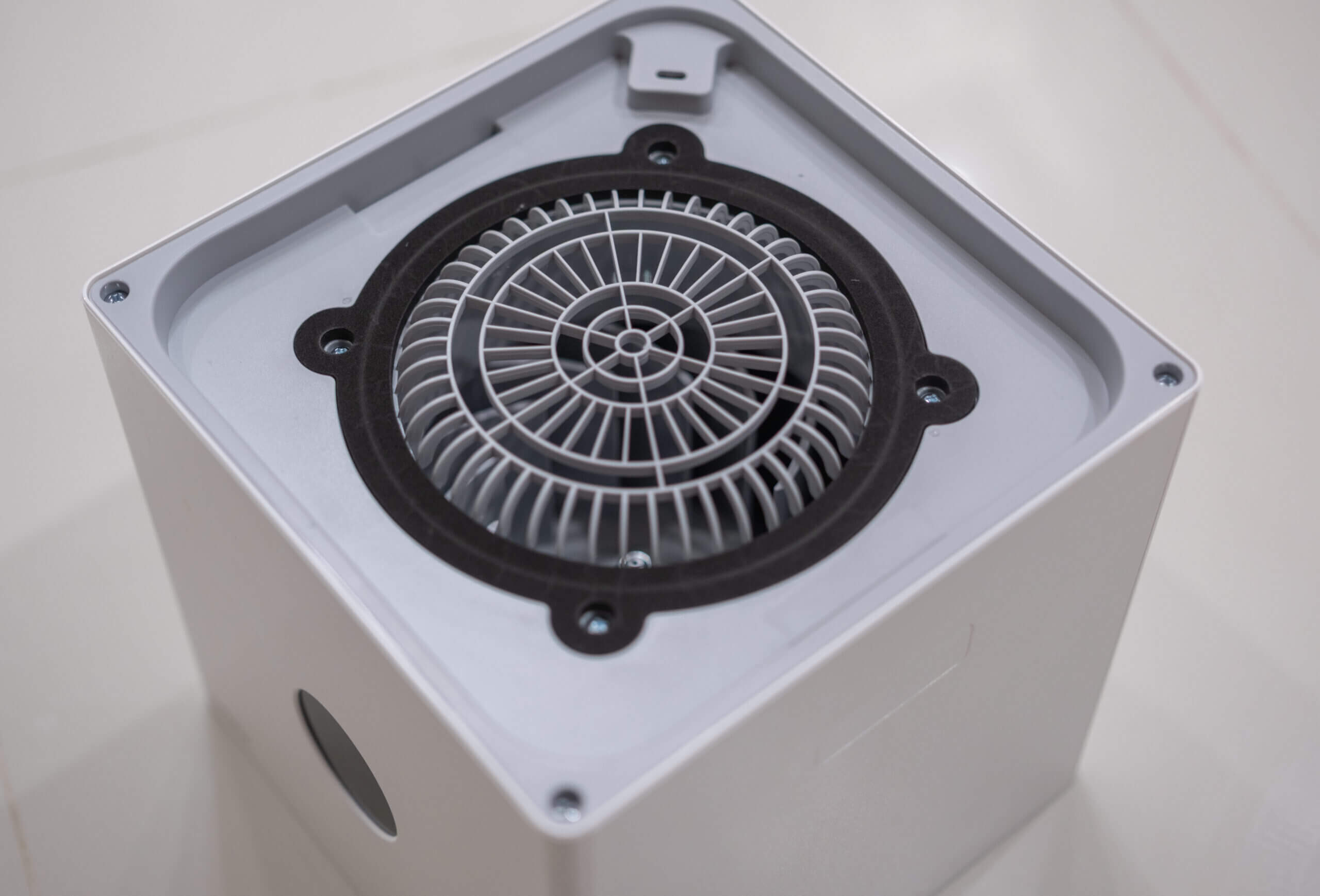
This also extends to other elements of the design. For example, the power and mode buttons are located on the top of the device near the exhaust vent and can sometimes be a bit weird to push. It took me a while to get used to the non-responsive feel of them and I’m not a fan – I would have preferred normal push buttons. With that said, since I usually control my device remotely, it’s also not a deal-breaker.
The most potentially frustrating part of the design of the Xiaomi Air Purifier 4 Lite is that there is no way to easily access the fan for cleaning. While you kind of access it from the inside by removing four screws, it’s not designed to be readily cleanable like some other air purifiers. It’s not something you should need to be doing often, but I do like to clean the fans whenever I replace my filters if possible.
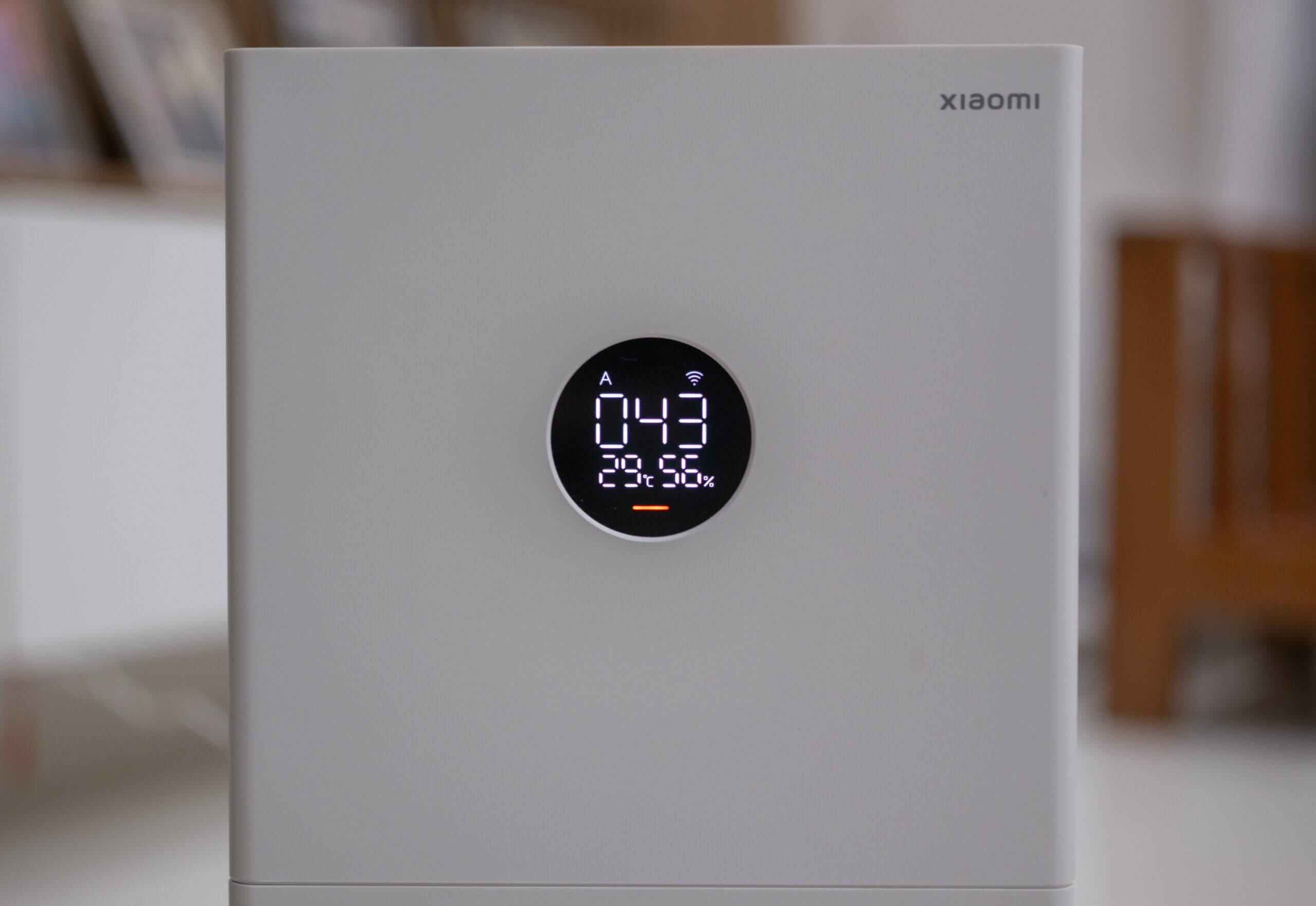
On the front of the device is a small, round screen which gives an overview of the current conditions based on readings from the laser particle sensor found in the device. At any given time, the screen will show the current mode that the device is in, the WiFi status (if it is connected or not), the PM2.5 concentration, temperature and relative humidity. There is also a small bar at the bottom of the screen which lights up in different colours to give you a quick indication of your air quality at a glance.
Overall, the design of the Xiaomi Smart Air Purifier 4 Lite is good. It’s what you would expect at this price point – putting functionality first, but doing so in a way that still looks aesthetically pleasing. I do wish there was easy access to the fan for cleaning, but this isn’t impossible – just a bit more time consuming than on a device that allows for easy cleaning.
App & Connectivity
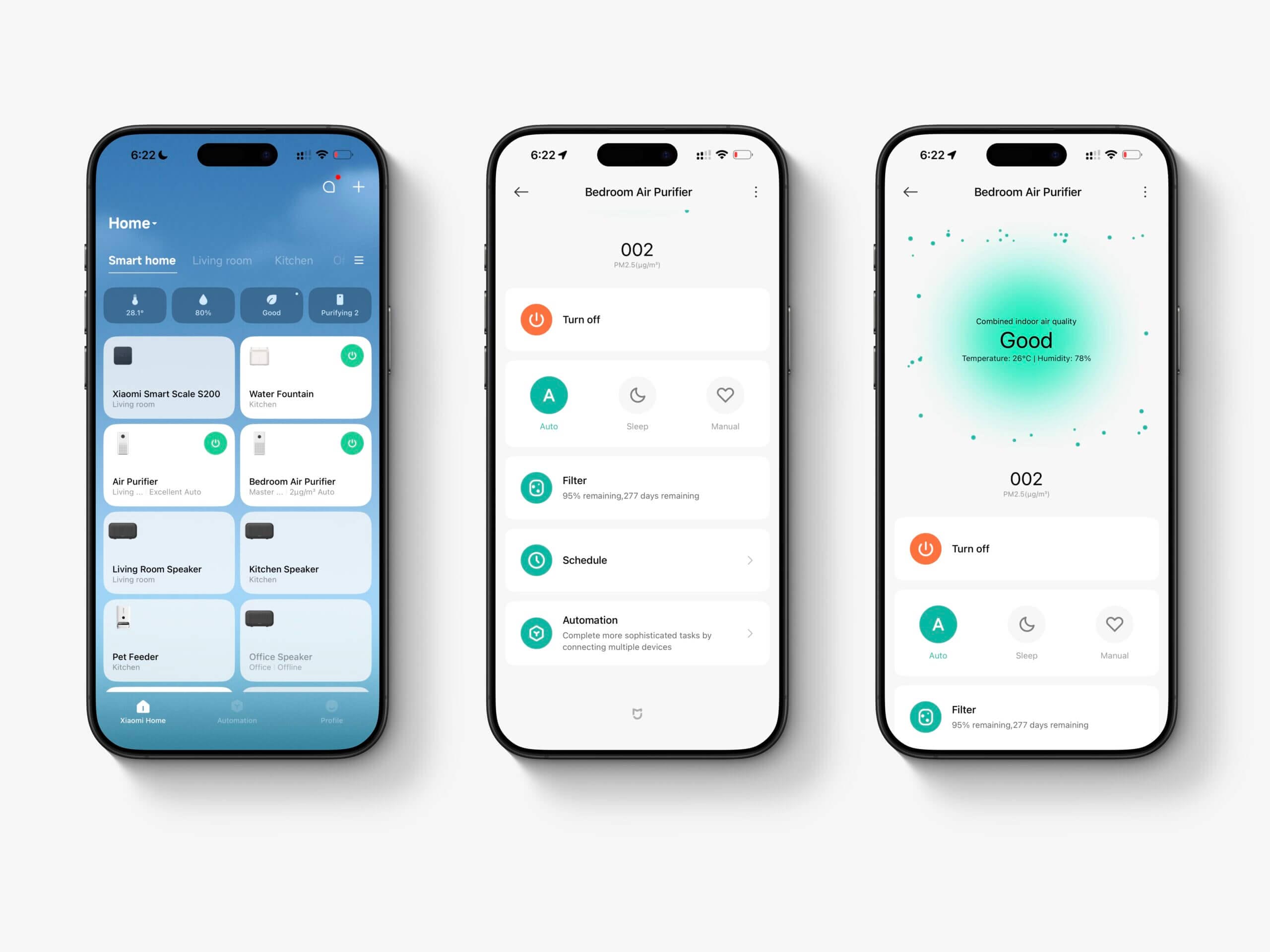
The Xiaomi Smart Air Purifier 4 Lite has WiFi connectivity (2.4 GHz only) that allows it to be controlled via the Mi Home application or you can integrate it with Google Home or Alexa. Unfortunately, Alexa integration (and I can only assume the same stands true for Google Home) is underwhelming and – despite having a normally Alexa-reliant smart home – I found myself barely using the commands for the Smart Air Purifier 4 Lite.
This was due to the fact that there are only a few usable commands which are basically limited to the following:
- Alexa, turn on/off the bedroom air purifier
- Alexa, put the bedroom air purifier on mode Auto
- Alexa, put the bedroom air purifier on mode Sleep
- Alexa, put the bedroom air purifier on mode Manual
The issue here comes from the fact that automatic and sleep both tend to be quite low speeds. Automatic (as discussed earlier) isn’t strict enough for me, and sleep mode is essentially the lowest speed the device goes. Manual allows for full speed control, but only within the app. I usually leave it at maximum speed, and this allows me to say ‘put the bedroom air purifier on mode Manual’ whenever I want full speed. However, that means I can’t put the device at half speed via voice. It’s a bit annoying, and I wish there was a half-speed mode and 3/4 speed mode that could be activated via voice.
Moving past the subpar Alexa integration, I actually quite like the Mi Home app and this is likely how you’ll be interacting with the Smart Air Purifier 4 Lite if you have one. Unfortunately, similar to my issues with the Alexa integration, without the app you can’t really control the speed of the device unless you don’t mind always keeping it on Auto mode. Even to set what level you want manual to run at, you will need the app.
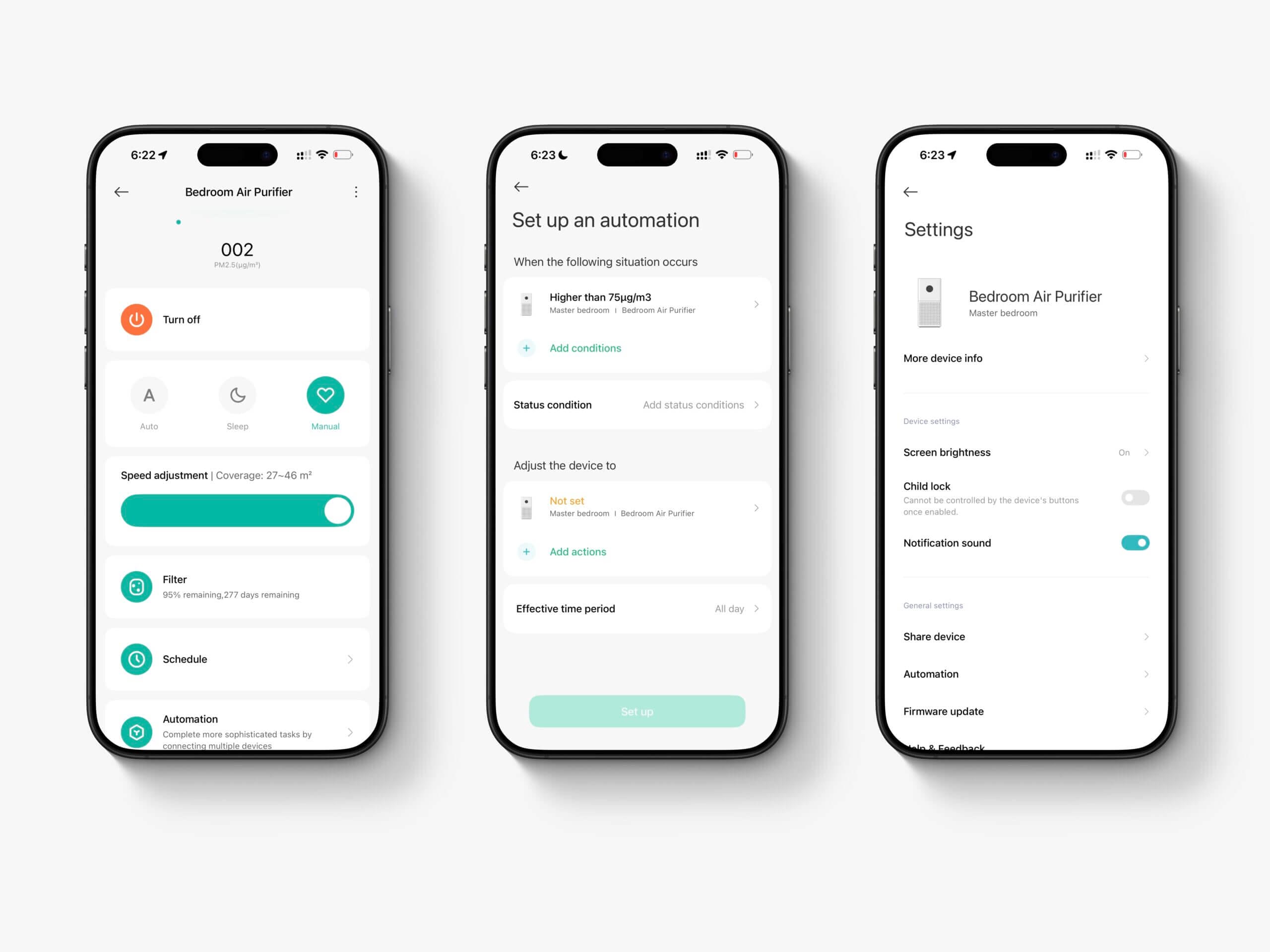
If you have any other Xiaomi devices, you may already have the Mi Home app. The good news is that it’s relatively powerful and it allows for automations with any other Xiaomi devices you may have. Again, I personally haven’t used this much because I usually do these things through Alexa, but it’s nice to have.
Once you’ve added the device to the Mi Home app (which was a painless process as the device was automatically discovered) and have connected it to your WiFi, you can access a few basic settings for the device. Here, you can remotely turn it on or off, set the mode – most importantly, you can specifically set speeds via Manual mode – check filter lifespan and create schedules and automations.
Interestingly, despite being able to see the current temperature, relative humidity and PM2.5 concentration, you can’t see any historical data in the app. I was surprised about this as I can see this information on the Mijia Smart Air Purifier 6 and, to be honest, I was a bit disappointed. This could be done entirely through a software update, but with the device being so late in its lifecycle, I doubt historical data will ever be added.
Under the settings menu, you can also adjust screen brightness, add a child lock (so the buttons on the device can’t be pressed) and enable or disable the notification beep that the device makes. You can also share the device with other Mi Home users, update the device (I have actually received a couple of bug fix patches) and adjust a few other Mi Home settings.
Overall, the connectivity for a device in this price range is pretty great and I can’t complain. However, after having used other Xiaomi air purifiers, I do wish you could see historical data from the PM, temperature and relative humidity sensors. I’m certain they will add this functionality on the next generation of this device, but it would also be very easy to add here and it’s a useful feature to have.
Pricing & Competition
As I mentioned in the introduction, I live in the Philippines and I purchased my purifier here. Please keep this in mind because local pricing can differ greatly and the devices that are in the same price range here may differ from in your locality. In Southeast Asia in general, the Xiaomi devices are very competitively priced but I believe them to be a bit more expensive in other regions.
I purchased the 4 Lite for ₱6,000, though it now usually sells for closer to ₱7,500 (about $115). This puts them squarely in between the Air Purifier 4 Compact which is usually around ₱3,999 and the 4 (now the 6) which goes for around ₱10,500. At this price, it’s a very appealing device. One thing I want to flag before you reach the charts below is that the prices I quote in the text are what these sell for here in the Philippines, because that’s where I bought and tested them. The charts use Western retail pricing instead, which puts the 4 Lite nearer $199, as that’s the only way to compare it fairly against devices sold in the US and Europe. Let’s take a look at a few other devices in this price range:
| Device Name | Price | CADR | Connectivity |
|---|---|---|---|
| Xiaomi Air Purifier 4 Lite | ₱7500 ($115) | 360 | WiFi (Mi Home, Alexa, Google Home) |
| SmartAir Sqair | ₱7000 | 315 | None |
| Levoit Core 300 | ₱5500 | 240 | WiFi (Vesync, Alexa, Google Home, Apple HomeKit) |
At this price point (again, this will vary depending on where you’re purchasing) there is little that compares with the Xiaomi Smart Air Purifier 4 Lite in terms of both performance and connectivity. In a way, it feels like a device that must have a catch somewhere, and it feels like a much better value proposition than Xiaomi’s larger air purifiers – which, while still good deals, do have some competition in their price brackets.
Looking at the prices in Europe, it looks like this device often costs double what it does here. In these cases, it’s definitely worth looking more into the alternatives on the market. However, in Asia at least, I feel like it’s very hard to find a device that comes close to what Xiaomi has achieved here. It’s telling that even the SmartAir Sqair – a device designed to be incredibly simple so as to be cheap – can’t even beat the pricing of the 4 Lite which has both a higher CADR and many more features.
When it comes to ongoing costs, you need to consider both the electricity consumption and the filter cost and lifespan. Taking a look at electricity first, this device draws 32 W at max, 9 W at half speed, and 3 W on sleep. That’s almost identical to the larger Mijia Smart Air Purifier 6, which pulls 33 W flat out while moving a good deal more air. I reran these a few times to be sure of them.
Running it twelve hours a day works out to about $11 a year in electricity where I am, which is less than the filters cost by a wide margin.
As for filters, official ones go for around ₱1,000 to ₱1,400, so roughly $17 to $25, and they need replacing every 6 to 12 months depending on how polluted your home is and how hard you run the device. Six months is the figure I’d plan around if you have pets. That’s cheap next to most of what I’ve tested, though regional pricing swings a lot, so check locally before counting on it.
Prices are official retail in a Western market: US where the device is sold there, Europe where it is not. Other regions differ, sometimes sharply.
Buying price only tells you where you start, though. The order barely shifts once these are actually running, which isn’t always how it goes. The Levoit is the priciest to buy and stays the priciest to keep, because its filters cost about 60% more than Xiaomi charges for theirs.
Electricity assumes half speed, twelve hours a day, at $0.29/kWh. Filters use the most conservative manufacturer interval, which for all four is six months. Prices are official retail in a Western market: US where the device is sold there, Europe where it is not. Other regions differ, sometimes sharply.
On those numbers the 4 Lite costs about $61 a year to keep running, against $85 for the Mijia 6 and $90 for the Levoit. Cheap filters are doing most of that work.
Conclusion
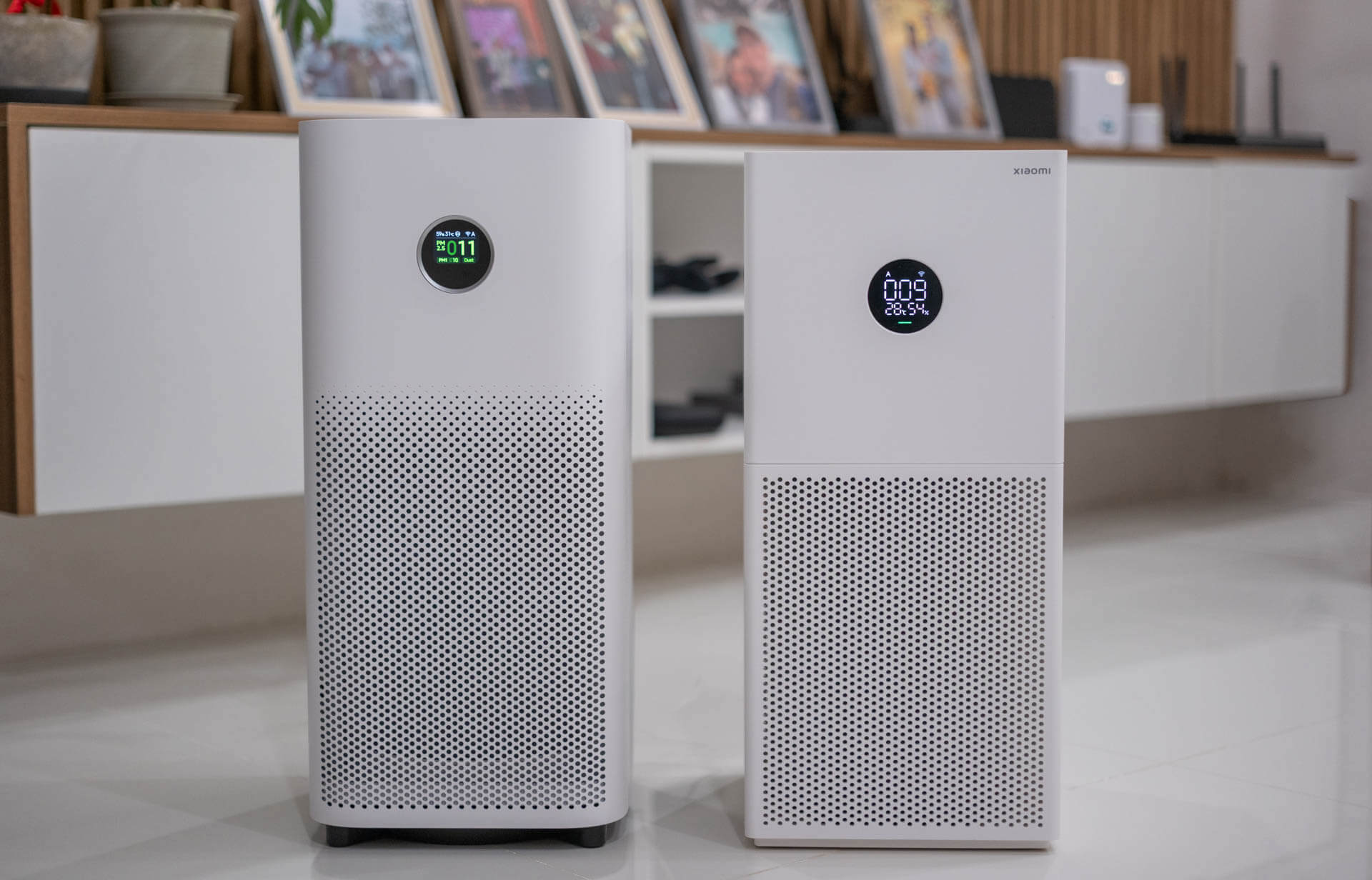
The Xiaomi Smart Air Purifier 4 Lite is a great device for the price that it usually costs in Southeast Asian countries (and, I believe they’re also quite affordable in South Asia). However, in other markets I don’t know if it’s quite as tempting due to the higher pricing and the lower pricing of good alternatives. Considering you can’t even get a SmartAir Sqair – a device that has lower performance and none of the other features – for the price of the 4 Lite here makes this incredibly tempting and, from my research, there aren’t many alternatives unless you want to pay significantly more.
I’m not a fan of every aspect of this device – for example, I don’t like how difficult it is to clean the fan, the lack of smart home integration features, and the power draw (which is comparable to the Smart Air Purifier 6 which has a significantly higher CADR), but these feel like small drawbacks at this price point.
The biggest concern here is really that once Xiaomi releases an updated model – presumably the 6 Lite – they may discontinue filters for the 4 Lite which they’ve had a habit of doing in the past. However, even now, many online marketplaces are full of third-party replacements, some of which I’ve heard are quite good. I don’t generally advocate for using third-party filters however, and you might want to stock up on 4 Lite filters in advance if this is a worry.
That about concludes my review of the Xiaomi Smart Air Purifier 4 Lite. If you’ve used this device, or if you have any questions remaining after reading this review, I would love to hear from you! I do my best to answer all questions and comments and always value your feedback. Thank you for reading!
- Excellent value (especially in Southeast Asia)
- Strong max-speed performance
- Good WiFi + Mi Home control
- PM2.5 sensor tracked well in testing
- Includes pre-filter + activated carbon
- No UV/ion features (fewer ozone concerns)
- Auto mode thresholds too lenient
- Sleep mode very weak
- Limited voice assistant control
- No historical data in app
- Fan not easily accessible for cleaning
- Uses unique, non-interchangeable filter
Xiaomi Smart Air Purifier 4 Lite FAQ
Is the Xiaomi Smart Air Purifier 4 Lite powerful enough for a bedroom?
Yes. With a CADR of 360 m³/h, the 4 Lite is well-suited for master bedrooms, studio apartments, and small living areas. In my testing, it cleared a small 30 m³ room from heavy pollution very quickly at maximum speed.
How accurate is the built-in PM2.5 sensor?
Based on my testing, the PM2.5 sensor performed surprisingly well. It tracked closely with dedicated indoor air quality monitors such as the AirGradient ONE and PurpleAir Zen. However, like all low-cost sensors, it won’t be perfectly accurate in all situations.
Does the Xiaomi Smart Air Purifier 4 Lite use a HEPA filter?
The filter is not officially certified as HEPA, but it is rated for 99.97% filtration efficiency, which is comparable to true HEPA performance. It also includes activated carbon for limited VOC adsorption.
Is Auto mode effective?
In my experience, Auto mode is not aggressive enough. The trigger thresholds are too lenient, meaning the purifier doesn’t ramp up quickly enough during pollution spikes. Manual mode provides much better performance.
Does the Xiaomi Smart Air Purifier 4 Lite show historical air quality data?
No. Unlike the newer Smart Air Purifier 6, the 4 Lite does not provide historical PM2.5, temperature, or humidity data in the Mi Home app. You can only view real-time readings.


