
There are few brands that sell a wider range of products than Xiaomi. Seriously – have you ever been to a Xiaomi store? If you haven’t, you might not realise it, but they sell everything from sunglasses and back massagers to smartphones. They even recently launched their own car. All of this is to say that Xiaomi is probably about as close as you can get to a company that “does it all”. But is that breadth ever a downside?
When I recently visited a Xiaomi store here in the Philippines, their air purifiers immediately caught my attention. Judging by the lineup – four different purifiers were displayed in that particular store – it was clear that air purification is one of their more core product categories. Being interested in air quality, the purifiers drew my attention and I began to read through the specifications. Two things instantly stood out: the prices and the specifications each model claimed.
Before going further, I should add an important bit of context. I live in Asia – specifically the Philippines – where Xiaomi products tend to be significantly cheaper than in markets like the U.S. or U.K. While Xiaomi purifiers are generally considered on the affordable side worldwide, here they offer an almost unmatched feature set for the price. We’ll dive deeper into that shortly, but please keep this perspective in mind throughout the review as it’s obviously impacted how I think of (and judge) the devices.
After doing more research online – and reading HouseFresh and Air Purifier First’s excellent coverage – I decided to pull the trigger and buy a couple of units for our home. So while this is a review, these purifiers weren’t purchased just for testing. They were bought with the intention of daily use. After about a month of running them, I’ve been very happy with their performance and can speak from firsthand experience as these are the purifiers we rely on every day to ensure we have clean air in our home.
But enough setup. As you can probably tell, I’m excited to get into this review, and I hope you find it useful. As always, if there’s anything I didn’t cover – or if you have additional questions – feel free to jump into the comments below. I’ll do my best to reply when I can.

I independently review air quality monitors with a focus on accuracy. I’ve tested well over 50 devices, compared some of them against reference instruments, and rely on peer-reviewed research and third-party studies wherever possible.
I don’t accept sponsored posts or paid reviews, and I don’t run ads on BreatheSafeAir. When I receive a free product, the company has no say in what I write. Affiliate links don’t influence my views and never increase the price you pay.
I’m constantly learning about how these sensors work – from opening them up, discussing with researchers in the field and examining the hardware inside. That ongoing learning process helps me write reviews that are grounded in how the technology actually behaves, not just what the spec sheet says.
You can read my full Disclaimers & Ethics page for complete details. And as with any review, even mine, I always encourage checking multiple independent sources before making a decision.
This post contains affiliate links. For more information, please refer to my affiliate disclaimer. I was NOT sent a product for review; I purchased this product myself. All opinions expressed in this post are my honest thoughts. I only recommend products that I believe in.
Informational Purposes: Information on this blog is for informational purposes only. Readers are encouraged to confirm the information herein with other sources. This website assumes no responsibility for the accuracy of the information, which is subject to change without notice. Products mentioned on this website are not medical devices and do not guarantee protection.
If you notice any errors or inconsistencies in this article, please contact me so I can update the information accordingly.
Contents
Xiaomi Air Purifier Lineup

Xiaomi’s air purifier lineup can be surprisingly confusing. Depending on where you live – and which generation purifier you’re looking at – the exact same family of devices may fall under Xiaomi, Mi, or Mijia branding. For example, I currently own th, Xiaomi Smart Air Purifier 4 Lite and the Mijia Smart Air Purifier 6 – yet both are, ultimately, Xiaomi products.
Historically, the Mi label was used for Xiaomi’s more premium devices, while Mijia covered the company’s smart home ecosystem. Recently, though, the branding has felt a bit inconsistent, with new generations frequently being renamed. The result is a lineup that can look more fragmented than it actually is.
The good news is that, once you understand the naming structure, it becomes much easier to decode. Most Xiaomi air purifiers roughly follow this format:
- Xiaomi / Mi / Mijia
- “Smart Air Purifier” or “Air Purifier” – effectively the same thing
- Series number – 3, 4, 6, etc.
- Descriptor – Compact, Lite, (baseline), Pro, Elite
In my case, I picked up the Smart Air Purifier 4 Compact and Smart Air Purifier 4 Lite – the lower-power models – for our bedroom and my office, along with the Smart Air Purifier 6 in its baseline configuration. According to the sales assistant, the 6 was brand new at the time of purchase, so I believe this to be the replacement for the 4 series. In practice, it feels like a very incremental evolution of the 4, offering a few extra features and a slightly higher CADR rather than a complete redesign.
One important thing to understand is that features tend to be tied more closely to the series than the exact variant (see the image above where the Smart Air Purifier 6 has more features – but less performance – than the 4 Pro). In other words, devices within the same series usually share similar connectivity and smart features. What primarily changes between Lite, baseline, Pro, or Elite models is filtration capacity and performance-related upgrades.
Performance
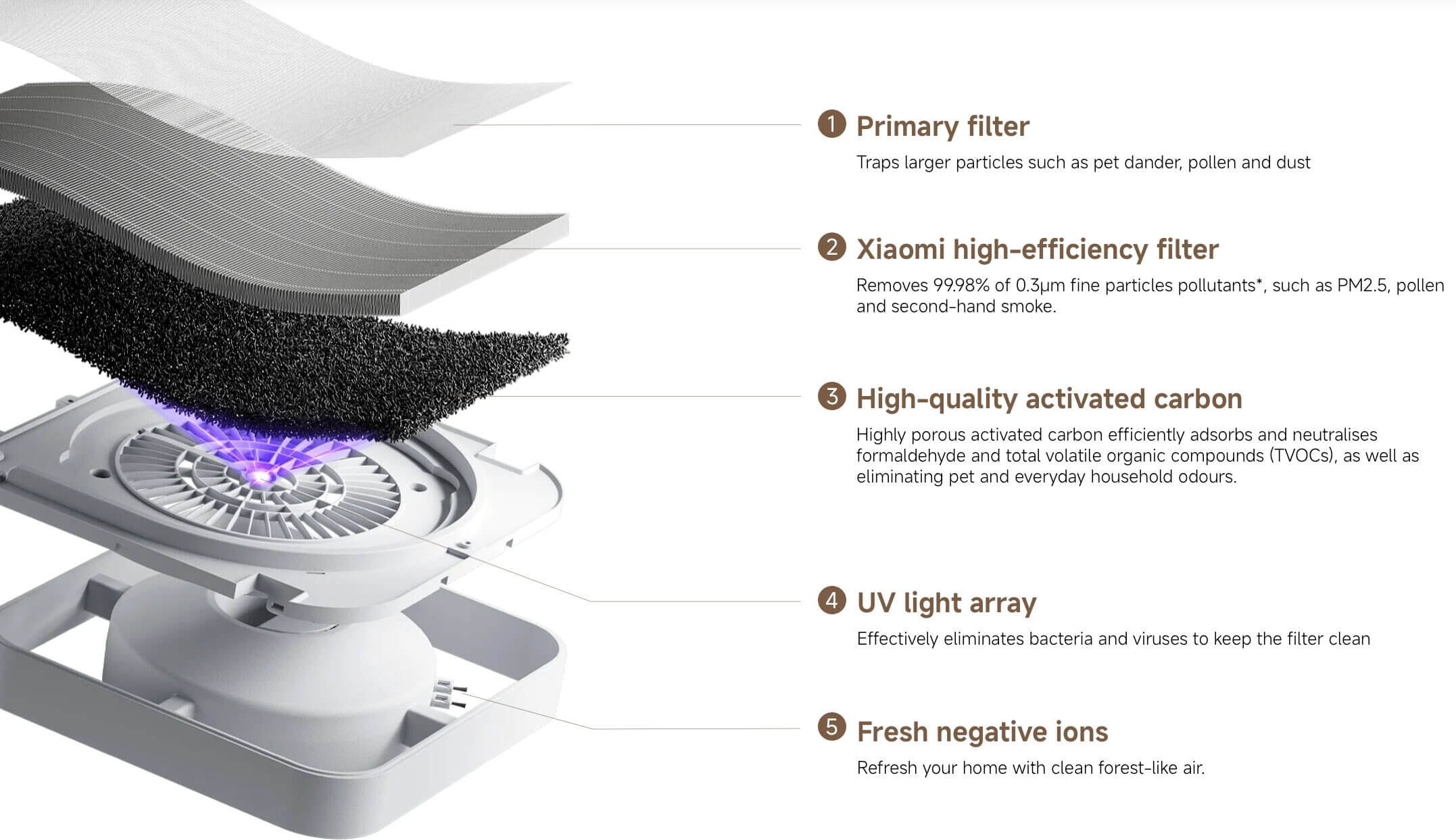
The Mijia Smart Air Purifier 6 (that’s quite a mouthful!) uses a five-layer ‘filter’ of which three layers are mechanical – a ‘primary’ pre-filter to stop large particles, a high-efficiency filter and an activated carbon filter. There is also a UV light array and ioniser, but more on those later. Based on the official specifications from Xiaomi, this filter technology makes the Smart Air Purifier 6 quite a stacked device. As per their words, these are just a few of the official specifications of the device:
- 443 m³/h CADR
- 218 m³/h formaldehyde CADR
- 29 – 50 m² coverage area (dependent on speed)
- 87.5 m² room size based on 2 ACPH
- 99.99% removal rate of PM10, H1N1, and a range of other particles, viruses, and bacteria.
The majority of these tests (and the many more quoted on the product page) were conducted by the Guangzhou Institute of Microbiology, Korea Conformity Laboratories, Cheari (Beijing) Testing and Certification Co., and a couple by Intertek and SGS. If you don’t recognise these names, that’s understandable – the takeaway is that Xiaomi appears to have taken testing seriously, and the device has undergone evaluation by a range of third-party laboratories. Of course, manufacturer claims are one thing, but I was curious to dive a bit deeper into exactly how the device performs.
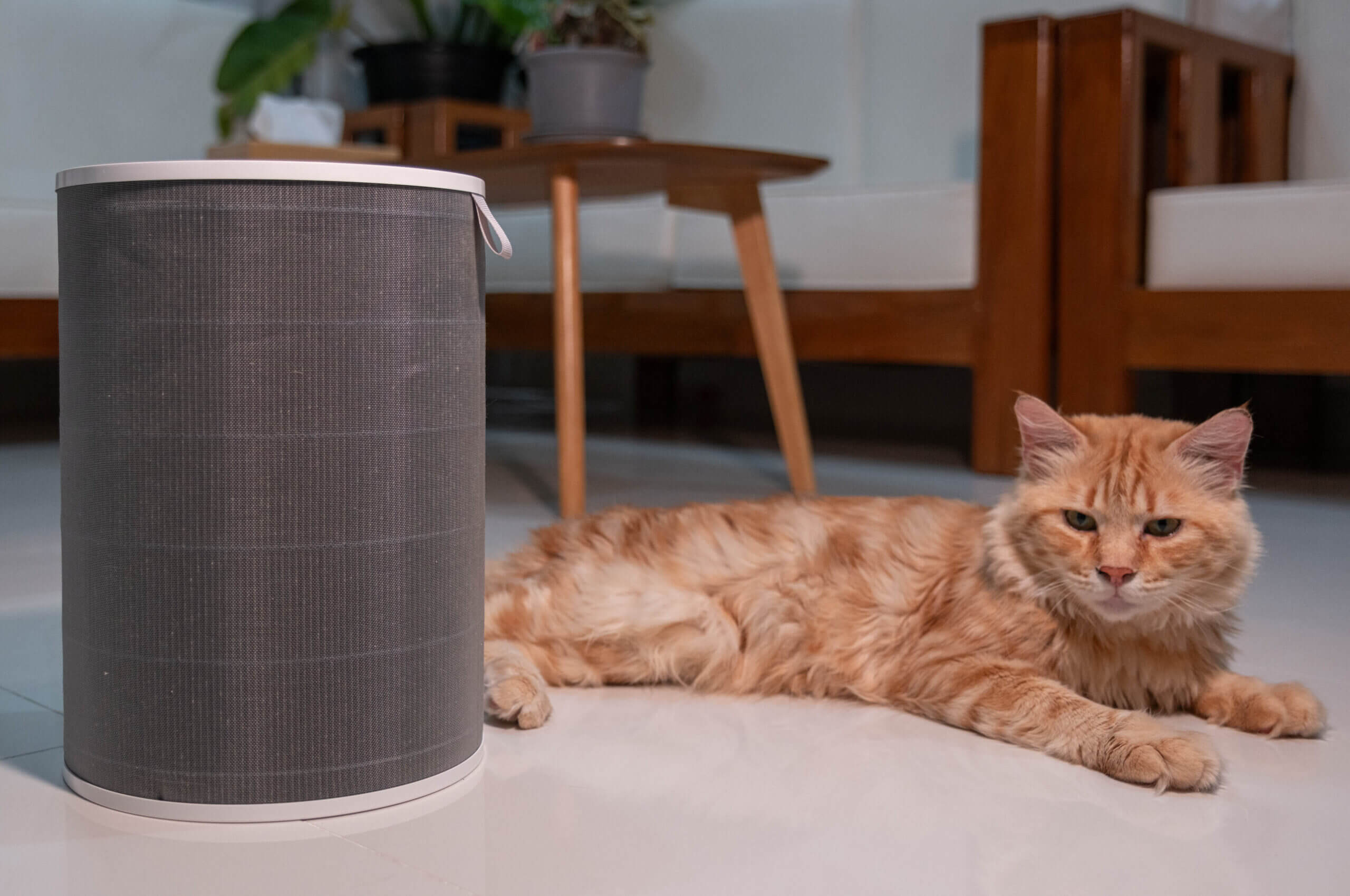
Never missing a moment to pose!
Now, I simply don’t have the capacity – nor does any individual reviewer that I’m aware of – to test the authenticity of all of these claims. I wish I had a microbiology lab in my garage, but alas. What I can do, however, is see how the device performs in a few (relatively) controlled situations and talk about the impact it’s had on my home overall.
If you haven’t read my blog before, you may not know that my usual content focuses on air quality monitors. I have access to a range of monitors that I use around my home, so I wanted to see how the device performed when it came to PM2.5. While the Xiaomi Smart Air Purifier 6 does have a particle sensor built in, I wanted to use third-party devices for this test. However, I’ll also talk about the sensor performance a bit later in the article.
I placed the Xiaomi Smart Air Purifier 6 in a room that is around 30 m³ (29.4 m³ to be exact) and burned incense to reach roughly 500 µg/m³ of PM2.5. From here, I extinguished the incense and remotely triggered the air purifier, first at maximum speed (manual mode at full, not Level 3) and then at manual mode at half speed (approximately Level 2). I then let the purifier run – far longer than necessary – while recording how long it took the particle concentration to drop below 5 µg/m³. Each speed was run three times; the charts show the mean of those runs, with the shaded band spanning the fastest and slowest. I didn’t test Sleep mode or Level 1 here, because neither is meant for pulling pollutants down from a peak – they exist to keep an already-clean room clean.
All readings come from a single AirGradient ONE I-9PSL, factory calibrated, placed in the room for the duration of every run. Still far from scientific, but it provides a somewhat accurate snapshot of performance. It’s also worth mentioning that particles will naturally settle over time, but this can take hours depending on airflow and particle size. To account for this, I did a ‘baseline’ test with no purifier running. This is the dashed grey line on the graph below. As you can see, using the air purifier resulted in a cleaner room much faster than simply allowing particles to settle.
| Series | Runs | Measured CADR | To 50% | To 90% | To 99% |
|---|---|---|---|---|---|
| Max speed | 3 | 453 m³/h | 2:45 | 8:30 | 15:26 |
| Half speed | 3 | 301 m³/h | 4:36 | 13:24 | 24:09 |
Measured CADR is the median of 3 runs, fitted to the exponential part of each decay curve in a 29.4 m³ room. The manufacturer states 443 m³/h. A real room isn't a sealed test chamber, so my figures won't line up exactly with a lab result, and a difference here doesn't mean the manufacturer is wrong.
29.4 m³ · AirGradient ONE I-9PSL (factory calibrated) · Download max speed data (CSV) · Download half speed data (CSV) · Download room alone data (CSV)
At maximum speed I measured a CADR of 453 m³/h, which in this room works out to roughly 15 air changes per hour, and the concentration fell by 90% in about eight and a half minutes. Half speed measured 301 m³/h and reached the same point in about thirteen and a half. The gap is significant. What surprised me was how well half speed held up, given it draws barely a quarter of the power and is far quieter – for anything short of clearing a genuine spike, it is the setting I would leave it on. The purifier is clearly designed for larger spaces, but I couldn’t easily test a bigger area in a semi-controlled environment without impacting my wife, pets and our daily lives.
| Series | Runs | Measured CADR | To 50% | To 90% | To 99% |
|---|---|---|---|---|---|
| Mijia 6, max speed | 3 | 453 m³/h | 2:45 | 8:30 | 15:26 |
| Levoit Vital 200S-P, max speed | 3 | 387 m³/h | 3:29 | 10:02 | 19:31 |
| Xiaomi 4 Lite, max speed | 3 | 350 m³/h | 3:56 | 11:36 | 21:02 |
Measured CADR is the median of 3 runs, fitted to the exponential part of each decay curve in a 29.4 m³ room. A real room isn't a sealed test chamber, so my figures won't line up exactly with a lab result, and a difference here doesn't mean the manufacturer is wrong.
29.4 m³ · AirGradient ONE I-9PSL (factory calibrated) · Download mijia 6, max speed data (CSV) · Download levoit vital 200s-p, max speed data (CSV) · Download xiaomi 4 lite, max speed data (CSV) · Download no purifier, room alone data (CSV)
Run against two other purifiers tested in the same room under the same conditions, the Mijia 6 comes out ahead of both. It cleared 90% of the particles in 8:30, against 10:02 for the Levoit Vital 200S-P and 11:36 for the Xiaomi Smart Air Purifier 4 Lite. Its measured CADR of 453 m³/h leads the Levoit’s 387 and the 4 Lite’s 350. Beating the 4 Lite is no surprise, since that is the smaller sibling in the same lineup – it is here as a point of reference rather than as a real rival
Of course, in most situations you likely won’t be using an air purifier to clear an extreme spike, but rather to keep concentrations consistently low. In these cases, I think the Smart Air Purifier 6 performs very well. For context, we live in a three-bedroom home of around 100 m², and we usually keep the purifier in the combined kitchen/living area which takes up roughly half of the house’s floor area.
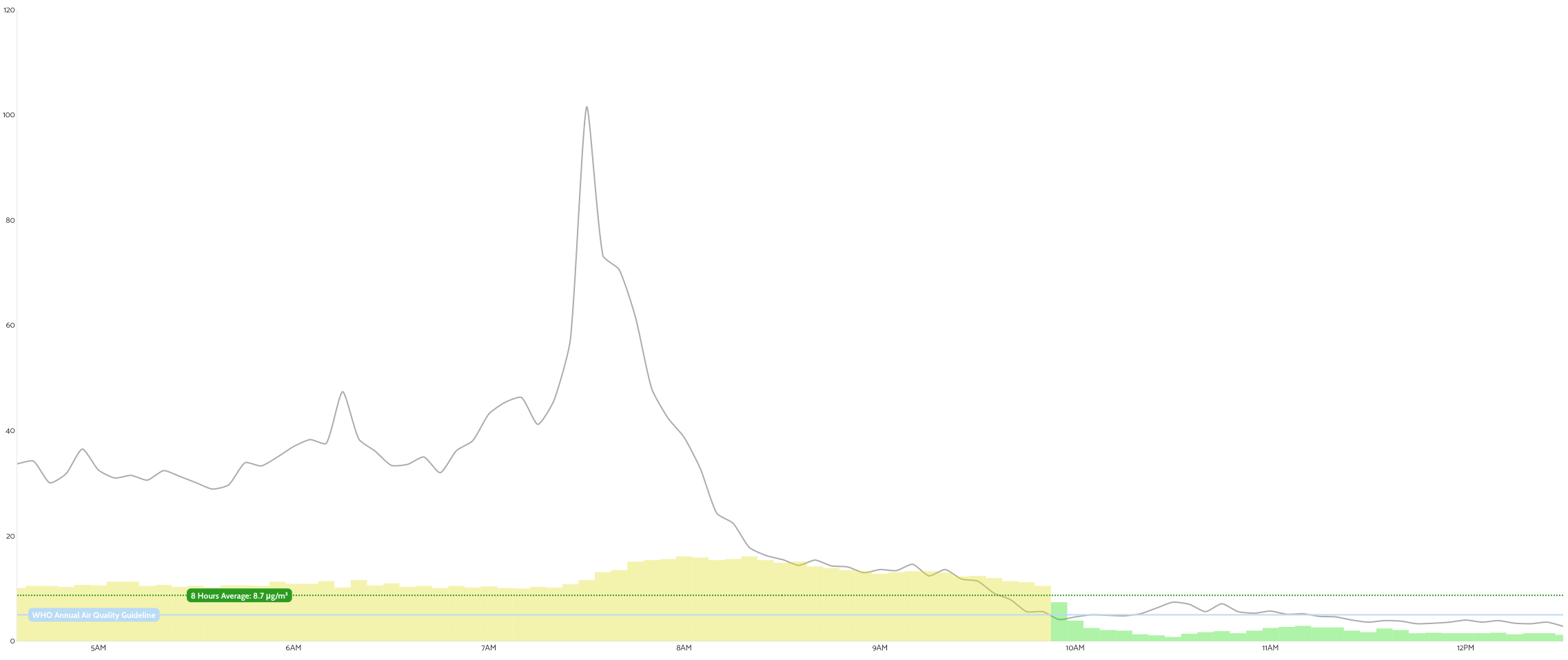
Data from my AirGradient monitor. The grey line represents outdoor PM2.5 concentration, and the bars at the bottom represent indoor concentration.
Above is data from one of my air quality monitors in the living room (about four metres away from the purifier), showing ambient concentrations we typically see indoors (until around 10am) compared to levels with the Xiaomi purifier running at Level 2. As you can see, there was a significant difference between having the purifier on Level 2 compared to not running it at all.
All things considered, I was quite impressed with these results, and I think that Xiaomi’s claims of this purifier being capable in rooms up to 50 m² is fair as our living area is very close to this. While it does perform best in rooms this size or smaller, I also noticed an obvious improvement in my adjacent office due to air mixing. This was all at Level 2, which is audible but – we found – not overly disruptive.
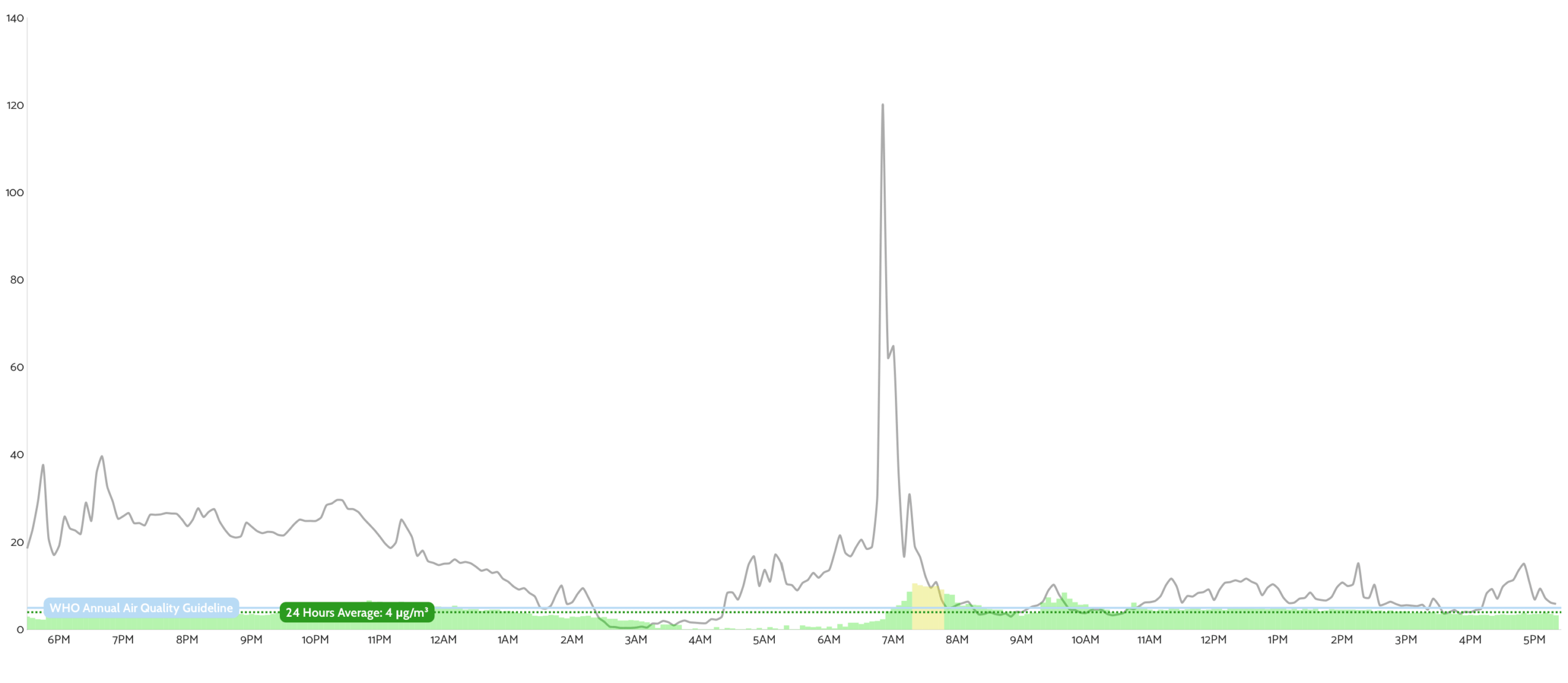
Level 1 results. The air quality is still good, but there was a consistent particle concentration between 3-5µg/m³.
Besides the preset speeds (under the “Level” setting on the Mi Home app), there are also a few other modes: Auto, Sleep, and Manual. I didn’t find myself using manual mode much, but it allows you to fine-tune speed – including running faster than Level 3 or slower than Level 1. When I wanted rapid purification, I simply set manual mode to maximum.
Automatic mode adjusts speed based on the readings from the built-in laser sensor. While I like the idea of automatic control, Xiaomi’s implementation wasn’t ideal for my preferences, so I rarely used it. Based on Xiaomi’s documentation, the purifier reacts to both PM2.5 and PM10 (though they call it ‘dust’) levels based on the following thresholds:
PM2.5
- Excellent (green): 1–20 µg/m³ – Sleep mode speed
- Good (yellow): 21–35 µg/m³ – Level 1 speed
- Moderate (orange): 36–55 µg/m³ – between Level 1 and Level 2 speed
- Poor (red): ≥ 56 µg/m³ – Between Level 2 and Manual (maximum) speed
PM10 (‘dust’) is a bit less transparent, as a 1-100 “Dust Index” is used, but Xiaomi doesn’t clearly define its brackets. With that said, I can speak to the PM2.5 thresholds. Simply put, for me, they’re too high. The U.S. EPA considers much lower long-term exposure levels acceptable, and indoors – where air quality is usually controllable – I prefer fans to ramp up sooner because I ideally never want the concentration passing 5µg/m³. Unfortunately, these thresholds aren’t adjustable and I think Xiaomi missed a big opportunity here.
As mentioned earlier, the purifier uses a combined mechanical + carbon filtration system. The mechanical filter handles particulate matter very well, capturing dust, smoke, allergens, and particle-bound microbes. However, it will do nothing to filter gases or VOCs (volatile organic compounds), which are often a bigger danger than particulate matter within homes. This is where an activated carbon layer becomes important.

The pre-filter doing its job of filtering larger particles, dust, animal dander, and hair/fur.
The carbon layer targets gases such as formaldehyde and other VOCs. However, gas filtration performance drops much faster than mechanical filtration as the carbon becomes saturated. In other words, TVOC and formaldehyde performance will decline long before particulate filtration does – which is normal behaviour. While Xiaomi advertises the lifespan of these filters as 6-12 months, I’m certain that the carbon filter will be saturated long before then. Unfortunately, it’s also near impossible to measure the performance of a carbon filter due to the inherent limitations of air quality monitors.
Besides the carbon filter, the device also has two other ‘layers of filtration’ (as they like to advertise it). The first of these is a UV lamp intended to inactivate bacteria. UV-C can neutralise microbes very quickly under the right conditions, but particles are only exposed for milliseconds in a fast airflow system, so the real-world benefit is difficult to quantify. Such systems can also generate ozone which is detrimental to health, but higher quality devices tend to output very little or no ozone. With that said, I prefer to disable these features out of caution and because I don’t think they add much to filtration performance.
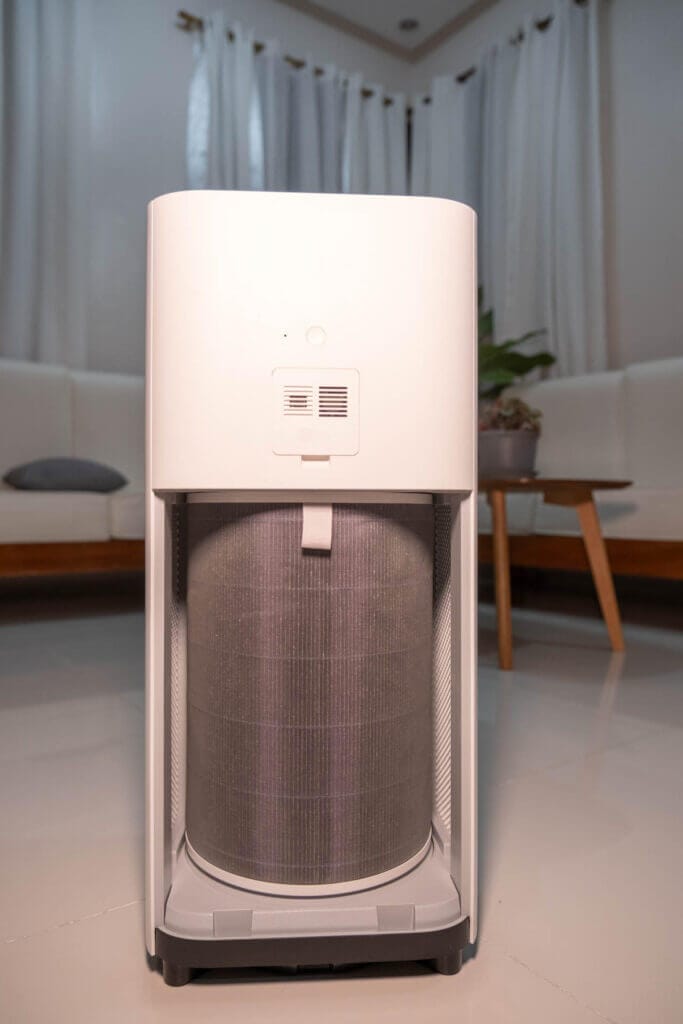
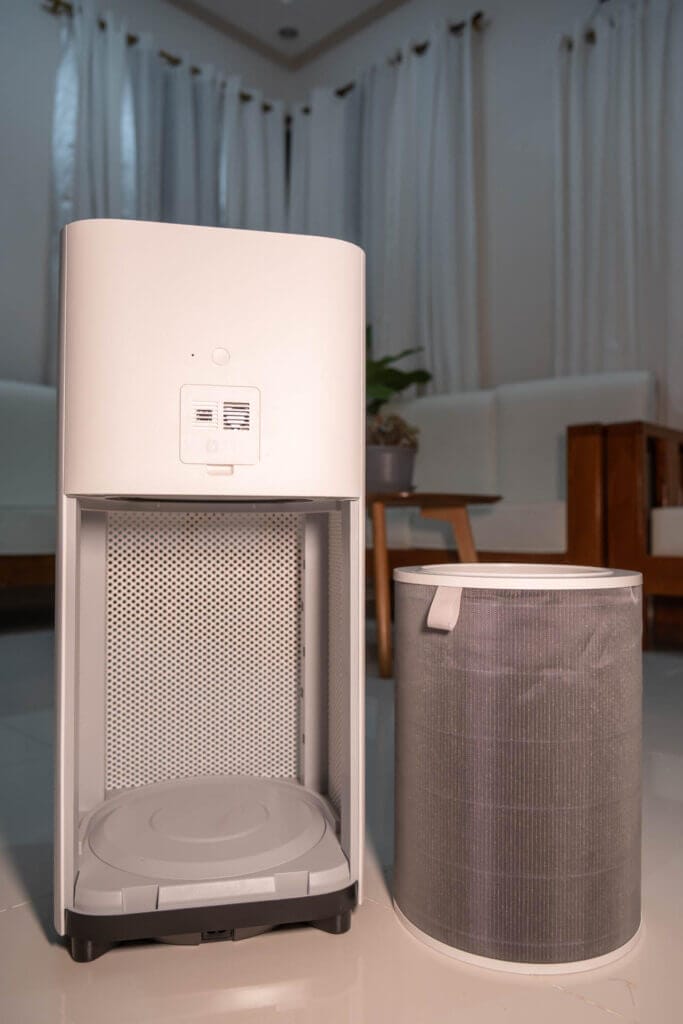
The device also features negative ion generation. Ionisers charge airborne particles so they clump together and are more likely to stick to the filter. While this may slightly improve capture efficiency, ionisers can also emit ozone, so I keep this feature turned off. Xiaomi’s previous generations higher end models (the 4 and 4 Pro) carry CARB ozone safety certifications, meaning their systems are designed to operate safely and I imagine the 6 series will undergo this testing once they reach the U.S. market. Regardless, since the mechanical filter does most of the heavy lifting, disabling ionisation doesn’t meaningfully reduce performance and I’d prefer to be safe than sorry.
I have generally been impressed by the performance of the Mijia Smart Air Purifier 6. It’s not best-in-class performance-wise, but it is a solid performer for an apartment or a living area/lounge in a house. In our case – living in a small house – it does most of the heavy lifting and we can rely on a Xiaomi Smart Air Purifier 4 Lite in our master bedroom to cover the rest.
BreatheSafeAir is a one-person publication. Every share and every subscriber is important to me.
I don’t have a marketing budget or a team behind me. Just a lot of test equipment and a genuine interest in helping you make sense of your air quality. If you find this useful, subscribing to my newsletter is the best free way to support the work. You’ll get information on what I’m currently testing, findings that don’t make it into the full reviews, and the kind of detail you only get from someone who thoroughly tests these devices.
Sensor Performance
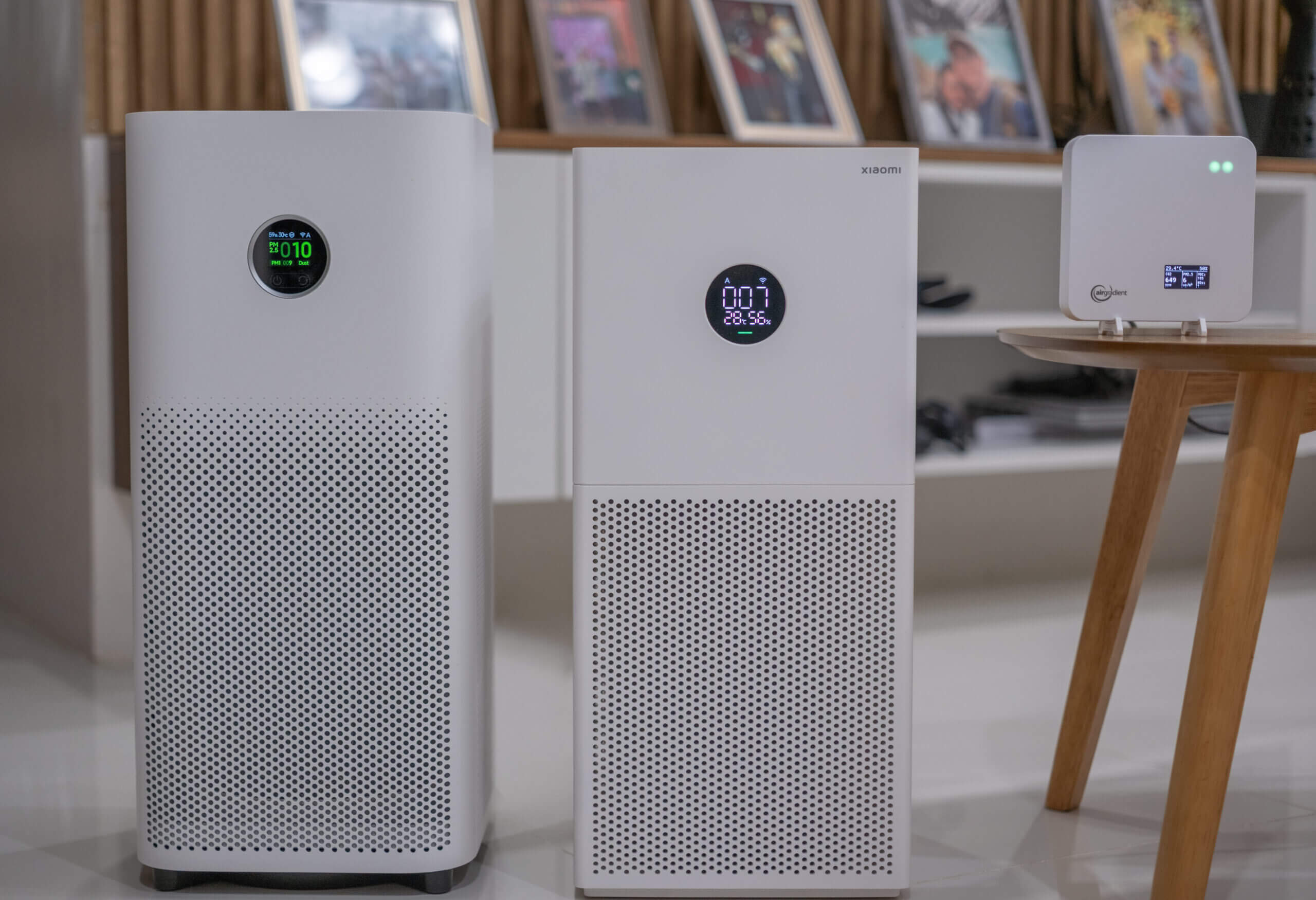
One of the biggest complaints I read about before buying a Xiaomi air purifier was that the PM readings tend to overreport. Many people mentioned that the numbers the numbers were inflated or totally unreliable, so I was particularly interested to see how the Mijia Smart Air Purifier 6 would compare against my other monitors.
After a lot of side-by-side testing, I think the reality isn’t quite as bad as I thought it would be. The Smart Air Purifier 6 tracks overall trends well. When pollution rises from cooking or incense, it reacts quickly and clearly, and in normal day-to-day use it follows the same general patterns as my AirGradient ONE monitors and PurpleAir Zen.
That said, I did notice occasional spikes that didn’t appear on my comparison monitors. Readings might sit steadily around 15-20 µg/m³, briefly jump to around 50 µg/m³ for a few measurements, and then settle back down without any obvious cause. Since this behaviour didn’t show up on the calibrated AirGradient units running alongside it, it seems more like sensor noise or internal processing quirks than real-world changes. It’s worth noting that I also saw this behaviour on the Xiaomi Smart Air Purifier 4 Lite.
During incense smoke tests, the Smart Air Purifier 6 generally reported slightly higher values than my calibrated AirGradient ONE monitors, and this gap did become much more noticeable at higher concentrations. In one test, for example, the 6 reported 425 µg/m³ while the AirGradient ONE reported 277 µg/m³. This pattern of over reporting is fairly typical of low-cost optical sensors, particularly once concentrations climb above ~200 µg/m³. However, I’m not really going to know the Smart Air Purifier 6 for this. At lower concentrations, it performed well – definitely well enough to identify trends – and at the higher concentrations where it really begins to lose accuracy you should already have the device at maximum speed anyway.
Overall, the Smart Air Purifier 6 works well for understanding trends. It clearly shows when pollution rises and falls, but individual readings (especially brief spikes) shouldn’t be used – rather, watch the device for a few seconds to ensure the readings are consistent. It won’t replace a dedicated, calibrated air quality monitor, but it performs better than I expected. Just keep in mind that the numbers can run high, especially at elevated concentrations.
Design
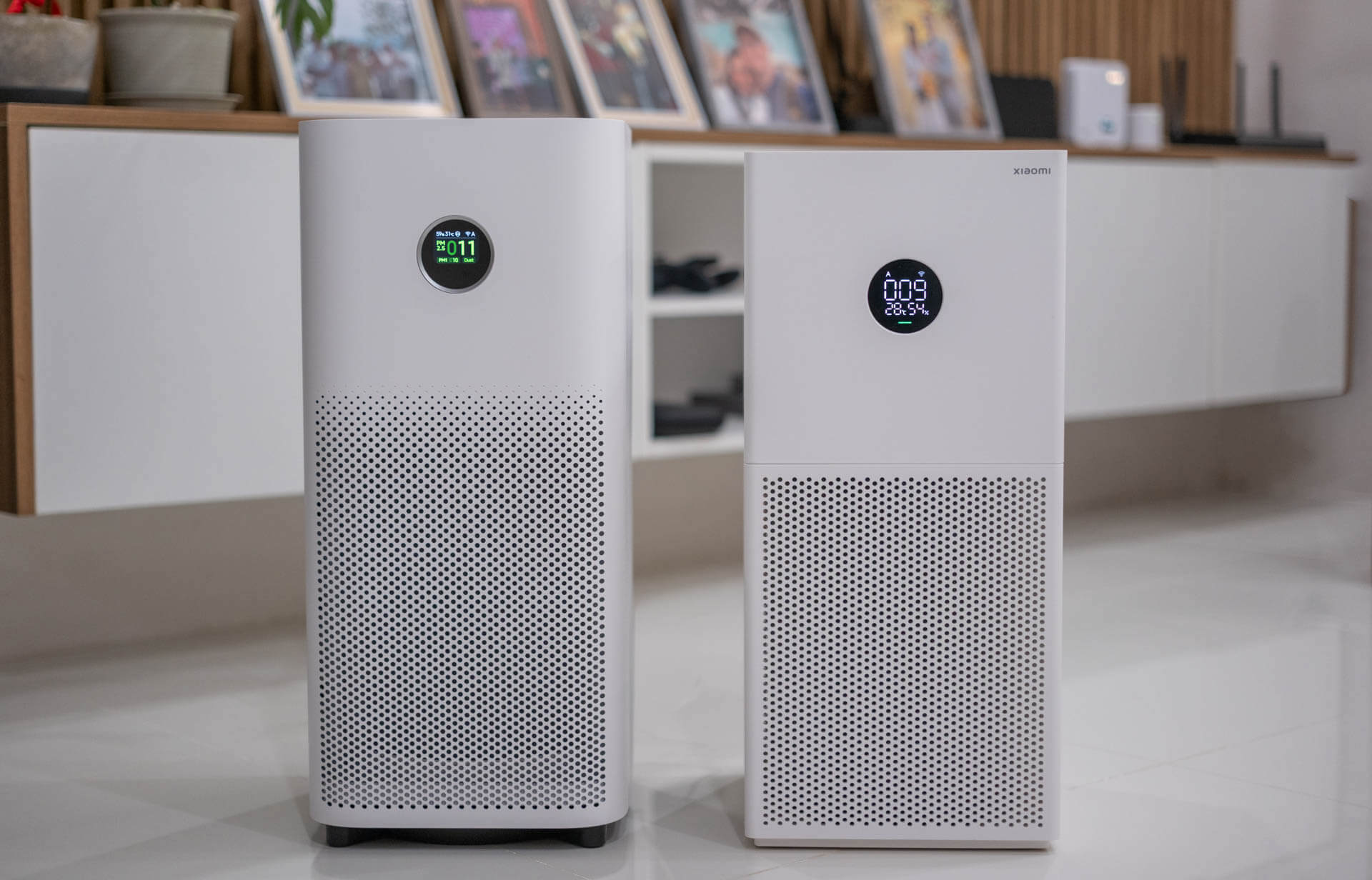
Smart Air Purifier 6 (left) and 4 Lite (right).
In my opinion, the Xiaomi air purifiers have always been designed quite well and I think the Smart Air Purifier 6 has improved both on looks and functionality over the previous 4 series. For example, while I know they’re of different price brackets, the Smart Air Purifier 6 feels like a night and day improvement in build quality over the 4 Lite – or, at least, I felt so.
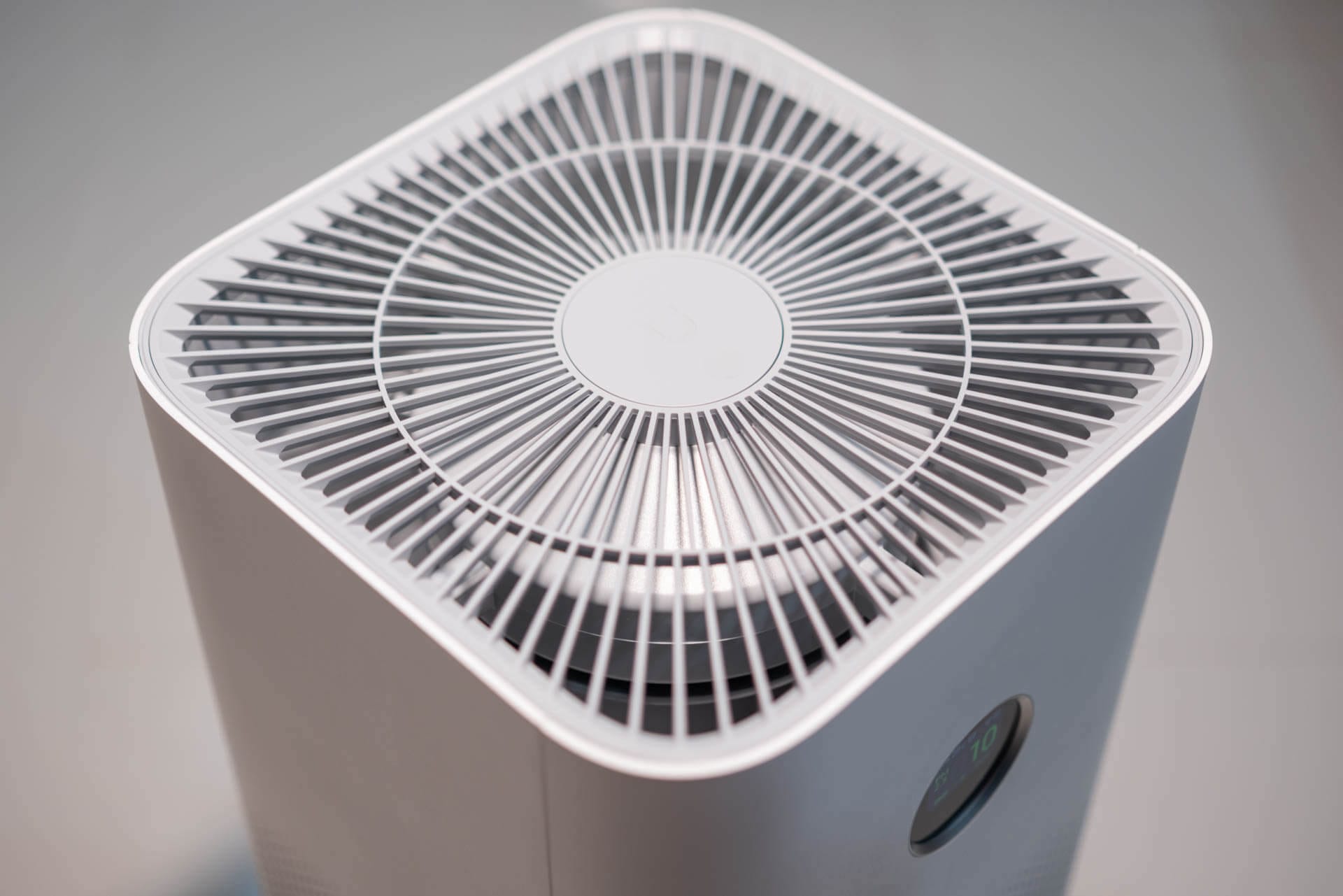
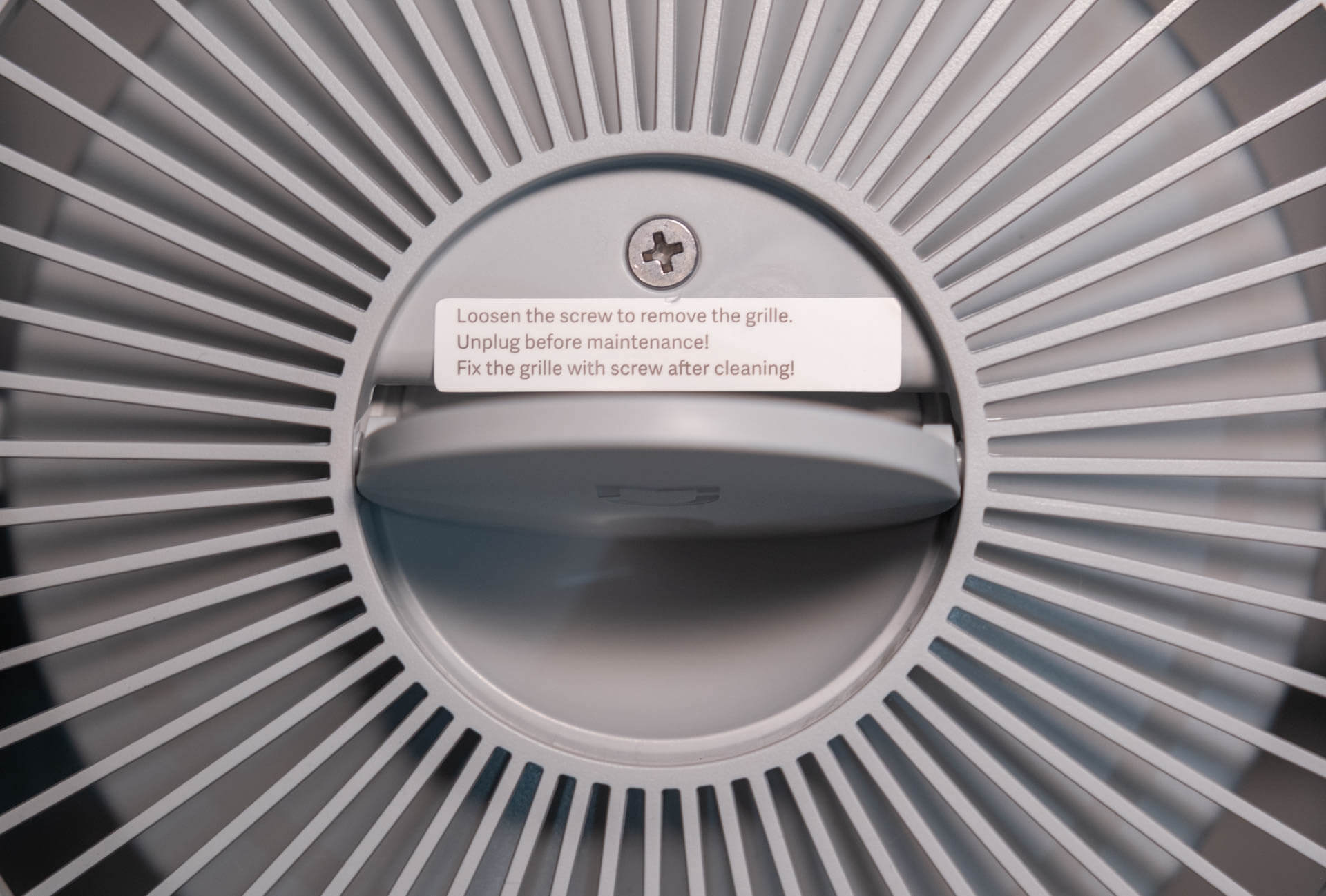
Starting at the top of the device, there is a large exhaust behind which the fan and a few other elements (like the UV lamp) are housed. It’s important to note that the top of the device is only the exhaust, and that air is pulled in from the vents around the bottom of the device. This is important to keep in mind because you will want to keep the lower vents away from furniture or walls if possible. In the centre of the top is a panel that can be pushed down to expose a screw which will allow you to remove the top of the device if cleaning is needed.
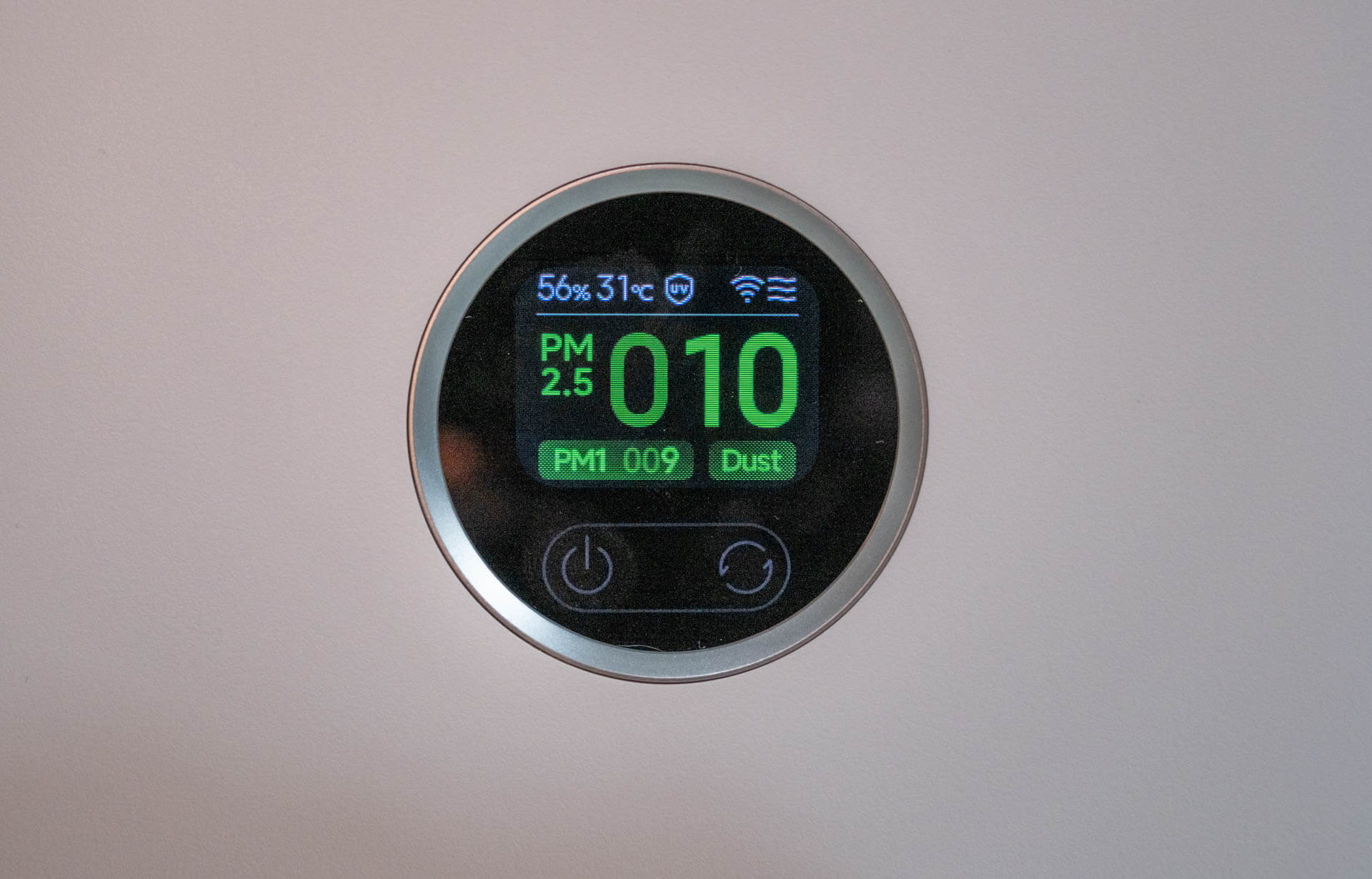
Moving to the front of the device, we have the display of the device as well as a couple of touch buttons. The display is small, but this is an air purifier so I’m not sure if we can expect anything else here! Luckily, it contains basically everything you could want – the current temperature, humidity, PM1, PM2.5 and ‘dust’ (PM10) as well as the mode the device is running in. If you have the ioniser or UV filter enabled, you will also see that information here.
Below the display are two buttons. One of these will let you turn the device off and on, and the other one will let you alternate between modes. However, you aren’t able to fine-tune any modes here so you can’t use the manual mode by relying on the on-device buttons alone. With that said, if you set a speed in the app, cycling to manual mode will remember that last setting.
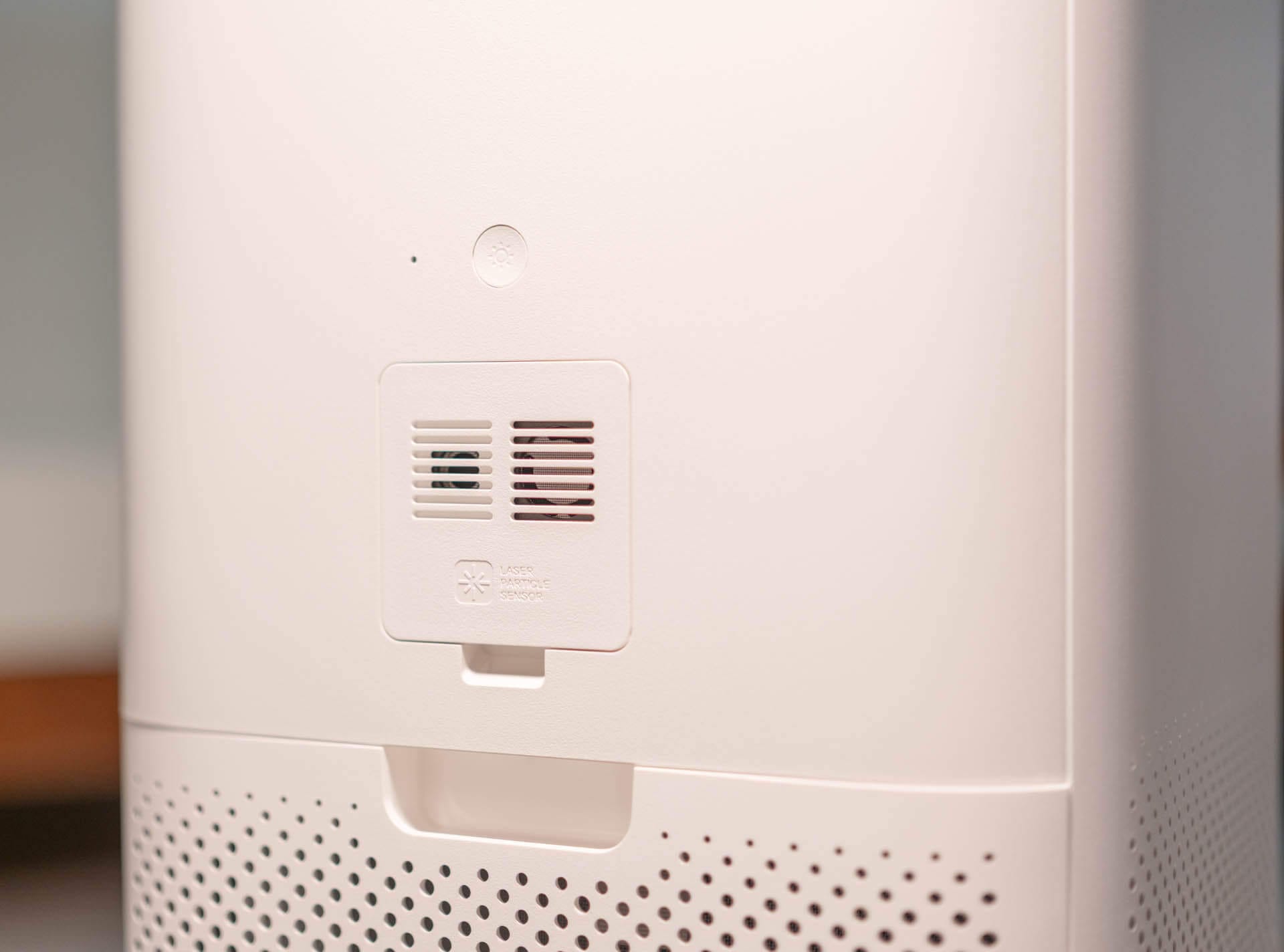
There isn’t much else to the front of the device, but if we turn it around there are a few things of interest. The first of these is a cover, under which the PM sensor lies. This sensor measures PM1, PM2.5, PM10 (again, Xiaomi chose to call this ‘dust’ for some reason), temperature and relative humidity. The way that this sensor is installed makes it seem like it’s replaceable – it’s very easy to remove – but I’m unsure how easy it is to source a replacement. Just above this sensor is a button that lets you change the screen brightness.
Underneath the sensor is a slot that allows you to remove the back panel which will give you access to the filter. The filters are quite large, cylindrical pieces that have a loop on them for easy removal. To install a new filter, you just need to push it into the slot. Overall, it’s a very straightforward process. Since the filter is cylindrical, it means that every side of the device can ‘inhale’ air giving it a deceptively large filtering surface.
Interestingly, at the bottom of the filter is an NFC tag that has a warning not to remove it. While I’ve only used official Xiaomi filters so far (my device isn’t old enough to need a replacement filter yet), I wonder if this tag is there to prevent – or at least warn the user – away from using third party filters. I don’t know, but I hope the device at least supports these filters and, at most, gives the user a warning.
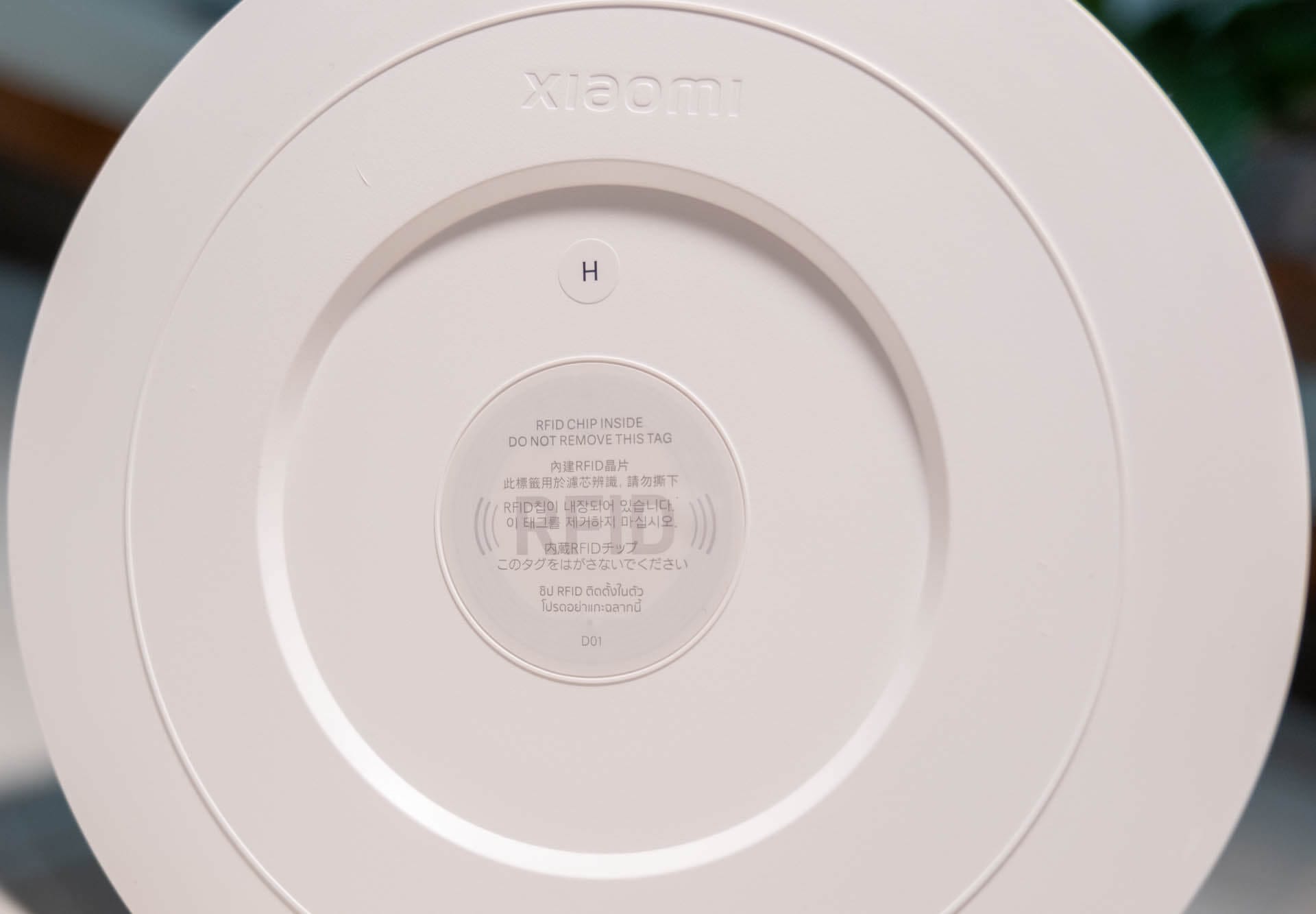
Overall, the Mijia Smart Air Purifier 6 is a well-designed device that fits into most homes. It has a modern, minimalist look and, while looking quite nice, it’s clear that function wasn’t sacrificed in pursuit of aesthetics. The device is also not too heavy or large, meaning it’s portable enough to be easily moved around the house when it’s needed elsewhere.
Oh, before moving on, let’s quickly discuss sound as that is directly related to the design of the device. Well, based on the air purifiers I’ve used, the Mijia Smart Air Purifier 6 is surprisingly quiet. At max speed I measured 59 dBA, falling to 46 dBA at half speed. Sleep mode sits below what I can reliably measure: every purifier I tested read within a couple of dBA of my room’s own noise floor at its lowest setting, so I just treat it as inaudible. I found Level 2 to be the sweet spot for performance and sound in a room at daytime, and Sleep mode is barely audible at nighttime.
Sleep is left out: every unit read within a couple of dBA of the room’s own noise floor at its lowest setting, which measures the room rather than the purifier.
There is very little between the three at full speed – all sit within 2 dBA of each other, so none of them is meaningfully quieter when you actually need the airflow. At the middle setting the Levoit is marginally quietest at 43 dBA against the Mijia’s 46, though not by a margin you would notice across a room
Connectivity
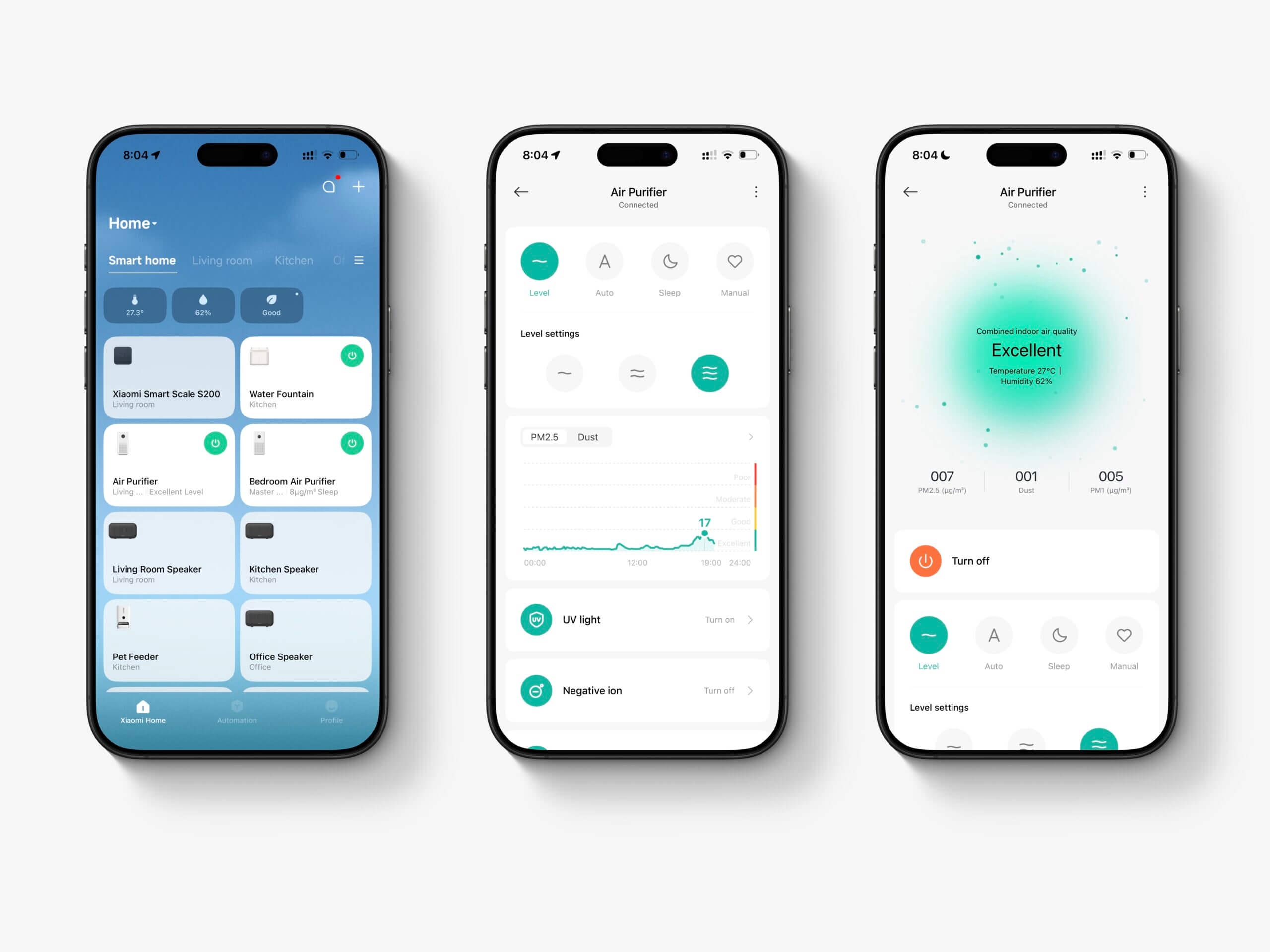
The Mijia Smart Air Purifier 6 is – as the name would suggest – quite smart and this was one of the key selling points for me. The device offers Alexa, Google Home and Mi Home integrations, allows you to easily implement this into any smart home. Even if you don’t have a smart home, you can just download the Mi Home app and access the air purifier’s settings there.
The Smart Air Purifier 6 uses Wi-Fi (unfortunately, only 2.4GHz) for connectivity and the setup process was quite painless using the accompanying app. I am a bit disappointed that IoT devices are still getting released with only 2.4 GHz support (especially new ones like this), but I already rely on a 2.4 GHz network for so many other IoT devices that it wouldn’t really make much of a difference anyway.
Now, it is worth noting that while you can use the device standalone without any connectivity, there are quite a few features that are locked to the app. For example, you won’t be able to set custom speeds, or turn off the ioniser without using the Mi Home app. This is a bit of a disappointment, but it wasn’t a big deal for me as I already have the Mi Home app downloaded for other devices we have.
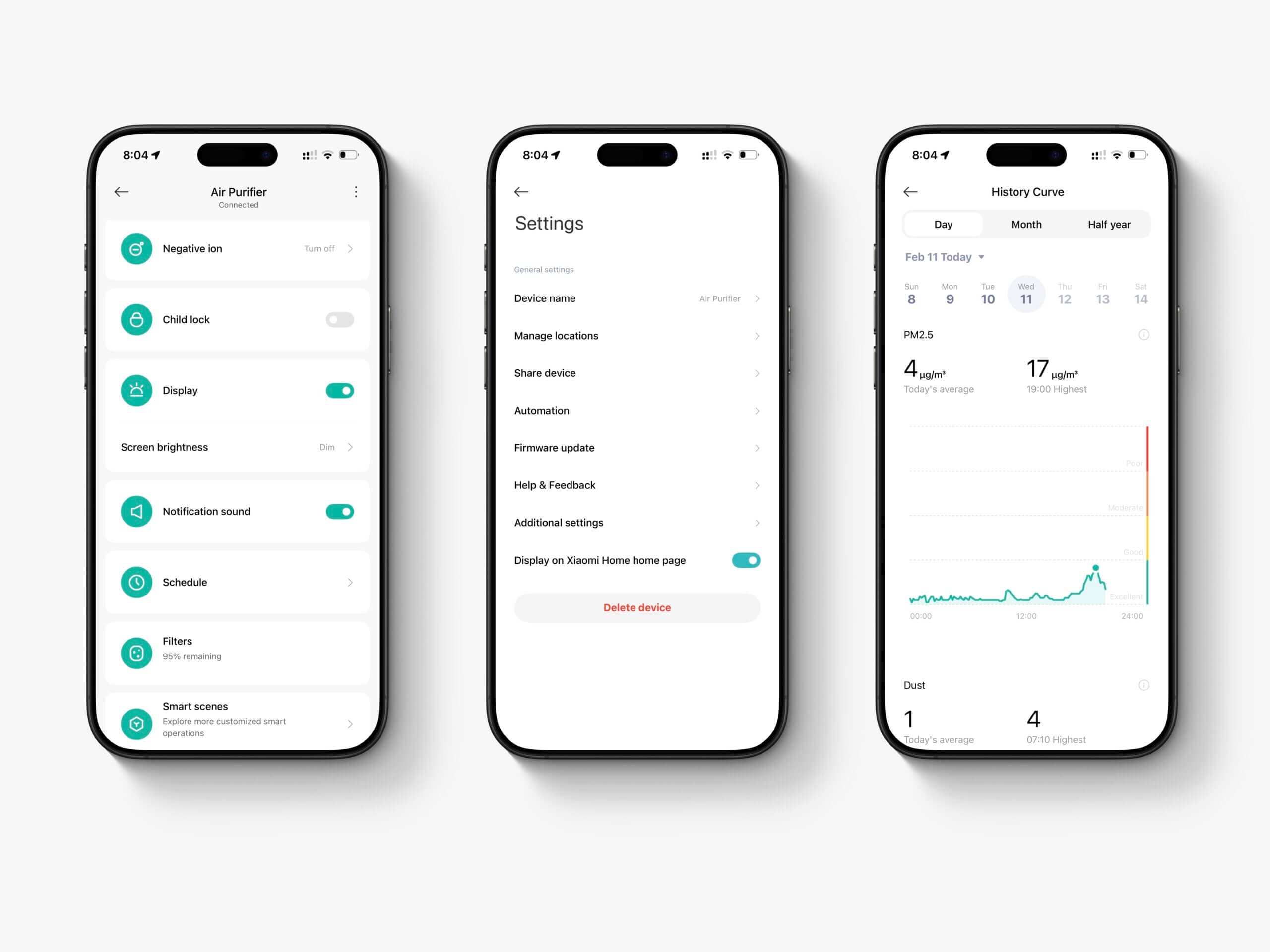
It is also worth noting that you can’t fully control the device through Alexa (and, I imagine, Google Home) either. In fact, Alexa with this device is quite limited and you’re stuck with just a few commands like ‘Alexa, put my living room air purifier on silent mode’. For example, you can’t even use one of the level modes (Level 1-3) or set custom speeds with Alexa unless you pre-set the manual mode speed in the Mi Home app first. I say this because the reality is that you’ll want to have the Mi Home app to really unlock this device.
With that said, the Mi Home app is quite powerful (if you use other Xiaomi devices) and the user experience with the app is acceptable but not fantastic. Through the app, you will be able to view the current air quality, temperature and humidity and also see some historical data from the device. If you don’t have a dedicated air quality monitor, this is a handy feature to have.
It is here that you can also gain full control over the device and enable or disable the UV light and negative ion feature. Alongside these performance-related features, you can also enable child lock (so the device can’t be tampered with), change display brightness, enable notification sounds, set schedules for the purifier, check filter life, and more. Of course, if you have other Xiaomi devices you can also set up automations here.
If you would like other users to have control of the purifier as well, it’s possible to share the device so it can be controlled from multiple phones. With this feature set, it’s a decent app overall and I don’t really have any complaints. However, I do feel like the Alexa integration – which is primarily how I interact with the device – is a bit of a letdown and I really wish this could be expanded on. If I could just have more control over the device (‘Alexa, turn on the air purifier at 50% speed) I would be far happier. Alas.
Pricing & Ongoing Costs
As I mentioned in the introduction, I purchased this air purifier in the Philippines and this greatly impacts my perception and overall review of the device. For context, I picked this purifier up for ₱10,000, though it now sells for about ₱10,500, or roughly 170 USD. However, what I’ve noticed from reading reviews from those predominantly based in the U.S. and U.K. is that the device appears to be significantly cheaper here than in those markets. In Europe it lists at €199.99, or roughly $231, and that’s the figure the charts below use so that every device is compared on the same basis. The prices I quote in the text are the local ones I actually paid.
At the same time, a device like the AirFanta 3Pro is ₱9,600 here, slightly undercutting the Mijia Smart Air Purifier 6. While it has a much higher CADR, it loses many other features and is often touted as an affordable choice (even by myself!). In this market (and much of Southeast and East Asia), the Xiaomi lineup does offer an alternative at a similar price point. If you’re in the U.S. or Europe, you will want to check local prices and alternatives first.
When it comes to the ongoing costs of the Mijia Smart Air Purifier 6, you will be looking at two things: filter replacements and electricity costs. Let’s take a look at the filters first. The Smart Air Purifier 6 uses the same filter as the Smart Air Purifier 4, and if you already have some of these filters on hand, you’re in luck! Unfortunately, the other Xiaomi air purifiers use different filters that will not fit in this device.
Xiaomi state that the filter should be replaced every 6-12 months depending on air quality in your home and usage of the device. Here, a new filter costs around 37 USD (₱2,200). On Amazon (U.S.) the same filters look to go for around $30-$60 depending on sales. This is quite a big difference, and again highlights how this device might be a much better (or worse!) choice depending on where you live.
In a house with six cats, I found the filter needed replacing much closer to six months than twelve. I compared my six-month-old filter to a new one, and here are the results.
| Series | Runs | Measured CADR | To 50% | To 90% | To 99% |
|---|---|---|---|---|---|
| Mijia 6, max speed | 3 | 453 m³/h | 2:45 | 8:30 | 15:26 |
| Mijia 6 (old filter), max speed | 4 | 239 m³/h | 5:21 | 16:06 | 30:15 |
Measured CADR is the median of 4 runs, fitted to the exponential part of each decay curve in a 29.4 m³ room. A real room isn't a sealed test chamber, so my figures won't line up exactly with a lab result, and a difference here doesn't mean the manufacturer is wrong.
29.4 m³ · AirGradient ONE I-9PSL (factory calibrated) · Download mijia 6, max speed data (CSV) · Download mijia 6 (old filter), max speed data (CSV) · Download no purifier, room alone data (CSV)
On its old filter the same machine measured 239 m³/h against 453 m³/h on the new one, and took 16:06 to clear 90% of the particles instead of 8:30. That is a 90% loss of clean-air delivery from the filter alone, with no change to the fan, the room or the method. Twelve months is realistic only if you use the device occasionally and have no pets; run it daily in a home with animals and six months is the honest figure.
When it comes to electricity, the Mijia Smart Air Purifier 6 draws 33 W at maximum power. I noticed that on the website it’s rated for 40 W, but I never recorded this on the purifier, even when it was running at the maximum speed on manual mode. At half speed the draw falls to 9 W, and at Level 1 and on Sleep mode it settles at just 3 W.
The Mijia and the 4 Lite are near-identical here. The Levoit Vital 200S-P pulls noticeably more at maximum – 42 W against 33 – which is the price of a larger fan, though all three are trivial beside almost any other appliance in the house. Electricity is not where the money goes, though: at twelve hours a day it costs about $11 a year to run. Filters dominate.
Electricity assumes half speed, twelve hours a day, at $0.29/kWh. Filters use the most conservative manufacturer interval, which for all three is six months. Prices are official retail in a Western market: US where the device is sold there, Europe where it is not. Other regions differ, sometimes sharply.
On those assumptions the Mijia costs about $85 a year to keep running, against $90 for the Levoit Vital 200S-P and $61 for the 4 Lite. The ordering is set almost entirely by filter price: $37 here against $40 for the Levoit and $25 for the 4 Lite. If you can source filters cheaply, that figure moves more than anything else in this review
One more note on the ongoing costs and longevity. One of my friends in Thailand purchased an early Xiaomi Air Purifier in 2018 and he said it’s still working well today and that he’s still able to purchase filters for it. Official ones are still available (but hard to find), and there are also a wide range of third-party brands that also offer filters. While I don’t advocate for using third-party filters unless they’re well tested, it’s good to see that even if Xiaomi might drop support for the filters in the future, other companies look to keep the devices useful.
Conclusion
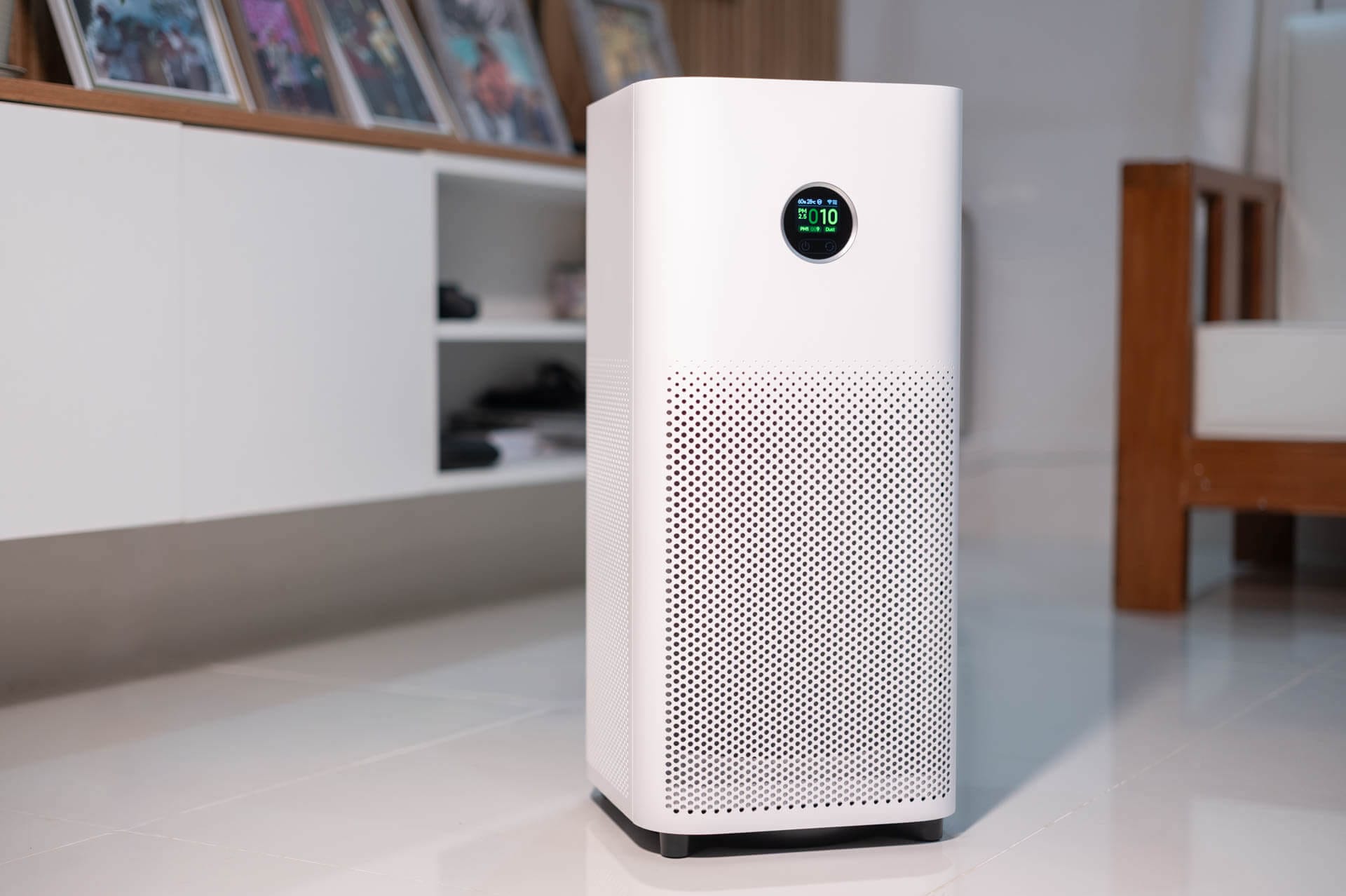
As you can probably tell, I’ve been quite pleased with my purchases (both the 4 Lite and Mijia Smart Air Purifier 6) and I’m happy that I decided to pull the trigger on these purifiers. While the Smart Air Purifier 6 isn’t the most powerful in this price range – the AirFanta 3 Pro takes that award! – it is perhaps one of the most balanced devices. That is to say it has solid performance, smart home integrations, a well-built support application, and looks nice. These factors combined will likely make it a popular device.
However, there are some caveats with this device. As mentioned, it’s not the most powerful and if a higher CADR is your primary focus, there are better devices in the price range. Also, if you’re expecting to clean your whole house, this device likely isn’t powerful enough. Rather, it’s well suited to a small apartment, or a large room like a lounge or living area. If you only need to cover a single bedroom, something smaller like the Levoit Core 300 will do the job for less, though it measured 258 m³/h in my testing against the Mijia’s 453. While Xiaomi states that it’s suited for a ‘master bedroom’, I don’t know of many houses large enough to have a 50m² bedroom.
I’m also not impressed with the smart home implementation. While it is there, the Alexa integration at least feels very barebones and ‘tacked’ on. Ideally, I would want to be able to control the whole device from Alexa or Google Home, but this doesn’t seem to be the case and you will definitely need the Mi Home app to make the most of this device. Oh, and that’s another caveat – you will need the app to really get the most out of this device.
However, outside of these aspects, I think the Mijia Smart Air Purifier 6 is a very well-rounded and solid device. The long-term costs of running it are moderate, and the upfront cost is very reasonable considering what you’re getting. As such, I would recommend this air purifier for a lot of people – just make sure to check your local pricing for both the device itself and replacement filters first.
- Strong real-world particulate performance for medium rooms
- Excellent value in Southeast Asian markets
- Good smart features and Mi Home app integration
- Quiet enough for daily use while still effective
- Modern design with easy filter access
- Shared filters with the Smart Air Purifier 4
- Auto mode thresholds are too high and not adjustable
- Alexa/Google smart control is very limited
- Gas/VOC filtration lifespan likely shorter than advertised
- UV and ionizer add questionable real-world benefit
- App required for full functionality
- Performance not class-leading for the price
Mijia Smart Air Purifier 6 FAQ
Is the Xiaomi Smart Air Purifier 6 powerful enough for a whole home?
No. It’s best suited to a single medium-to-large room rather than an entire house. While air mixing can improve nearby spaces, the purifier performs most effectively when placed in the room you want cleaned. For whole-home coverage, you’d likely want multiple units.
How often do the filters need to be replaced?
Xiaomi recommends replacing the filter every 6–12 months, but real-world lifespan depends heavily on air quality and usage. Particulate filtration remains effective longer, while the activated carbon layer for gases and VOCs may saturate sooner.
Does the UV light or ioniser actually improve air cleaning?
The mechanical filter does most of the meaningful filtration. UV and ionisation may provide marginal benefits, but their real-world impact is difficult to quantify. Many users choose to disable them out of caution, without significantly affecting core performance.
Can the purifier run quietly enough for a bedroom?
Yes. Lower speeds and Sleep mode are quiet enough for nighttime use while still providing continuous air cleaning. Higher speeds are audible, but effective for rapid purification when needed.
Do I need the Mi Home app to use the purifier?
You can run the purifier manually, but many advanced features – including speed customisation, automation, and disabling UV/ionisation – require the app. Smart assistant controls are available but somewhat limited.


