

With the current firmware, the Atmotube Pro 2 appears to have issues with its carbon dioxide measurements. I’ve experienced this myself, and I’ve also heard multiple reports of the same issue.
When I first tested the monitor, I found it to give very similar readings to the Aranet4 Home. However, sometime during my testing, the readings began to deviate quite significantly but systematically. As you can see on the graph below, there was a high agreement between the two devices at point 1. However, at some point, the Atmotube began to read significantly higher. As you can see, this difference is systematic, and it identifies the overall trends very well. To me, this looks to be an issue caused by automatic calibration. While the app does have a manual calibration function built in, this currently does not work so I’ve been unable to confirm this.
Therefore, please keep in mind that this review was written before I started to experience this issue. I have decided to keep the original review (with this comment), however, as I believe this issue can be resolved with a software and firmware update. I’ve mentioned the issue to Atmo and will remove this banner when the issue is resolved. For the moment, please keep in mind that there are some carbon dioxide-related issues with the device.

If there’s one air quality monitor I’ve wanted over the past few years, it’s a device that measures both PM2.5 and CO₂ in a genuinely portable form factor. Up until now, I’ve usually carried two devices – something like an Aranet4 Home or AirSpot CO2 Monitor for carbon dioxide, and an Atmotube Pro (original) or AirBeam 3 for particulate matter. One for indoor use (CO₂), one primarily for outdoor use (PM).
However, for some reason, finding a device that combines these two sensors in a portable package has proven surprisingly difficult. Sure, many indoor (and even some outdoor) monitors include both PM and CO₂ sensors, but they’re rarely designed to be carried around. In a way, I understand why. Most portable pollutant monitors are intended for outdoor use or commuting, while carbon dioxide monitors are typically used to assess ventilation and proxy transmission risk indoors.
Still, the marriage of these two sensors has always made a lot of sense to me. Having a single device that measures PM when I’m outdoors and then CO₂ when I move indoors is something I’ve wanted for a long time. Think about a typical daily commute that involves walking and public transport like trains or buses – it’s exactly the kind of scenario where having both sensors in one device just makes sense (at least to me!).
The reason I’m harping on about this combination is because it’s the primary reason I was so excited when Atmo announced the Atmotube Pro 2. While the device brings a range of improvements over the original (which we’ll get into later), the idea of a monitor that’s quite useful both indoors and outdoors was what really caught my attention. If it performs well, it could realistically halve the number of monitors I carry with me most days.
That prospect alone was exciting enough, so it probably won’t come as a surprise that I was very pleased when Atmo reached out to discuss their new device. After a few months of anticipation, I finally received the Atmotube Pro 2 a few weeks ago, and I’ve been taking it out with me daily ever since. In this review, I want to take an in-depth look at the device and see how it actually performs. If one thing is certain, it’s that it has a lot to live up to, given the legacy of the original Atmotube.
This post contains affiliate links. For more information, please refer to my affiliate disclaimer. I was sent a product for review, but the article is not sponsored. All opinions expressed in this post are my honest thoughts. I only recommend products that I genuinely believe in.
Informational Purposes: Information on this blog is for informational purposes only. Readers are encouraged to confirm the information herein with other sources. This website assumes no responsibility for the accuracy of the information, and information is subject to change without notice. Products mentioned on this website are not medical devices and do not guarantee protection.
If you notice any errors or inconsistencies in this article, please contact me so I can update the information accordingly.
Atmotube Pro vs Atmotube Pro 2
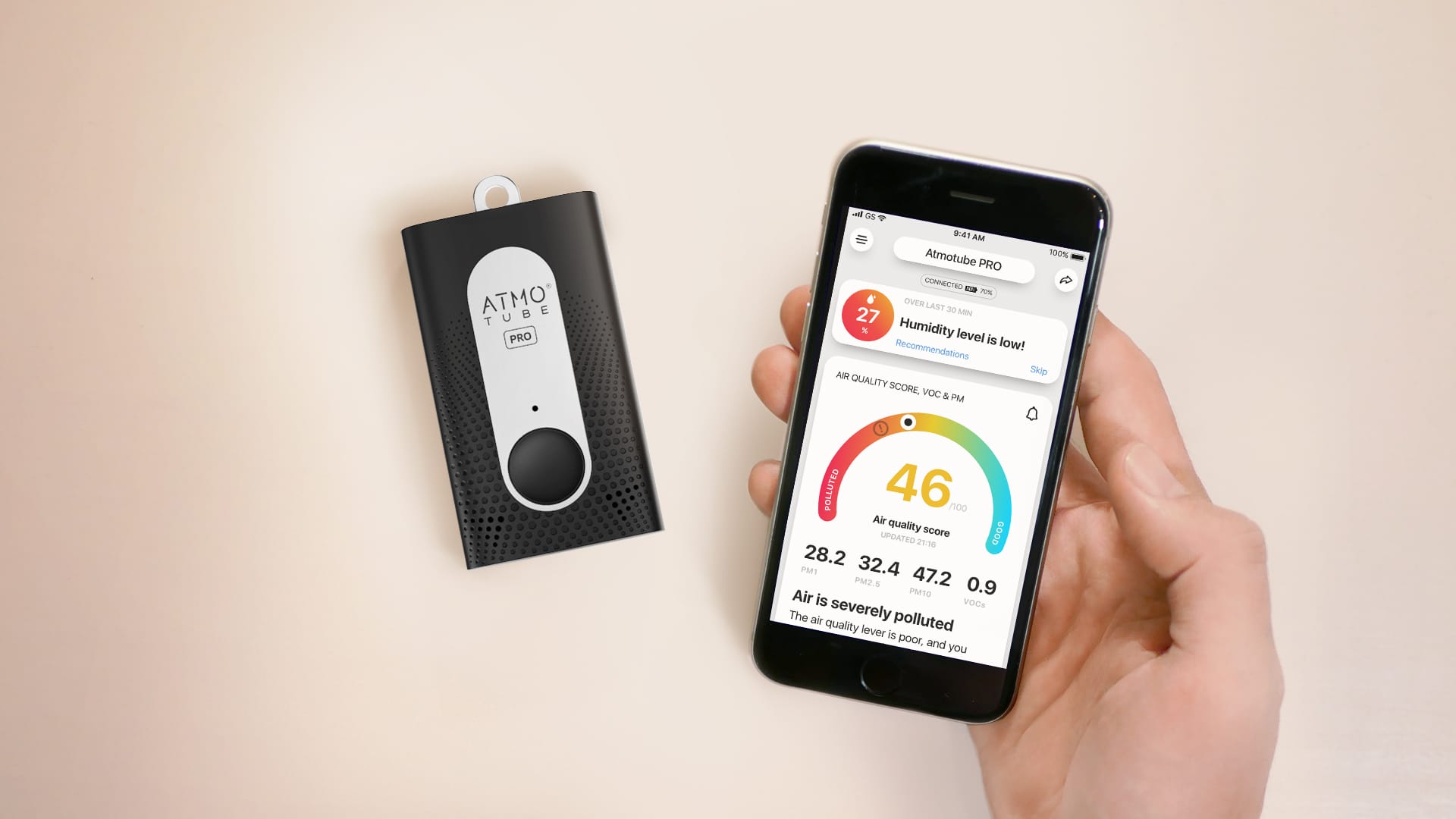
Original Atmotube Pro and app. Unfortunately, my device stopped working after three years of use so I can’t provide a side-by-side photo. However, the devices look identical!
There are likely a few people reading this article who are deciding between the older Atmotube Pro (while stocks last) and the Atmotube Pro 2, or who are simply wondering whether upgrading is actually worth it. If you fall into either of those camps, it’s worth first looking at how the original Atmotube Pro and the Pro 2 differ.
The most significant changes are in the sensor lineup. The Atmotube Pro 2 adds a carbon dioxide sensor (the Sensirion STCC4), upgrades the TVOC sensor from the Sensirion SGPC3 to the newer SGP41 – which also introduces NOx sensing – and adds a GPS chip. There have also been a handful of smaller changes, including updates to the temperature, relative humidity, and air pressure sensors, as well as improvements to battery life.
One upgrade that’s easy to overlook is the improved internal storage. The Pro 2 can now store up to 45 days of data internally, compared to just 10 days on the original device. For users who sync their device regularly, this may not matter all that much, but it’s still a welcome improvement. It’s also worth noting that both of these figures represent the maximum storage duration (at higher sampling rates, the effective storage window is shorter). Even so, the roughly 4.5x increase in internal storage should be particularly useful for anyone running the device at more frequent measurement intervals.
If you don’t want to read all of the above, here is a quick summary of the most important changes:
- Added CO₂ sensor
- Improved TVOC sensor
- Built-in GPS
- Improved environmental sensor
- Longer battery life
- Much larger internal storage
Overall, I think the Atmotube Pro 2 represents a solid upgrade over the original. The addition of a CO₂ sensor and GPS alone would have been enough to keep me happy, but the smaller improvements help make this feel like a meaningful step forward rather than a minor refresh. That said, the price has also seen an “upgrade,” so the big question is whether these changes justify the higher cost – but we’ll get to that later in the article.
Accuracy & Sensors
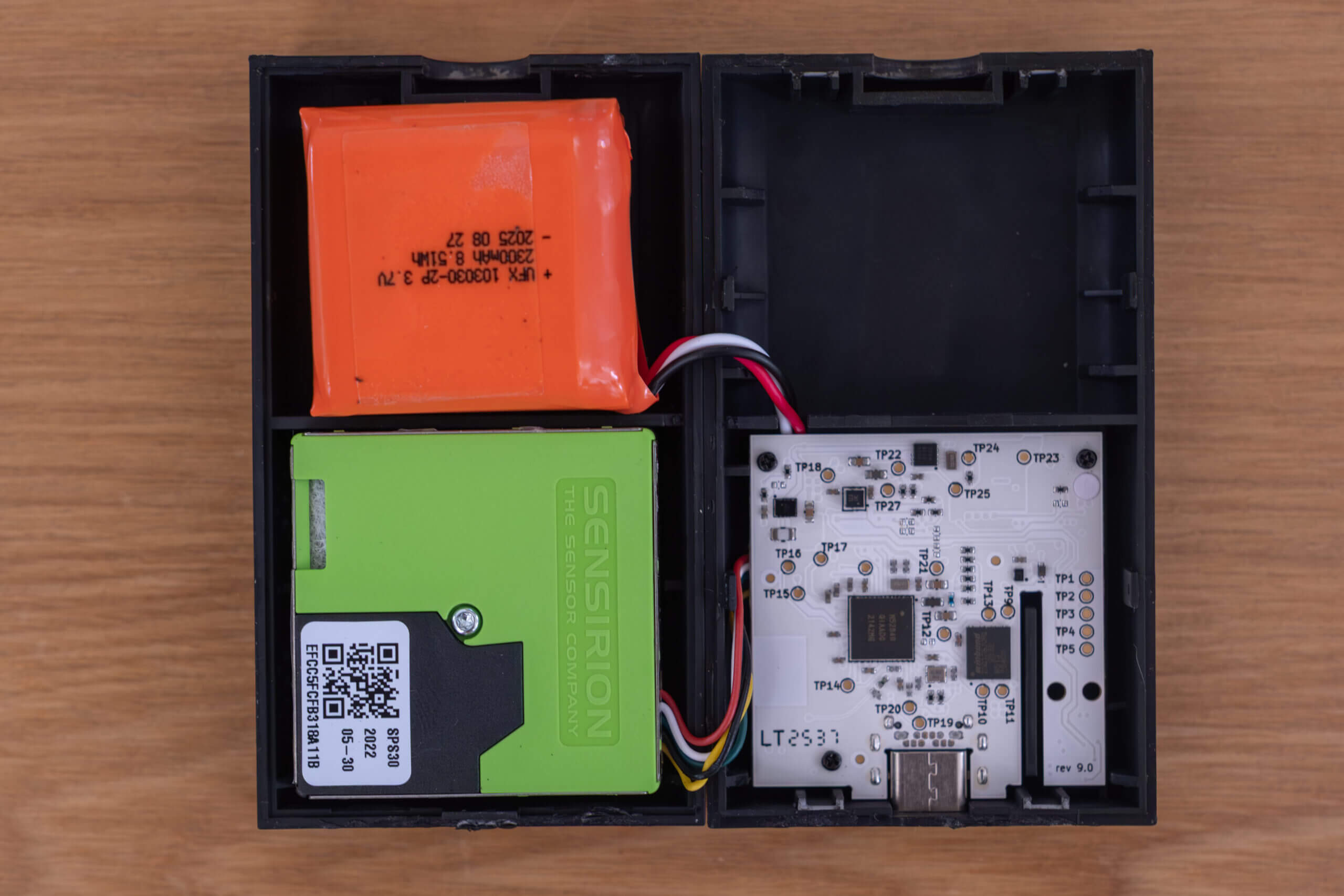
The inside of the Atmotube Pro 2 with the Sensirion SPS30 on the left (green). The other sensors are housed on the mainboard on the right.
While the Atmotube Pro 2 includes a range of updated sensors over its predecessor, one sensor that hasn’t changed is the Sensirion SPS30 particulate matter sensor. On first hearing this, I’d understand if you felt a bit underwhelmed – after all, we all like “upgrades,” and for most people the primary use of this device will be as a portable particulate monitor. That said, I actually think sticking with the SPS30 was a very good decision, for a few reasons.
Firstly, as I recently mentioned in my Airthings Corentium Home 2 review, using a well-established sensor means there’s already a body of third-party studies and validation available. In the case of the SPS30, that’s absolutely true, and we’ll look at some of those results in more detail shortly. Secondly, while new sensors have appeared on the market, relatively little has changed in the low-cost PM sensor space, and there simply aren’t many clearly better alternatives in this price range. Finally, the original Atmotube Pro was already widely trusted, and it’s likely Atmo didn’t want to risk losing that trust by switching to a less-proven sensor.
In fact, when I attended ASIC (Air Sensors International Conference) in Bangkok in early 2025, I read through a wide range of studies in the poster section, and the portable monitor used most (by far) was the Atmotube Pro. Given the amount of trust and validation surrounding both the device and the SPS30, it makes sense that Atmo chose to stick with it.
So, how well does it actually perform? To answer that, we need to look at third-party studies and results from independent testing organizations. One of the most well-known programs is AQ-SPEC, run by AQMD. This testing isn’t perfect (I wrote a full article on that here!), but it does provide a useful baseline when assessing sensor performance.
For both PM1.0 and PM2.5, the Atmotube showed strong correlations, with an R² of 0.9 for PM1 and between 0.79 and 0.92 for PM2.5. These are strong results – especially for PM2.5. On the other hand, the device showed a very weak correlation for PM10, ranging from 0.18 to 0.26. That said, nearly every low-cost optical sensor struggles with PM10, so this result isn’t particularly surprising. At this price point, PM1 and PM2.5 are the measurements you should be paying the most attention to.
The SPS30 is also the only sensor (as opposed to a complete monitor) to have achieved MCERTS certification from the CSA Group. In this testing, the sensor demonstrated a measurement uncertainty of less than 10% when compared to a Palas Fidas reference instrument, across concentrations from 0 to 75 µg/m³. Since this range covers most real-world exposure levels (unless you live in a very polluted area), these results are also encouraging.
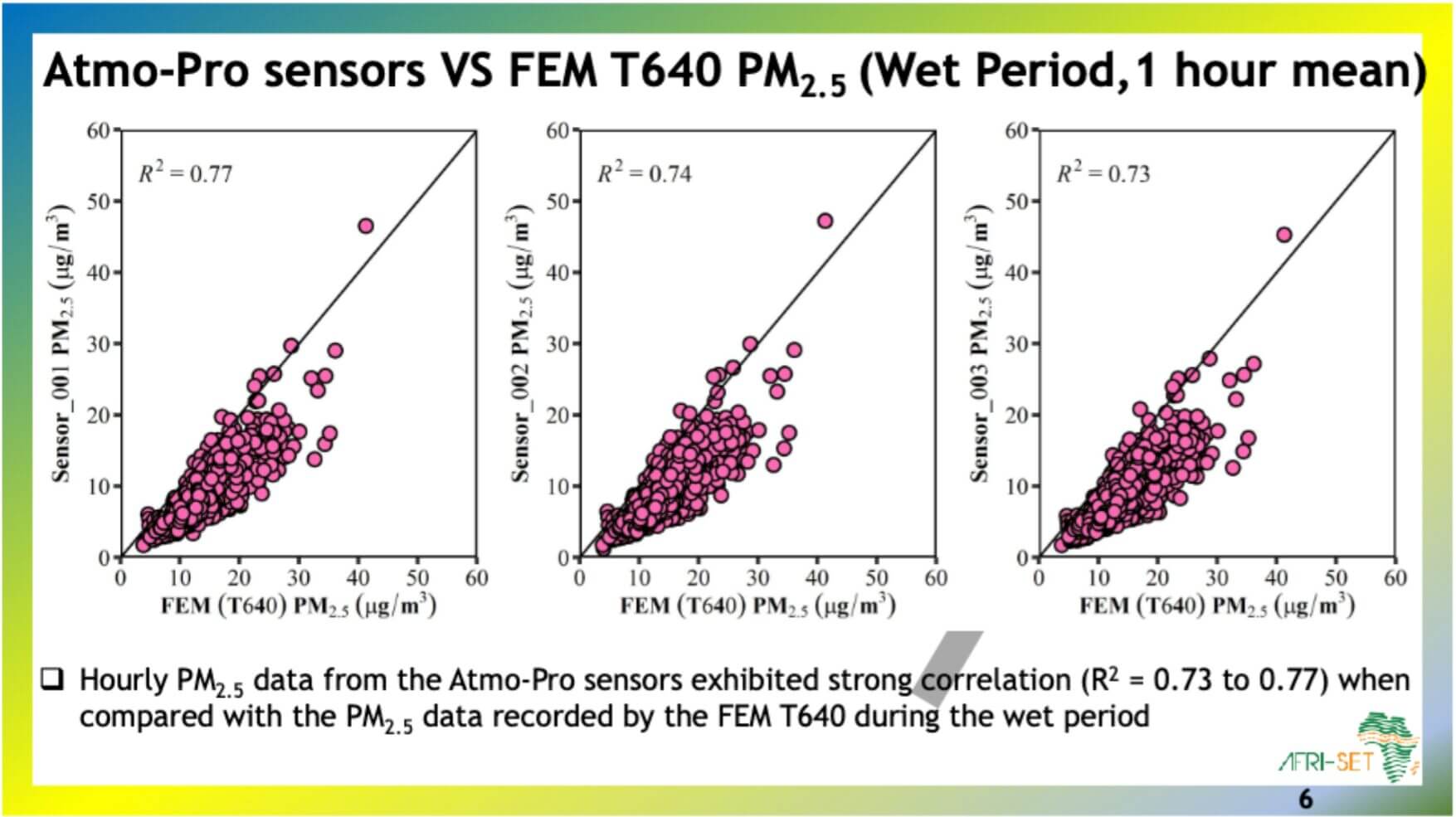
Afri-SET testing during the Ghanaian wet season. Image source.
Both AIRLAB (by Airparif) and Afri-SET have also assessed the performance of the original Atmotube using the SPS30, and it generally performed well across their tests – with the notable exception of the “dry season” test in Ghana. If you really want to go down the rabbit hole, there are countless additional studies on both the Atmotube and the SPS30 that further reinforce its position as one of the more accurate low-cost PM sensors available.
When we move on to the carbon dioxide sensor, things start to get a bit more interesting. Up until now, there have been two widely trusted types of CO₂ sensors used in consumer monitors: NDIR (non-dispersive infrared) and photoacoustic sensors. If you’ve ever researched CO₂ monitors, you’ll likely be familiar with sensors like the SenseAir S8 or Sensirion SCD41, both of which rely on one of these technologies.
However, the Atmotube Pro 2 is the first device I’ve tested that uses a new ultra-small sensor from Sensirion called the STCC4. This sensor uses thermal conductivity sensing and is significantly smaller while consuming less power than a photoacoustic sensor – which itself is already smaller and more power-efficient than an NDIR sensor.
Looking at Sensirion’s datasheet, this reduced size does come at a cost. While NDIR and photoacoustic sensors typically list accuracies in the range of ±30 ppm ±3% to ±50 ppm ±5%, the STCC4 is specified at ±100 ppm ±10%. That’s noticeably worse than most common CO₂ sensors currently on the market.
| Typical Accuracy | Absolute | Relative (% of reading) |
|---|---|---|
| NDIR | ±30 ppm | ±3% |
| Photoacoustic | ±50 ppm | ±5% |
| Thermal Conductivity (STCC4) | ±100 ppm | ±10% |
Since this was my first time using this sensor – and because spec sheets don’t always tell the full story – I was curious to see how it would perform when compared to a more traditional NDIR sensor. For anyone unfamiliar, NDIR sensors have been the gold standard in consumer-grade carbon dioxide monitors for quite some time and, assuming they’re properly calibrated, they’re generally very accurate. While other technologies have their own advantages (such as the smaller form factors enabled by photoacoustic and now thermal conductivity sensors), NDIR still hasn’t been beaten in terms of raw accuracy.
While it’s far from a true reference instrument, I used a factory-calibrated, brand-new Aranet4 Home as a baseline for comparison. In particular, I wanted to see how the sensor behaved across different temperatures, since thermal conductivity sensing clearly relies on compensation and post-processing. To do this, I placed both the Atmotube Pro 2 and the Aranet4 in an airtight (or at least as close as I could manage) container and exposed them to a range of different temperatures.
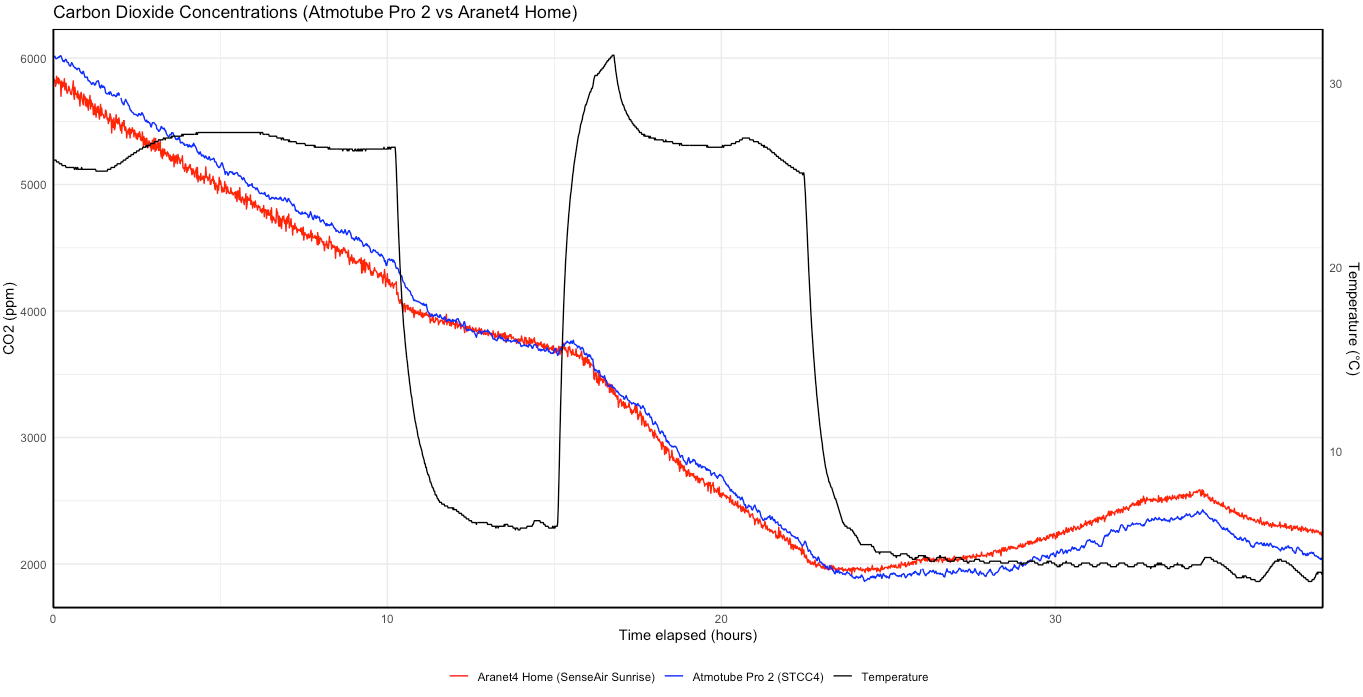
As you can see, throughout the entire test – and despite the changing temperatures – the sensor performed well when compared to the Aranet4 Home. In fact, it performed better than I expected, and I was genuinely surprised by the results. There are a few quirks in the measured CO₂ concentrations, such as increases as the temperature drops, but this is expected given changes in gas density. The primary goal here was to see how the STCC4 compared to an NDIR sensor, and based on this test, it appears capable of delivering readings that are more than accurate enough to be actionable. This is likely due to the fact that the temperature sensor in the Atmotube (the SHT40) feeds temperature data to the STCC4 so it can compensate for ambient conditions.
Anecdotally, I’ve also found that the Atmotube Pro 2 almost always reports CO₂ values similar to other monitors I regularly carry with me. One notable difference is update rate: the Atmotube provides readings every second. I’m not entirely sure whether each of these represents a fresh measurement or if some values are interpolated (the Vitalight Mini CO₂ Detector is a well-known example of this), but the device does appear to have a very fast response time, which is likely enabled by the low power consumption of the sensor.
I found the device to be great when commuting simply because of how fast it updated. Even with my Aranet set to take a reading every minute, it felt very slow to react when compared side-by-side with the Atmotube Pro 2. Sure, I can take readings on-demand, but needing to keep pressing the ‘take reading’ button is far less convenient than just seeing the almost real-time updates on the Atmotube Pro 2.
Again, this is far from a rigorous scientific evaluation, but I do think the STCC4 performs quite well, at least within typical indoor temperature ranges (I did notice some issues when the device was in the sun and the internal temperatures surpassed 40 degrees Celsius). I’m looking forward to testing this sensor further, and I’m genuinely excited to see what kinds of devices this technology can enable in the future. When combined with the Bosch BMV080, we may have some ultra-small devices on the horizon!
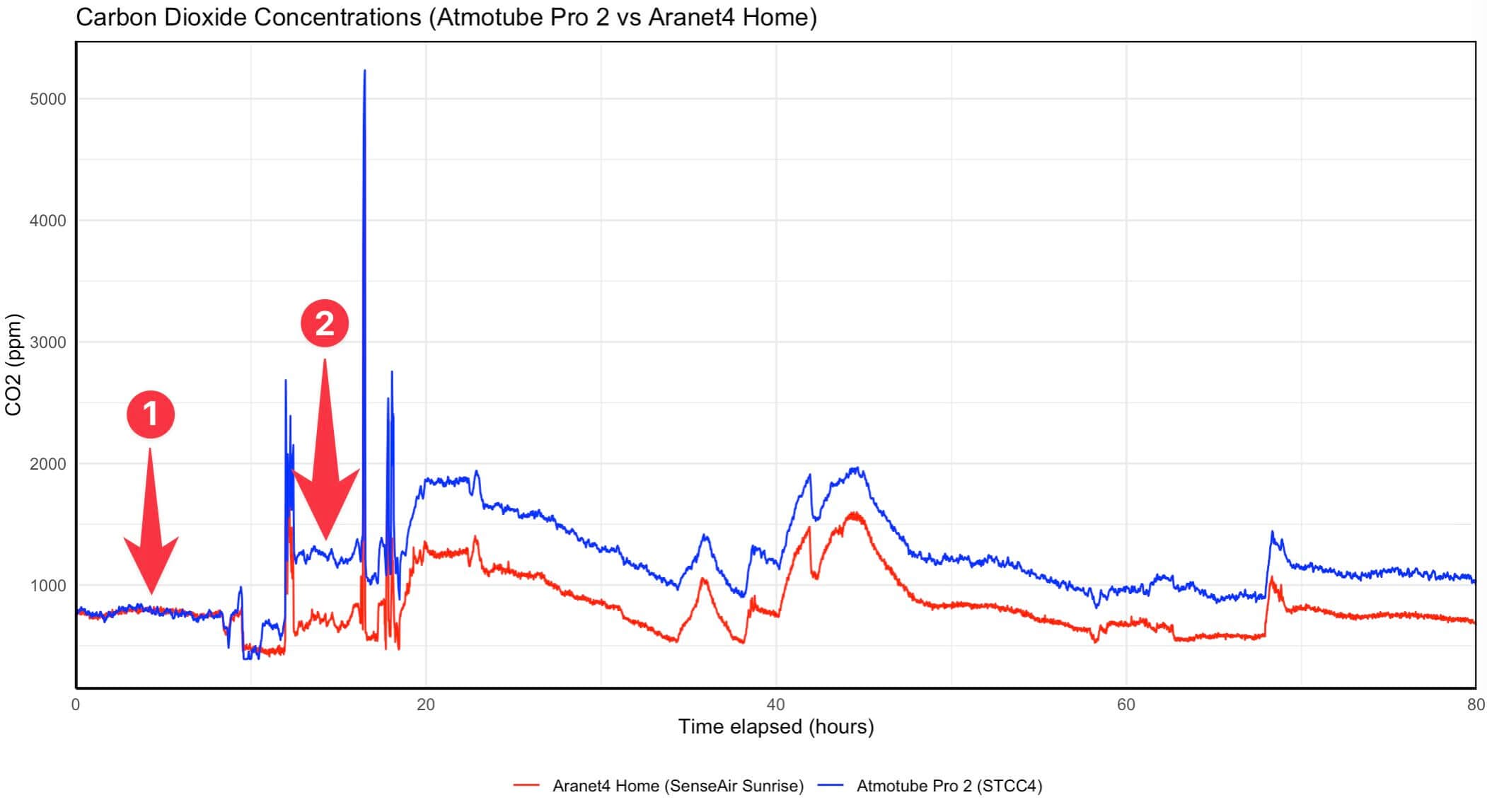
Point 1 on the graph above shows how well the Aranet and Atmotube Pro 2 aligned until an automatic calibration took place near point 2 (at least, I believe that’s the cause).
Before moving on, one final thing: the STCC4 uses an automatic calibration cycle that means that it automatically recalibrates quite frequently. While I haven’t been able to discover exactly how frequently the sensor updates, I believe it to be quite frequent as Sensirion states the following quote in their datasheet for the sensor. There is a full explainer on ABC/ASC below, but I do want to note that the automatic calibration can’t be disabled. However, it is possible to force a manual recalibration of the sensor. Atmo also allows you to choose the exact baseline level, which is a nice touch. By default, this is 600 and I wonder if this may have led to the issue shown above (the device reached around 400 ppm for a while around 10-hours in).
The sensor is operated with a built-in automatic self-calibration (ASC) algorithm to maintain long-term stability of the CO2 sensing performance. The algorithm assumes that the sensor during operation is exposed to fresh air containing approximately 400 ppm CO2 concentration at least once per week. Exposure to CO2 concentrations lower than 400 ppm can affect the sensor accuracy. The ASC state is stored in non-volatile memory at a maximum interval of 2 hours in continuous measurement mode or after 720 single shot measurements, corresponding to 2 hours in single shot measurement mode with a 10 s sampling interval.
Sensirion STCC4 Datasheet
Some carbon dioxide sensors and monitors implement autocalibration, a feature that prevents sensor drift (sensors slowly losing accuracy over time) by regularly calibrating the device.
How ABC Works: On a set interval, the sensor will perform ABC (automatic baseline calibration), which sets the lowest carbon dioxide concentration the device has been exposed to as the baseline (typically 400 or 420ppm). This isn’t an issue if a monitor is regularly exposed to ambient air (around 420-430ppm). However, if the device is in a room where CO2 levels do not reach ambient every calibration cycle (typically seven days), it can incorrectly set a baseline, throwing off all readings until the next automatic calibration.
If your monitor regularly goes outside or is in a room that often sees ambient or near ambient CO2 levels, ABC can be very useful. If not, I recommend disabling the feature.
Now, let’s move on to the final sensor. With the upgrade to the Atmotube Pro 2, Atmo also swapped out the previous Bosch VOC sensor for the Sensirion SGP41, which measures both VOCs and NOx. While the SGP41 is generally an okay sensor (and it’s very widely used), it’s important to highlight a few caveats here.
Firstly, because VOCs are inherently difficult to measure, the SGP41 reports values using a 1-500 index. On this scale, 100 represents an average baseline, with lower values indicating fewer VOCs and higher values indicating more. In practice, sensors like this should only be used to observe relative changes and trends over time – they should not be relied upon for absolute concentration values. There is an option to change the VOC units to ppb in the application, but I don’t recommend this because even Sensirion admits that a relative index can’t be turned into an accurate absolute output.
The same applies to NOx readings, which are also presented as an index (with 1 representing the baseline). In fact, during my testing, I found that temperature had a significant impact on the reported NOx values, and I wouldn’t personally trust the NOx output from this device.
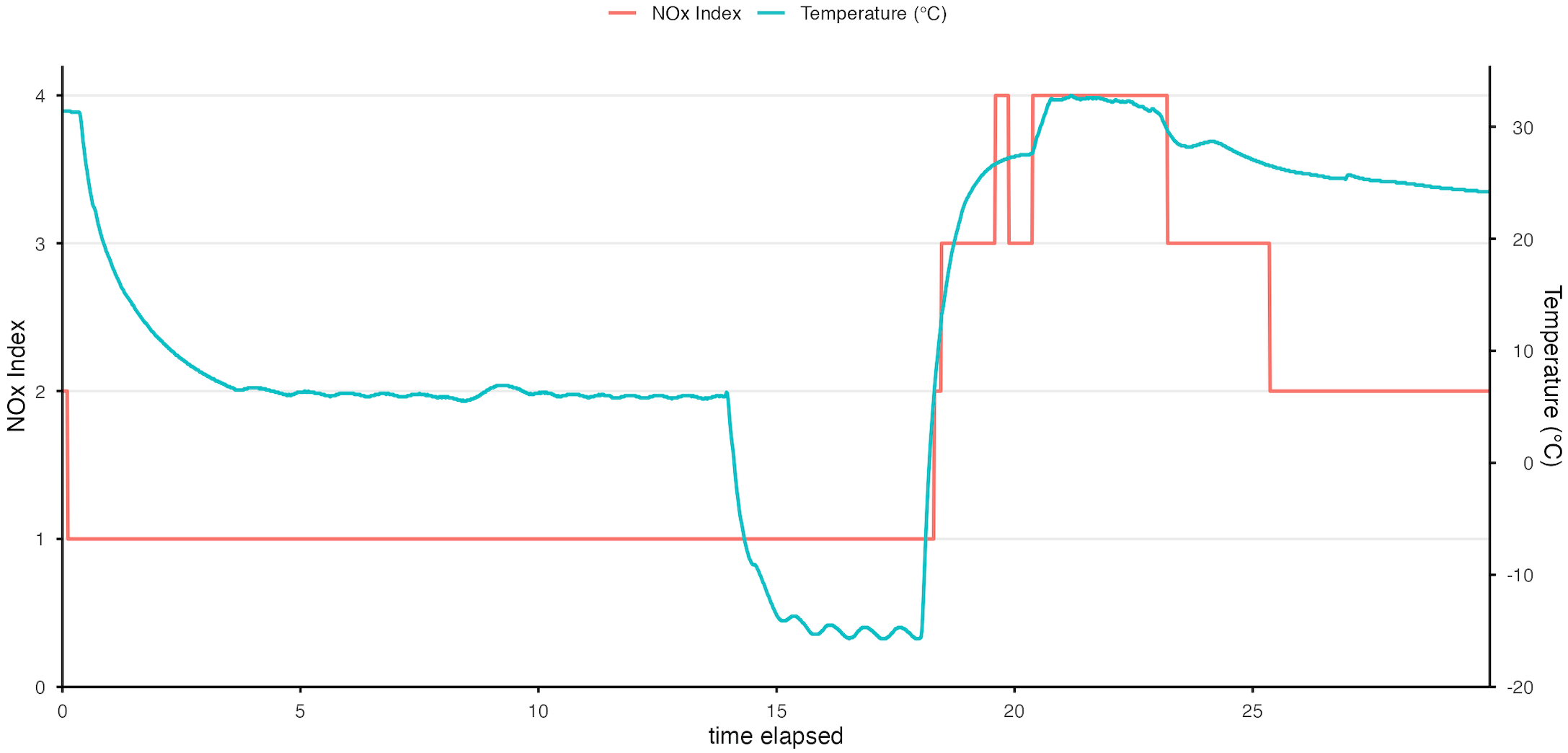
NOx concentration vs temperature in an enclosed (air-tight) container.
Again, this isn’t an issue that’s unique to the Atmotube Pro 2. All low-cost monitors that attempt to measure VOCs and NOx suffer from the same limitations – even those that claim to display values in ppb. At this price point, truly accurate VOC measurement simply isn’t realistic. As long as you keep that in mind, having the additional sensor is still a nice bonus, and it can be used to identify general trends.
Overall, the Atmotube Pro 2 carries forward the same good PM1 and PM2.5 from the original device. It then goes a step further, adding what looks to be a good CO₂ sensor and updating the VOC sensor. While I wouldn’t trust anything absolute from the VOC sensor (and you shouldn’t), it’s great for identifying trends and, again, this is a universal problem with low-cost sensors, not with the Atmotube in particular. I’m quite happy with how the device has performed.

BreatheSafeAir is a one-person publication. Every share and every subscriber is important to me.
I don’t have a marketing budget or a team behind me. Just a lot of test equipment and a genuine interest in helping you make sense of your air quality. If you find this useful, subscribing to my newsletter is the best free way to support the work. You’ll get information on what I’m currently testing, findings that don’t make it into the full reviews, and the kind of detail you only get from someone who thoroughly tests these devices.
Design
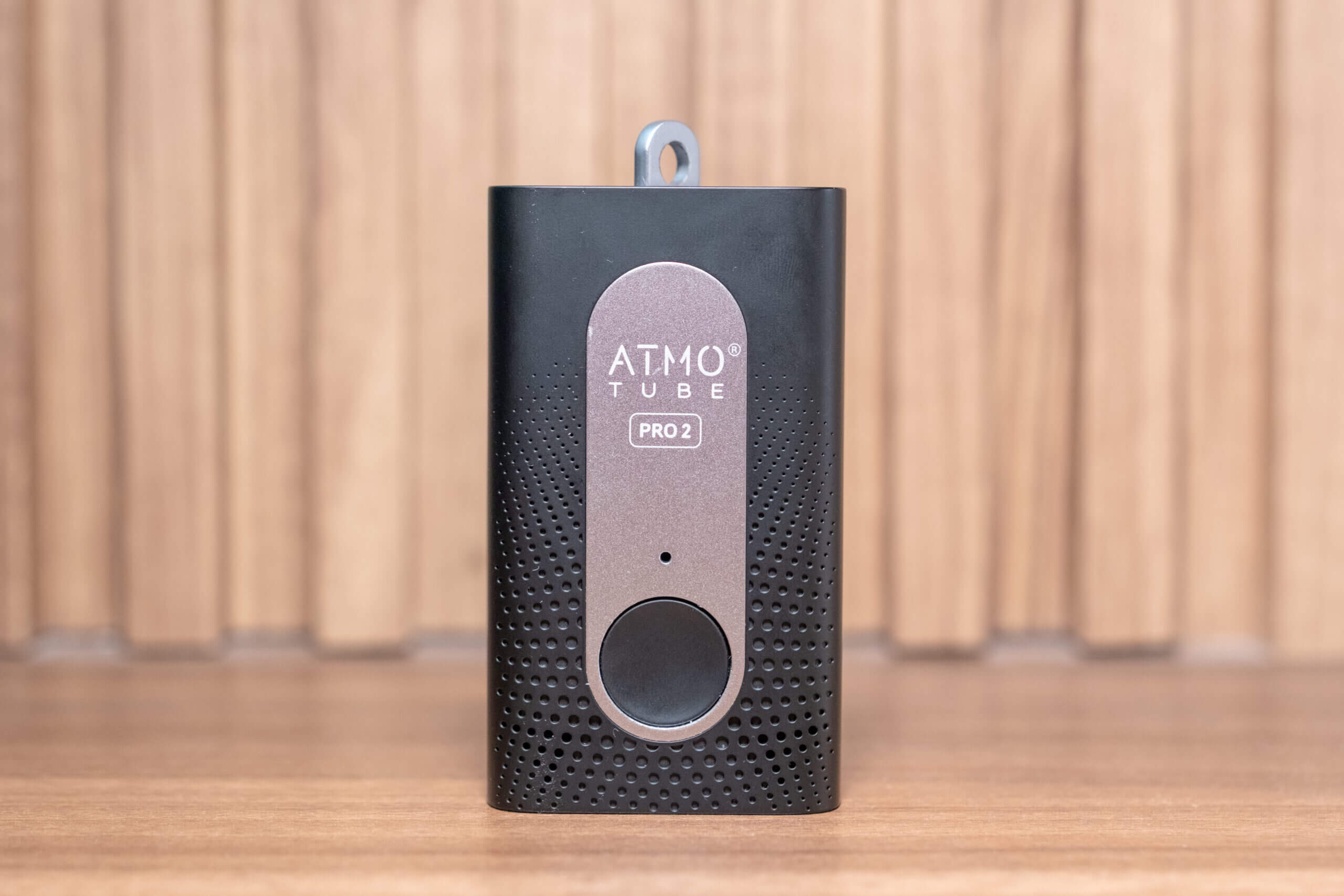
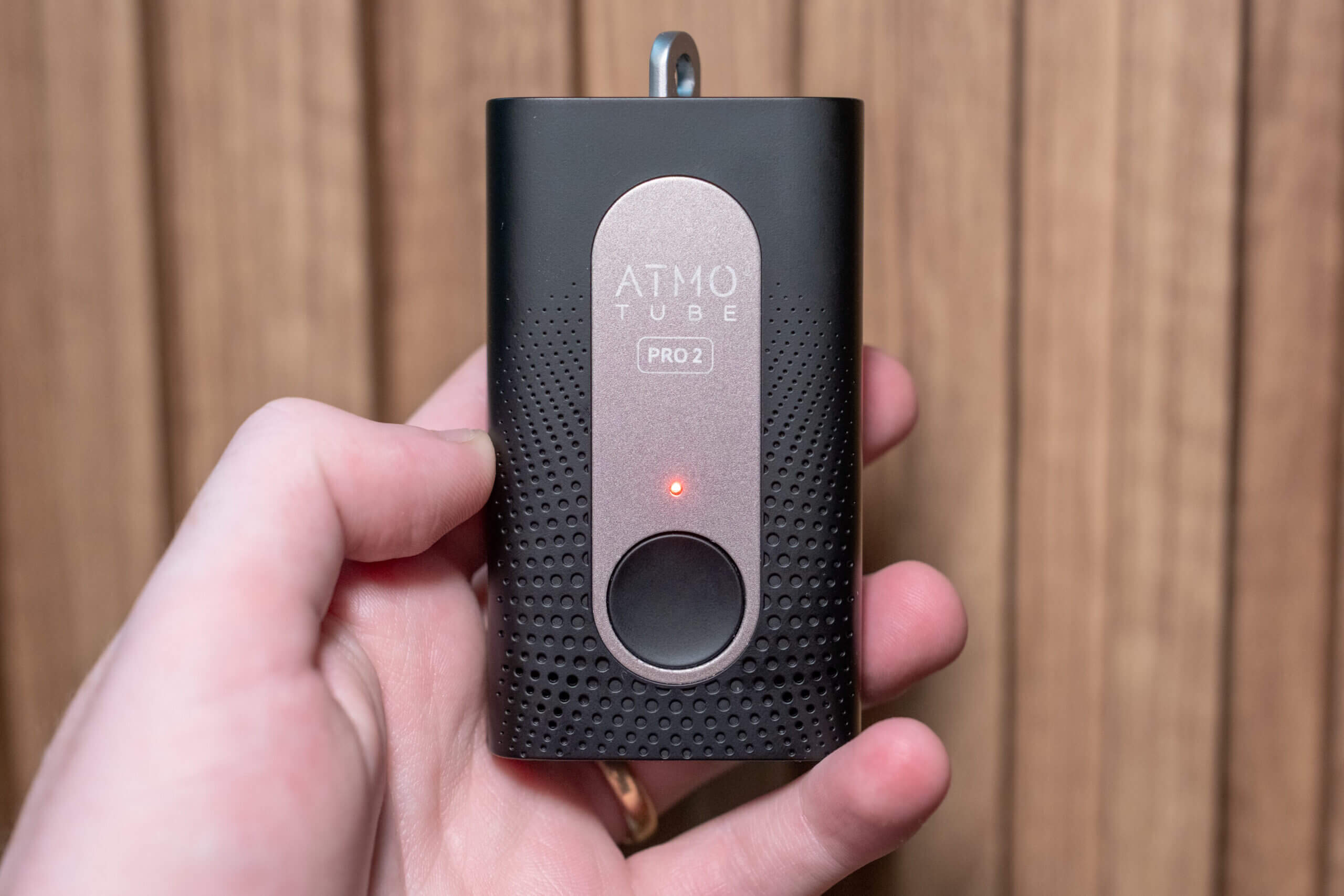
When it comes to the design of the Atmotube Pro 2, very little has changed from the original Atmotube Pro. In fact, if you handed me one of these monitors on its own and covered the label on the front, I wouldn’t be able to tell which version it was. There are a few minor differences in colour and weight (and, of course, the “Pro 2” label on the front), but aside from these small changes, the device is externally identical to its predecessor.
The device measures 86 × 50 × 22 mm, making it significantly smaller than any modern smartphone, albeit roughly twice as thick. While it’s not a device you’d want to keep in a pocket while actively taking measurements (although, for CO₂ this is probably fine), it is easily pocketable when needed and generally quite discreet.
Since the device needs exposure to ambient air to collect accurate measurements, it includes a rotating metal loop at the top. Also included is a carabiner that attaches to this loop, allowing the device to be mounted quickly and easily. Because the carabiner isn’t fixed, it can also be removed entirely if needed.
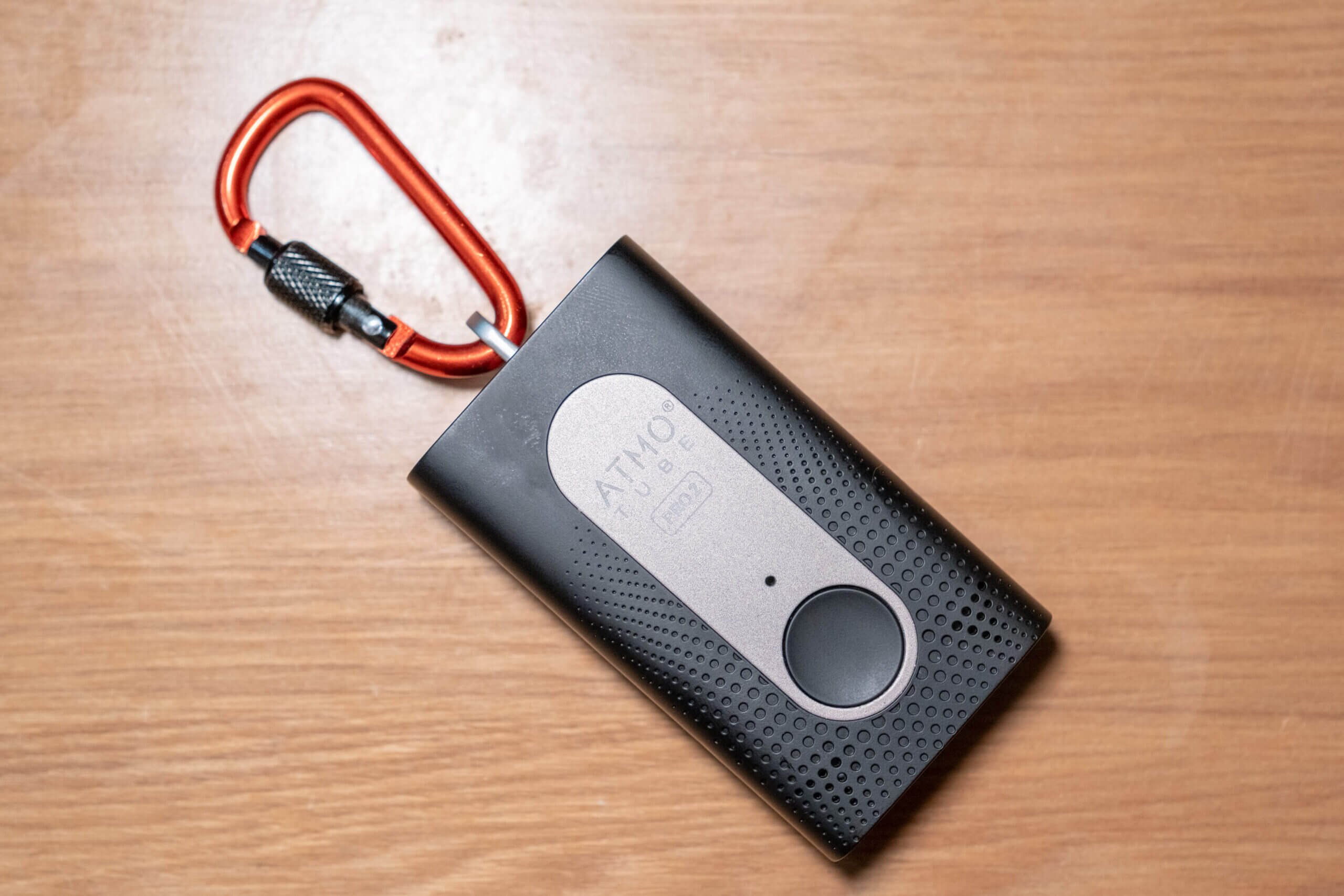
This mounting system makes it easy to attach the device to a range of items – backpacks, handbags, bikes, and more. Personally, I usually mount it on either my backpack or sling bag, depending on where I’m going. In both cases, the carabiner attaches neatly to the zippers themselves, as both bags have holes in the zipper pulls.
When my wife heads out, she’ll often take the device attached to her handbag. In all of these scenarios, the device is small and light enough (just under 100 grams) that the weight and size are barely noticeable – especially when mounted on a backpack. Since the device is primarily black, it’s also quite discreet, and I’ve rarely had anyone ask me about it. That can be both a positive and a negative. With other portable monitors (the AirBeam 3, for example) I was asked about the device far more often.
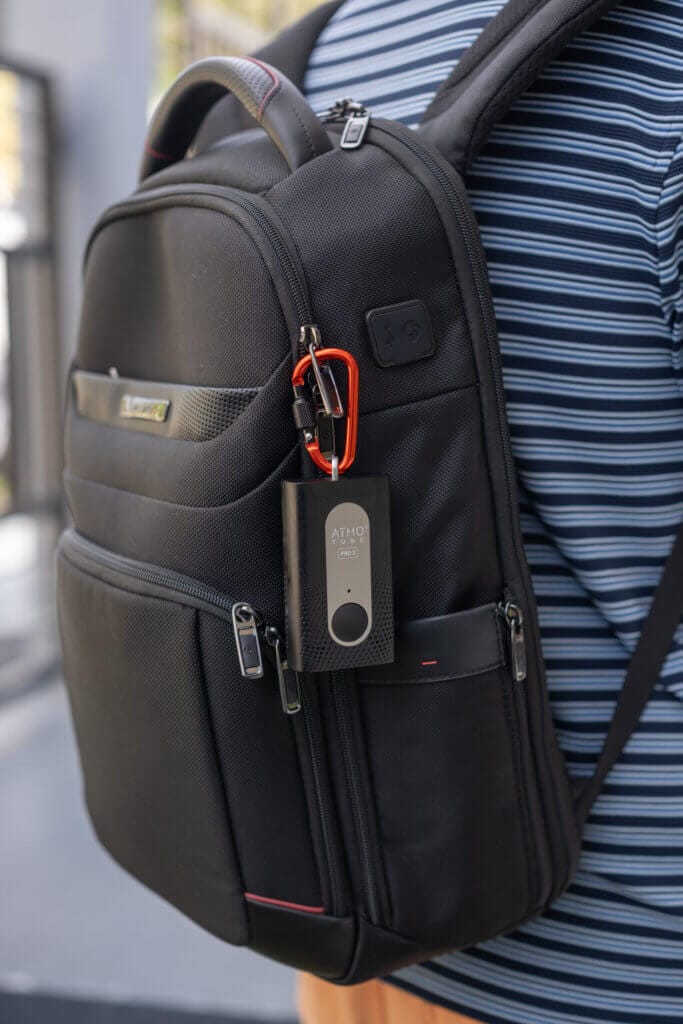
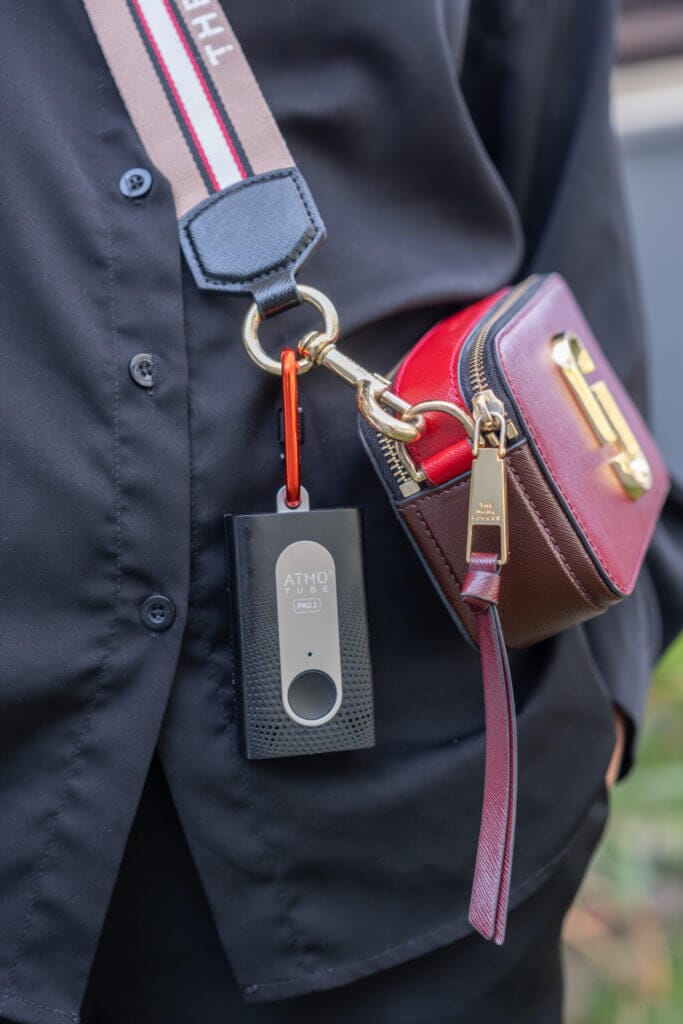
The carabiner also makes it easy to mount the device in other situations, though you may want to remove it when running (if using an armband), cycling (a phone mount that accommodates the width works well), or using the device in a car.
The Atmotube Pro 2 is primarily made from plastic, with the exception of the metal mounting point, but – much like the original Atmotube Pro – it feels solid and well built. While I still try to be careful when it’s attached to my bag (mainly to avoid knocking it against things), it’s durable enough to survive the occasional bump. That said, harder impacts can damage the sensors themselves, so it’s best to keep the device protected whenever possible.
Looking at the device more closely, you probably already have a good idea of what to expect based on photos alone. Still, there are a few details worth mentioning. On the front of the device is a single, fairly large button. It’s easy to press, even while wearing gloves (and you could probably manage it with mittens, too).
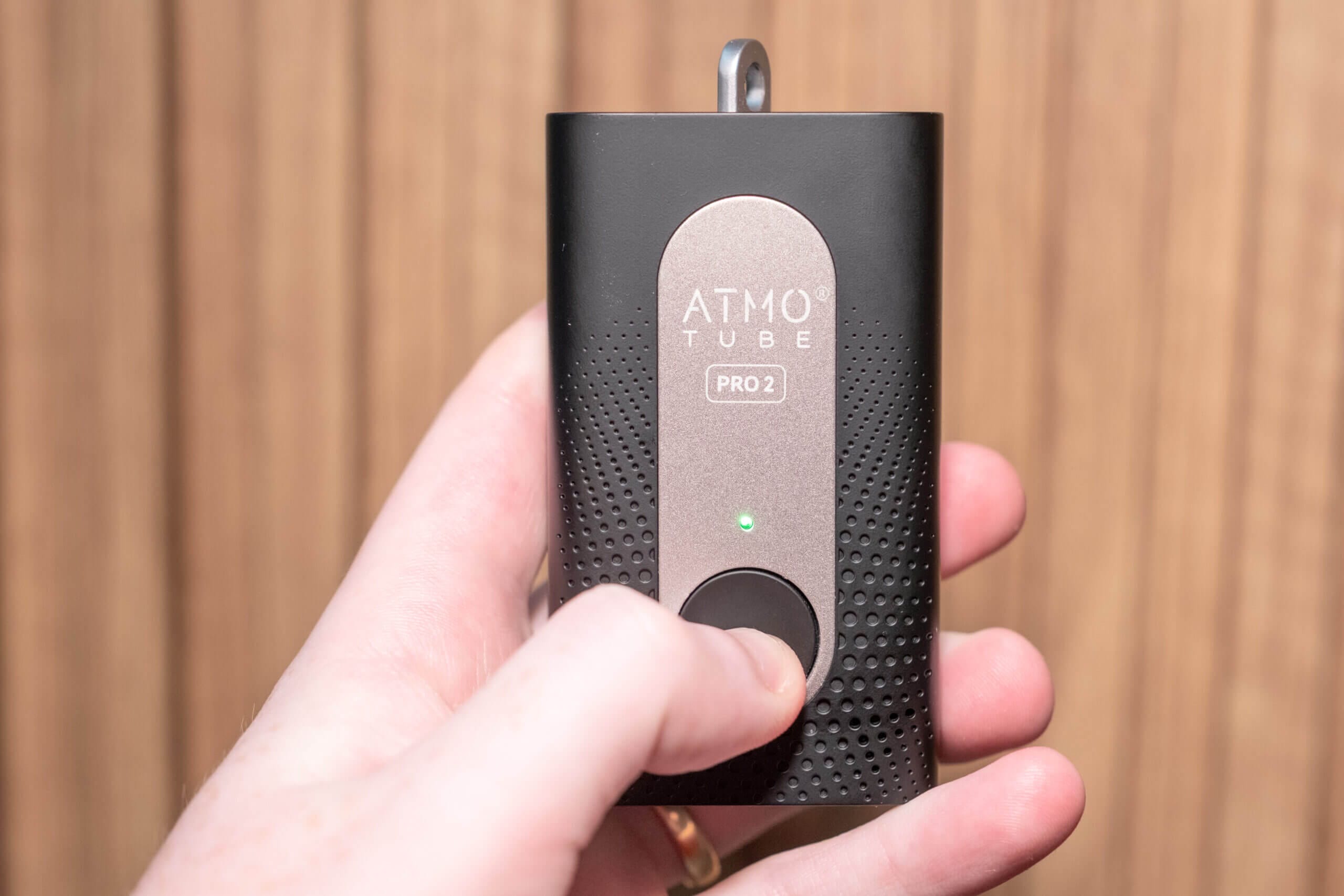
Pressing this button activates a small LED located directly above it, providing a quick indication of the current air quality. If the LED is blue or green, air quality is generally good. Once it turns yellow or red, it’s a sign that you may want to take steps to reduce your exposure. These colours align with Atmo’s own AQS scale by default, which we’ll look at in more detail in the App & Connectivity section later in the article.
Both the front and back of the device feature a mesh-like surface with multiple openings that allow ambient air to enter. These openings are essential for accurate measurements, but they also mean the device isn’t waterproof. While no air quality monitor is fully waterproof yet (though the Bosch BMV080 may eventually change that), some devices achieve a degree of weather resistance by placing their vents on the underside of the monitor. That’s not the case here.
On the bottom of the device is a USB Type-C port used for charging. Interestingly, Atmo also mentions on its website that this port could be used for external module expansion. It’s unclear whether the company has concrete plans for this, or if anything will ever be released that makes use of it, but the idea of future expandability is certainly intriguing.
Overall, the design of the Atmotube Pro 2 feels well suited to a portable air quality monitor. It’s small enough to carry without inconvenience, while still allowing space for a reasonably sized battery. The only real improvement I’d like to see in a future iteration is better weather resistance. Even if full sealing isn’t possible, there are design approaches that allow for water protection as long as the device remains in the correct orientation.
App & Connectivity
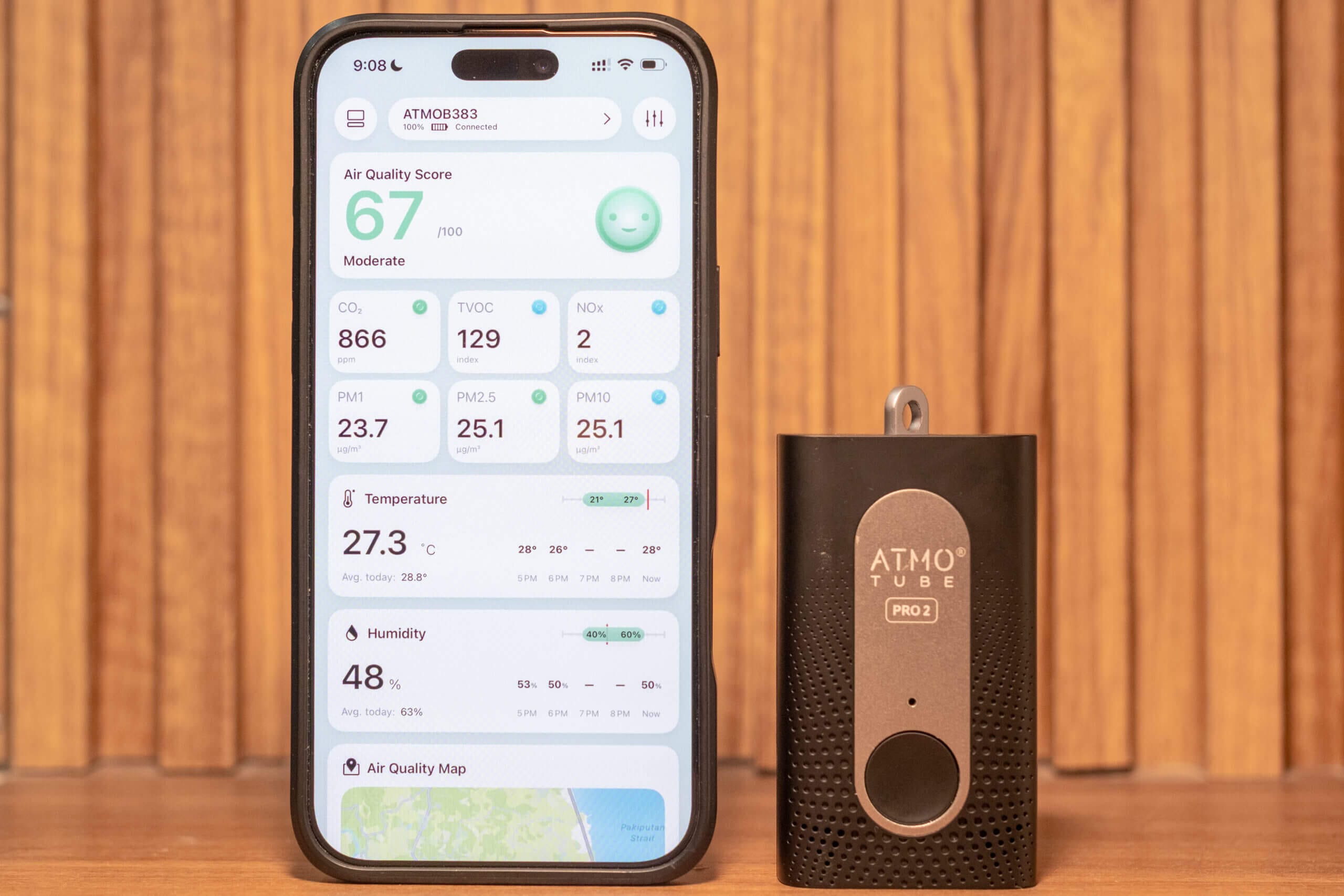
The Atmotube Pro 2 is a Bluetooth-based device that requires use of the accompanying app to get the most – well, really anything meaningful – out of the device. The good news is that it doesn’t need to be constantly connected, but you will need to download the app and keep it on your phone to use the device properly.
Interestingly, the Atmotube Pro 2 uses a new app (aptly named Atmo PRO2) instead of the original app used by the first Atmotube Pro. I’m not entirely sure why this change was made, but I assume it allows users to access data from both the original Atmotube Pro and the Pro 2 in one place. I would confirm this, but unfortunately my original Atmotube Pro recently died after three years of use. Either way, I’ll assume there’s a good reason for the change, and it’s not a major issue (especially since I’m now only using the Atmotube Pro 2). This is more of an FYI than a complaint.
Once you download the new app, pairing is straightforward. You’ll just want to keep the device near your phone so it can be detected. After pairing, the initial sync can take some time, depending on how long the device has been running without syncing. Since we’re already on the topic, let’s talk in more detail about syncing.
One major improvement over the original Atmotube Pro is internal storage. The Pro 2 has been upgraded from 256 KB to 16 MB, allowing it to store up to 45 days of data internally (according to Atmo). As always, this figure assumes relatively modest sampling intervals. If you’re logging data frequently, the effective storage window will be shorter. Still, this represents roughly a 4.5x increase over the original device, and in practice it means you only need to sync the device with your phone every few days (at high sampling rates) or even weekly.
However, what I have noticed is that, with this change (and the extra data this device provides) syncing can take quite a while – up to a minute – if you haven’t synced the device for a few days. While this is a minor inconvenience, I have encountered slightly frustrating syncing periods on a few occasions. Again, this is far from a deal-breaker, and I would prefer to have the extra storage and a longer syncing period than to not have it, but this is something to be aware of when you want to check the air quality in a pinch.
Another change that adds to the need for more storage is the addition of onboard GPS. Previously, if you wanted location data, you had to carry your phone with you, as the device relied on the phone’s GPS. With the Atmotube Pro 2, location data can now be recorded directly on the device and synced later via an internal GPS (but you can still use your phone’s GPS for improved battery life and accuracy). Combined with the expanded storage, this makes the Pro 2 a far better standalone device than the original. Anyway, back to the app itself.
The Atmotube Pro 2 can sometimes take a few minutes to get a GPS lock. If you struggle to get a lock-on with the device, lie it button-up outdoors for a few minutes before beginning your journey.
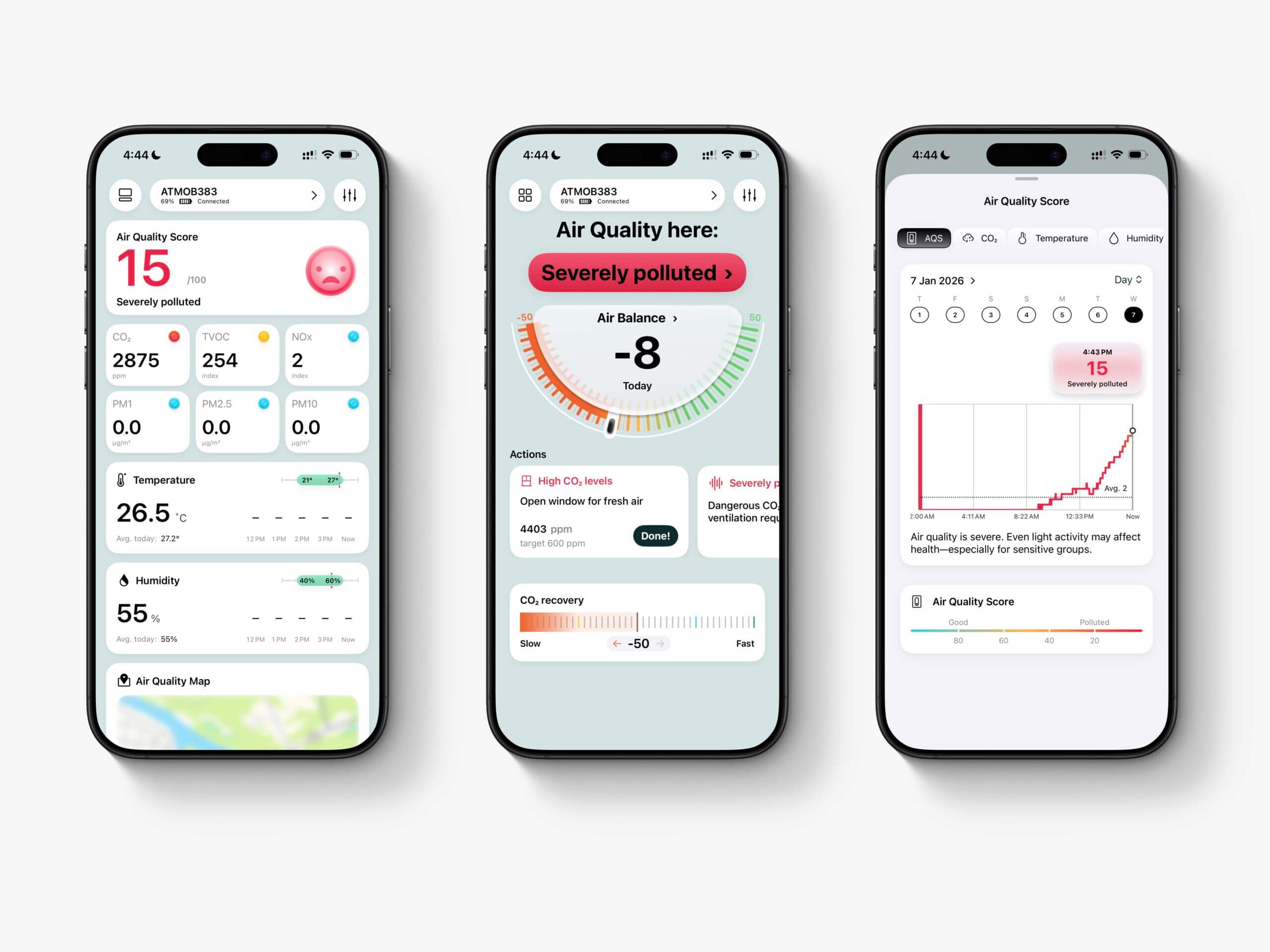
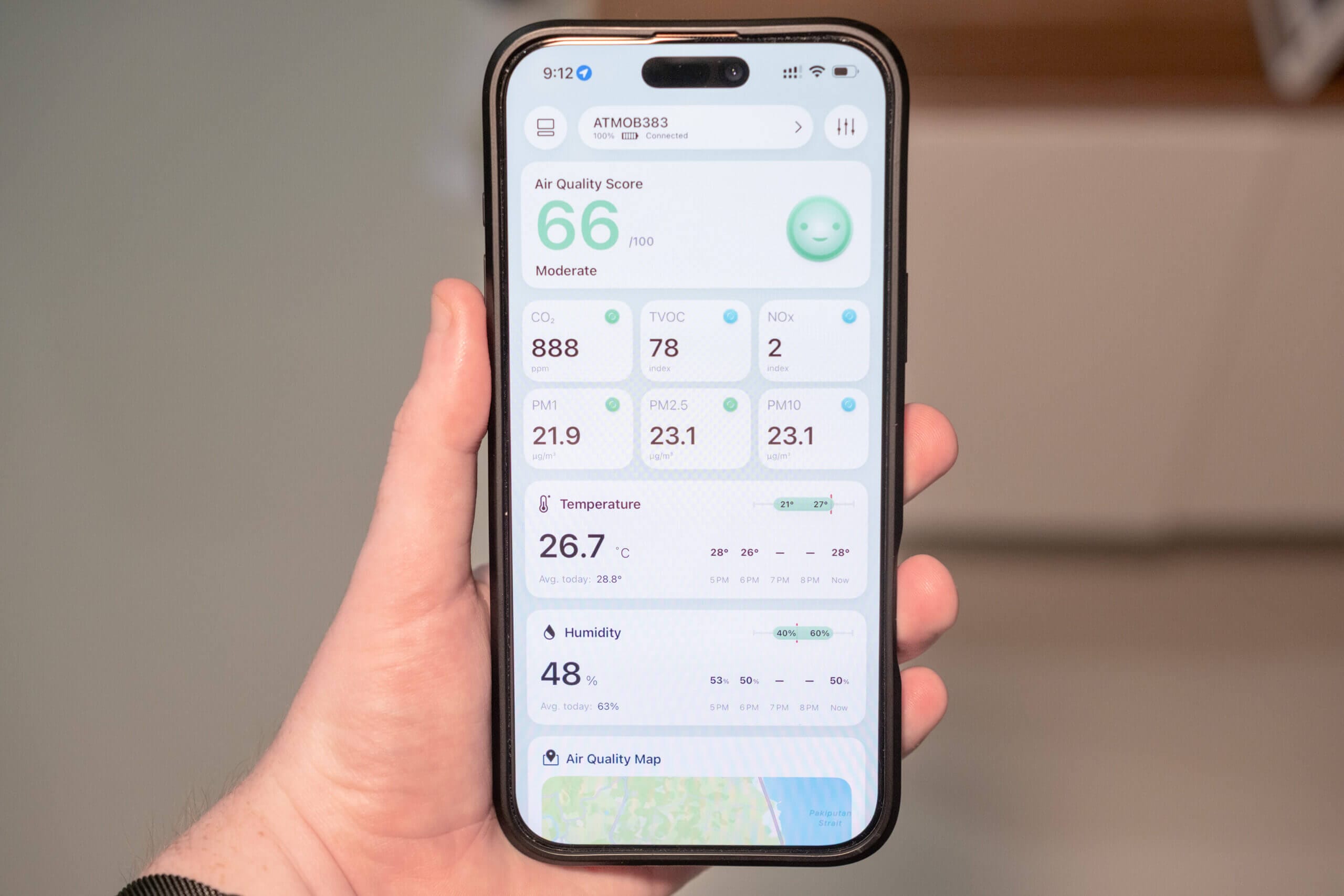
When you first open the app, you will come to a home screen that uses a card-style layout that displays readings from each sensor. Each card also includes a coloured status indicator (blue through red) to show whether levels are considered good or poor. At the top of the screen is an overall Air Quality Score and this is something I have mixed feelings about.
The Air Quality Score uses a 0-100 scale, where 100 represents “perfect” air quality and 0 represents extremely poor conditions. While I understand that this may be intuitive for users unfamiliar with air quality, most established AQI systems use higher numbers to represent worse air quality – and these conventions are now fairly universal. For anyone already familiar with AQI, the 0-100 approach feels a bit counterintuitive.
Another reason I’m not a big fan of proprietary AQIs (or AQSs) is that they often don’t align with official guidelines. For example, according to the U.S. EPA, PM2.5 is considered “good” up to 9 µg/m³. The WHO sets even stricter limits: 5 µg/m³ for long-term exposure and 15 µg/m³ as a 24-hour average. Both differ significantly from Atmo’s “good” thresholds.
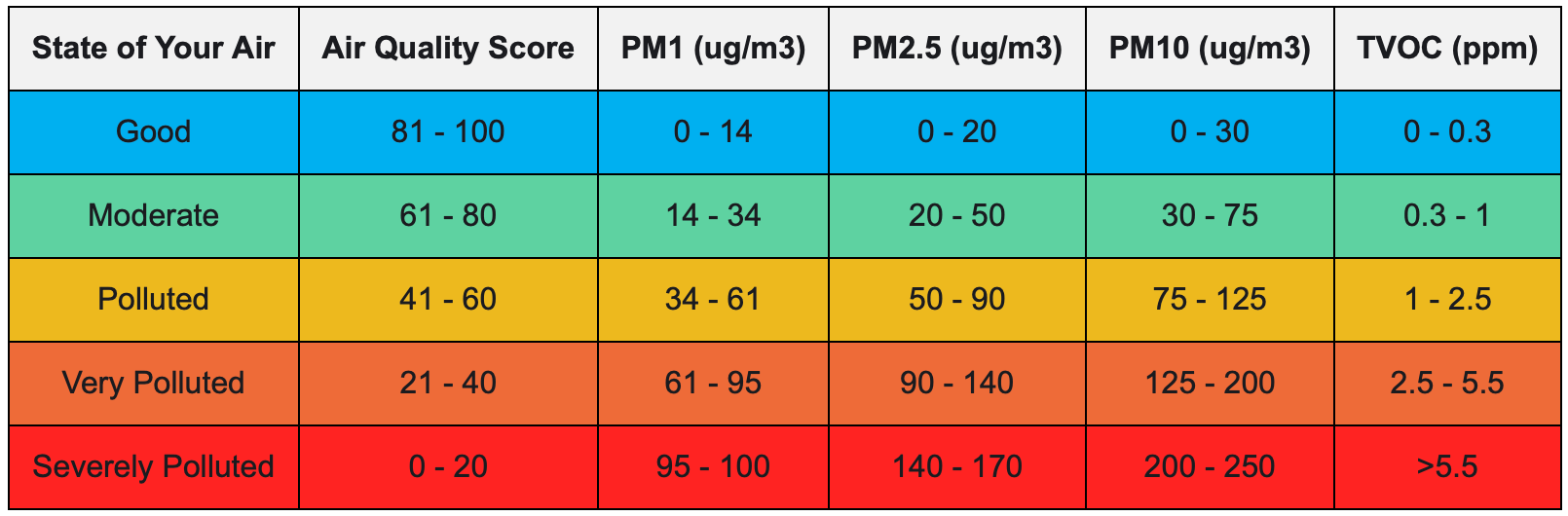
The same issue applies to carbon dioxide. In the app, CO₂ is only considered “good” at 400-600 ppm. While there are no official low-concentration CO₂ guidelines, I personally consider anything up to 800 ppm acceptable, as I don’t usually take action until concentrations exceed that level.
Perhaps I’m dwelling too much on this, and the 0-100 scale is genuinely better for users unfamiliar with air quality. That said, one thing the air quality space desperately needs is consistency. Even if the scale itself stays the same, I’d love to see thresholds aligned with official guidelines – at least for pollutants like PM, where those guidelines clearly exist.
Before moving on, I do want to commend Atmo for making the algorithm behind the AQS public and transparent. If you’re interested in taking a look at the code, you can find it here. Currently, the code is only for the AQS on the first device (it hasn’t been updated to include CO₂), but since Atmo makes its thresholds public, I don’t see this as a big issue. Anyway, now that I’ve sidetracked enough – back to the app!
Below the overall Air Quality Score, you’ll find individual readings for each sensor. In order, these include CO₂, TVOC, NOx, PM1, PM2.5, PM10, temperature, humidity, an air quality map (using GPS data), and air pressure. The layout is intuitive, and tapping on any parameter opens a graph view showing historical data.
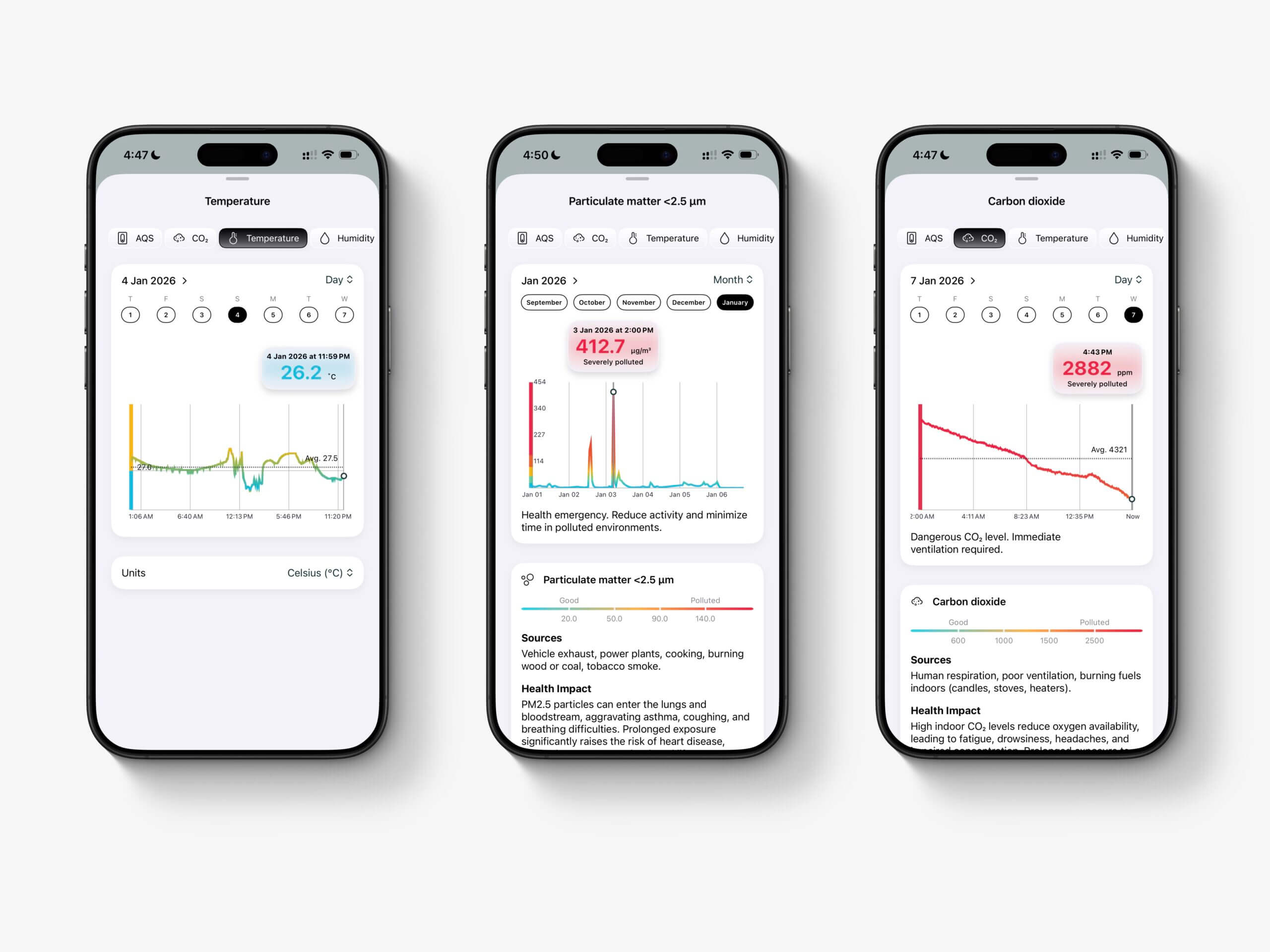
Overall, I like the graphs quite a bit. You can easily switch between metrics, select different time ranges (day, week, month, and even year), and scrub through the graph to see exact values at specific times. Below each graph is a short explainer about the pollutant and a scale – again using Atmo’s AQS thresholds.
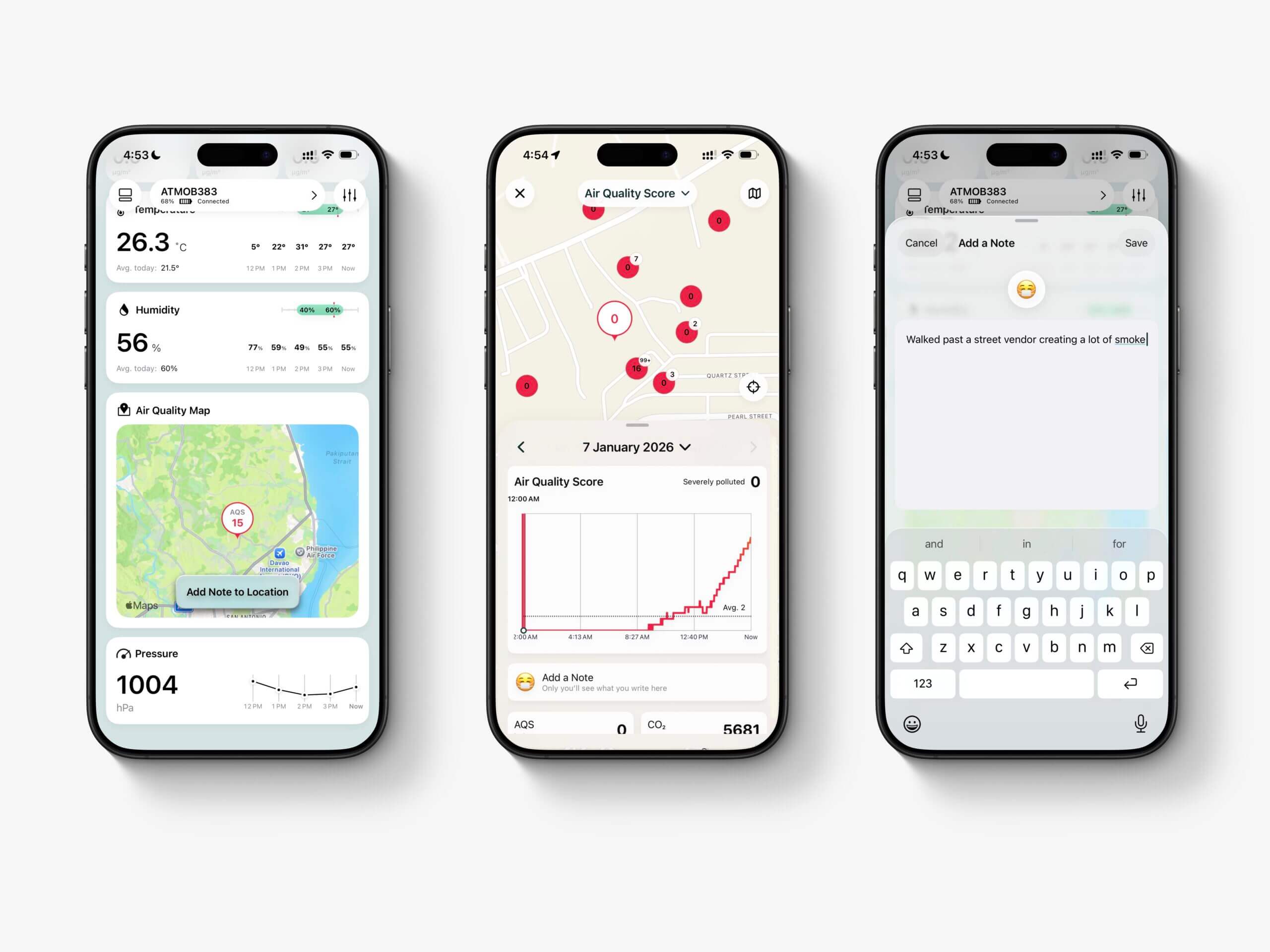
Back on the home screen, tapping the map near the bottom shows your current location along with the Air Quality Score. If you tap “Add Note to Location,” you can attach contextual notes to specific places. For example, if I walk past a street vendor grilling food, I can add a note to explain the PM spike the device records at that point. Over time, this builds into a personal air quality map, which can be genuinely useful for choosing cleaner commuting or exercise routes.
Worth noting is that there’s also a global air quality map you can opt into, allowing your data to be shared publicly on a map run by Atmo. I was pleasantly surprised by how much data Atmo users have collected, and there’s a lot to explore on the map. It also seems that the map is reset frequently, ensuring that data there is relatively up-to-date. However, it is worth noting that data submitted by Atmotube devices to the Atmo map won’t be as useful as a map with only static monitors (like PurpleAir), as those monitors are constantly recording information whereas each Atmotube will likely only submit one data point to a given location before the user moves on.
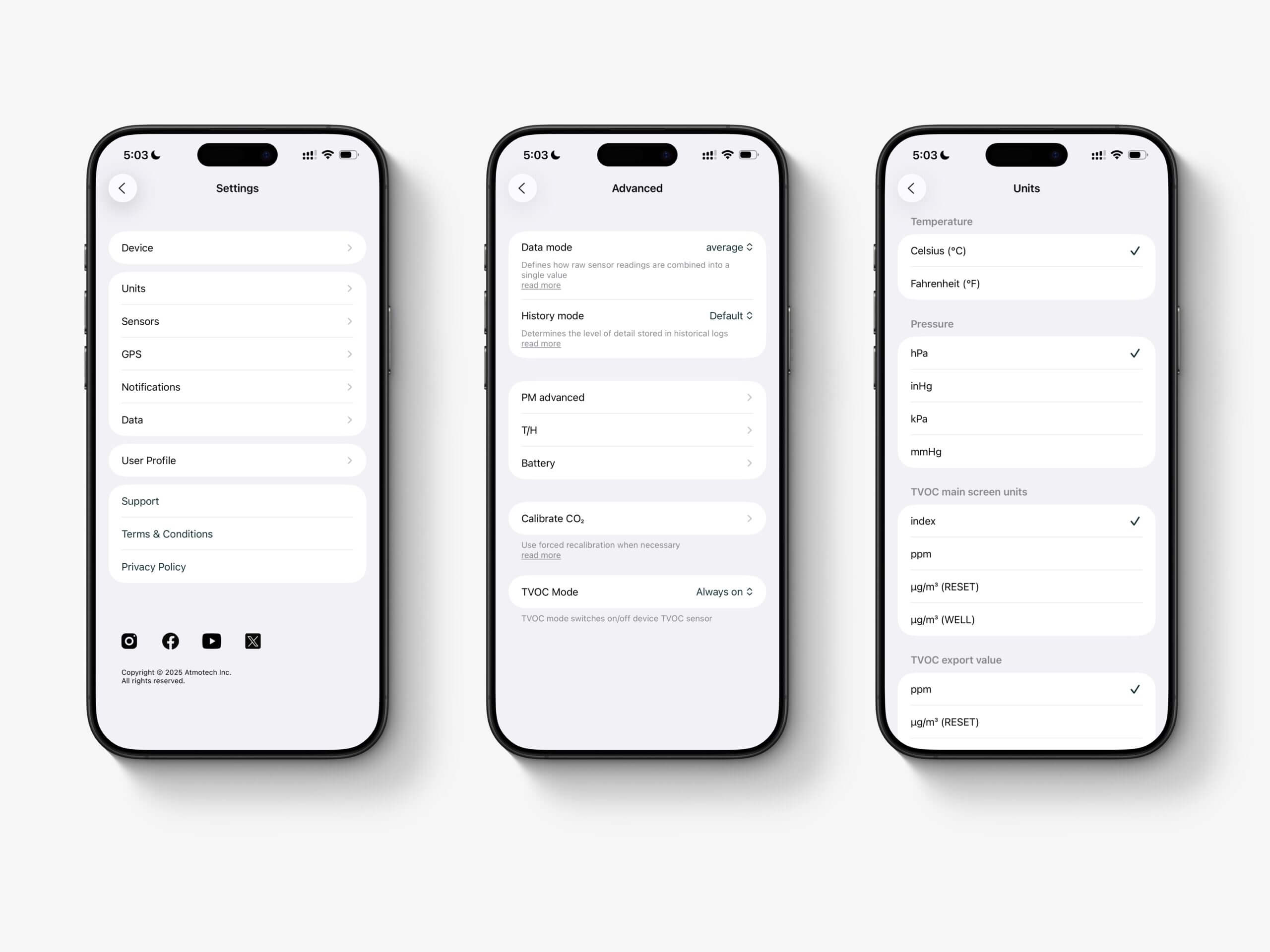
The final tab worth discussing in the app is ‘Settings’, which offers a good amount of customization. First, you can configure what the physical button on the device displays – options include AQS, CO₂, TVOC, NOx, and PM (presumably PM2.5, though it’s not entirely clear). From this screen, you can also unpair or power off the device.
The Units screen allows you to change temperature, air pressure, and TVOC units. You can switch TVOC readings from the Sensirion index to ppm here, but I wouldn’t recommend doing so unless you’re fully aware of the limitations of low-cost VOC sensors, for reasons I explain here. Now we get to the more “enthusiast-level” settings – in other words, my favourite part.
Under Sensors, you can adjust the PM measurement interval anywhere from once per second to once every 15 minutes. I absolutely love this flexibility. At home, a five-minute interval is more than enough. When running, cycling, or commuting, one-second measurements are fantastic. This screen also shows estimated battery life.
With my device fully charged, I was able to get the below battery life estimates. While the PM reading frequency does significantly impact battery life, the GPS puts much more strain on the battery and I wasn’t able to find any configuration that gave more than three days of battery life with it enabled. It is worth noting that you can disable the internal GPS and still get location data as long as you have your phone with you.
| Configuration | Estimated Battery Life |
|---|---|
| GPS on + Continuous PM | 1 day, 3 hours |
| GPS on + On-demand PM | 3 days, 10 hours |
| GPS on + 5-min PM | 2 days, 17 hours |
| GPS on + 10-min PM | 3 days |
| GPS on + 15-min PM | 3 days, 3 hours |
| GPS off + Continuous PM | 1 day, 12 hours |
| GPS off + On-demand PM | 11 days, 23 hours |
| GPS off + 5-min PM | 6 days, 6 hours |
| GPS off + 10-min PM | 8 days, 5 hours |
| GPS off + 15-min PM | 9 days, 4 hours |
Tapping Advanced under the Sensors menu brings you to what is arguably the most powerful part of the app. Here, you can enable different data modes (average, median, min, max), extend PM and GPS history (at the cost of storage), and configure individual sensor behaviours. For example, you can trigger the SPS30’s built-in cleaning function, set sensors to activate only when the button is pressed, and more.
Most importantly, this menu allows you to apply custom offsets to temperature and humidity readings and to calibrate the CO₂ sensor. These are extremely useful features, and I’m glad Atmo has made them accessible – many manufacturers simply don’t.
Back in Settings, there are a few other screens worth noting. The Notifications screen lets you enable preset alerts or create fully custom ones. This is a feature I really like. You can set alerts for when any pollutant – or even temperature, humidity, or air pressure – crosses a threshold of your choosing. Oddly, there’s currently no way to set notifications based on PM concentrations, which I hope is just an oversight and gets fixed in a future update. Once PM alerts are added, this will be an excellent notification system.
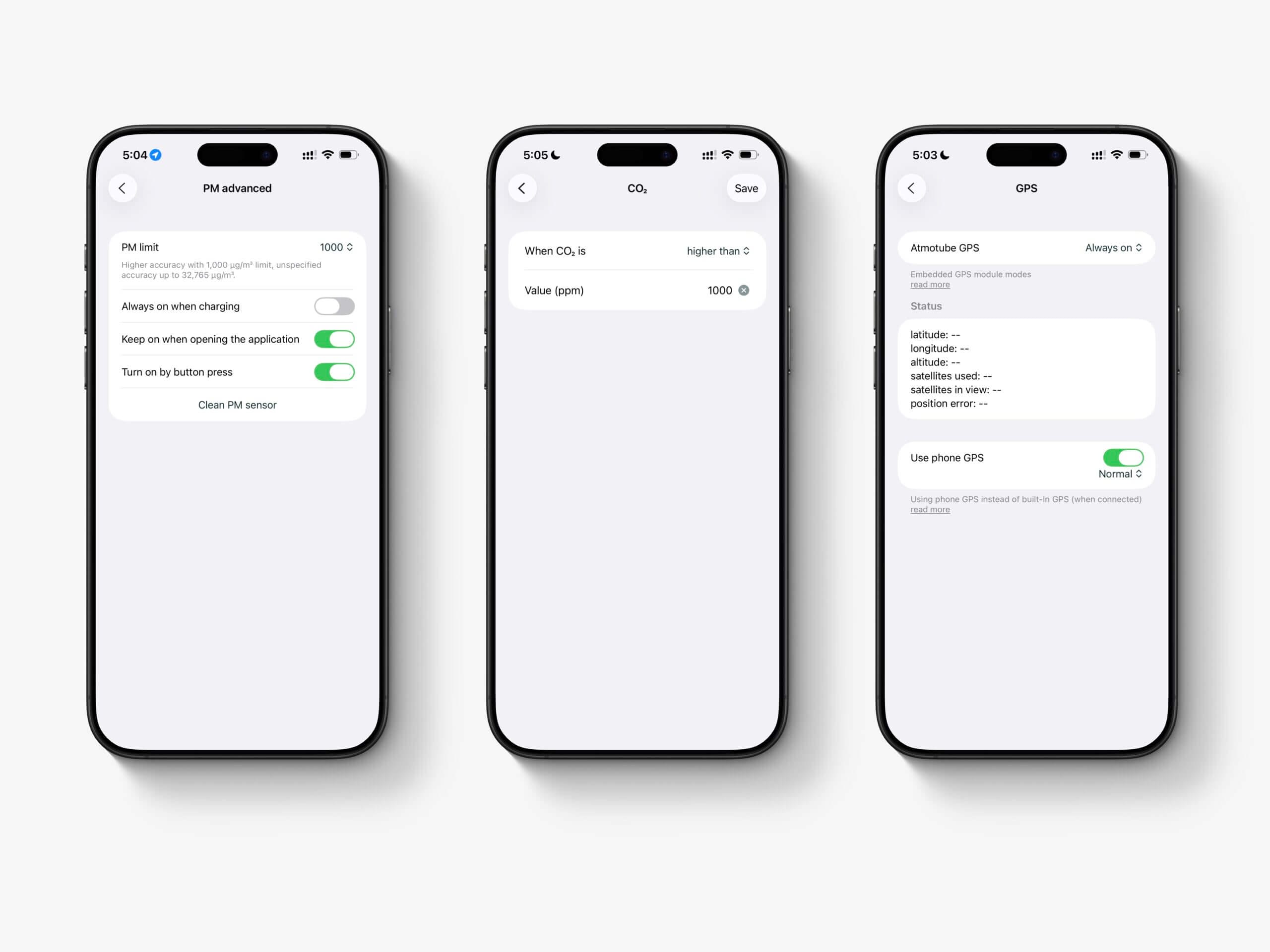
Finally, the app allows you to export data or wipe the device. Data exports happen directly on-device, and you can choose a specific date range to export as a CSV file. Exported data is at one-minute resolution, which strikes a nice balance between file size and detail.
Overall, I’m quite happy with the Atmo PRO2 app. The main issue I’ve encountered is occasional connection problems, where the app fails to sync until I force-quit and reopen it. As far as I can remember, this wasn’t as much of an issue with the original Atmotube Pro, and I suspect it may be related to more aggressive battery-saving behaviour on the Pro 2. Either way, a force quit reliably fixes the issue.
Pricing & competition
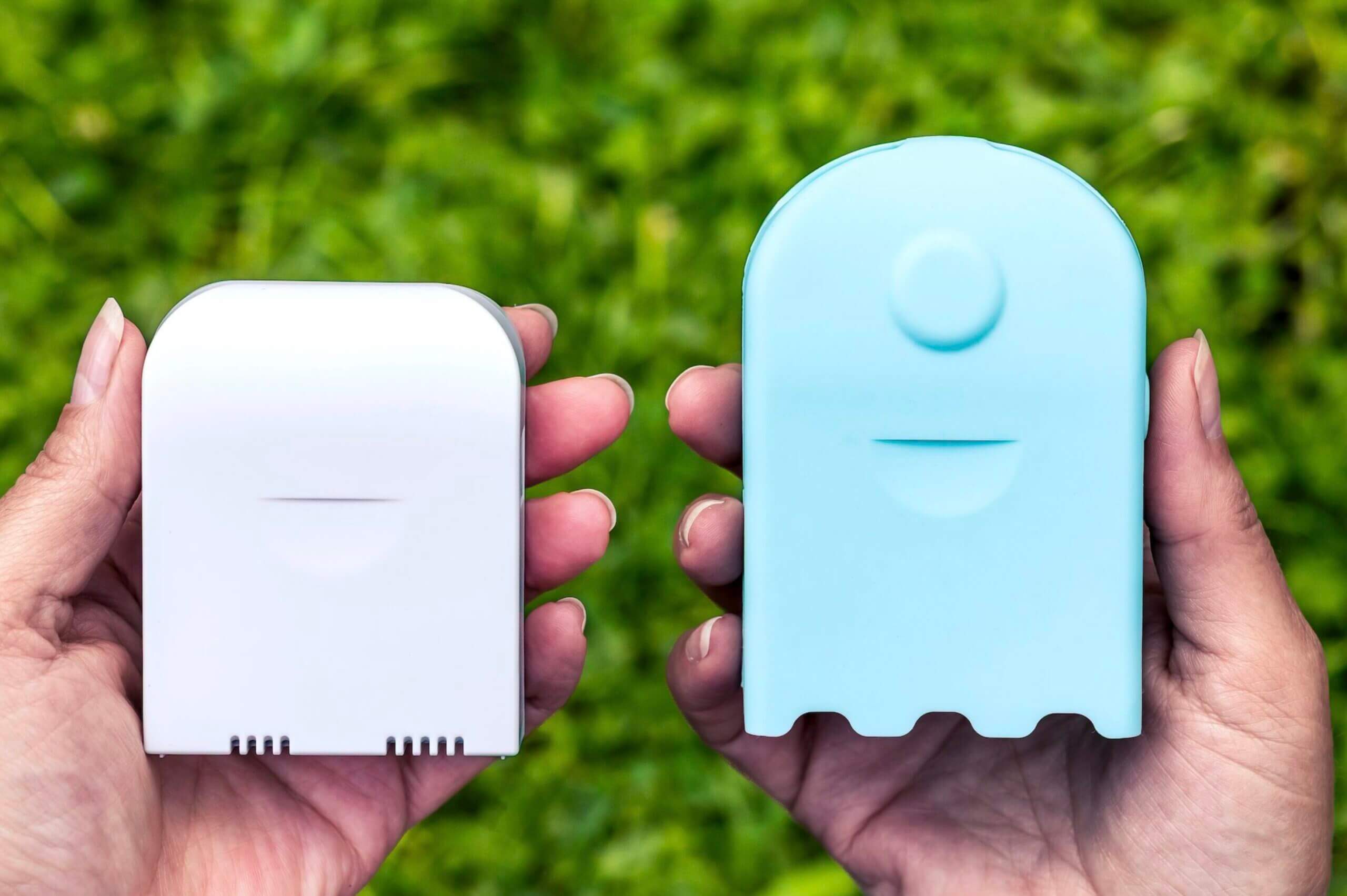
The AirBeam Mini and AirBeam 3 are two alternatives to the Atmotube Pro 2.
The one major disadvantage of the Atmotube Pro 2 compared to the original device is its price. Where the original Atmotube Pro retailed for $150 when I first reviewed it (and now sells for around $189), the Atmotube Pro 2 starts at $250. While there are a number of meaningful improvements over the original, this is still a significant price increase, and it won’t be easy to justify for everyone.
That said, it’s difficult to judge the device entirely in isolation. Looking at how the Atmotube Pro 2 compares to its closest competitors helps put that price into better context – and shows whether it’s actually expensive, or just feels that way. At the moment, there are relatively few fully portable air quality monitors on the market, so I’ve chosen a small group that I think offers the most comparable feature sets.
Perhaps the most directly comparable device is the AirBeam 3. This is a portable, weatherproof monitor designed primarily for outdoor use, and it measures particulate matter only. While it lacks additional sensors, it does include onboard GPS, 4G cellular connectivity, and an internal SD card for long-term data storage. The AirBeam 3 is priced at around $199 and uses a well-studied, accurate particulate sensor.
Compared to the AirBeam 3, the Atmotube Pro 2 offers better battery life, a wider range of measured parameters, and (in my opinion) a more refined and flexible app experience. On the other hand, the AirBeam 3 is cheaper, weatherproof, and benefits from cellular connectivity, which makes it well suited for unattended outdoor monitoring. It’s a tough comparison because both devices are genuinely good – the real deciding factor is whether you want a PM-only device or something that measures a broader set of pollutants.
Looking at the AirBeam Mini, which typically sells for around $99, the comparison is a bit more straightforward. The Atmotube Pro 2 offers additional sensors, onboard GPS, Bluetooth connectivity, internal storage, and a much more capable app. That said, these devices sit in completely different price brackets, so it’s reasonable that the Atmotube offers more. If all you need is a simple PM-only monitor and you don’t care about on-the-go connectivity or expanded data features, the AirBeam Mini remains a solid and affordable option.
Finally, there’s the question of the original Atmotube Pro – assuming you can still find one for sale. Which should you choose? Honestly, it largely comes down to the same question as before: do you mostly care about PM measurements, or do you also want to measure carbon dioxide? If you plan to pair the original Atmotube Pro with a dedicated CO₂ monitor, the combined cost quickly approaches that of the Atmotube Pro 2. That’s an important consideration, and one that makes the Pro 2 look much more reasonable from a pricing perspective.
Support & Warranty
Atmo offers a one-year warranty with all of its hardware and this includes the Atmotube Pro 2. The warranty itself is also pretty standard, covering manufacturing defects but not issues or damage that may be caused by the user. This is pretty standard – not just in the field of air quality monitors – but in all fields.
With that said, there is one interesting thing I found on the warranty page:
The warranty also covers: subject to the exclusions contained below, company warrants the embedded battery against defects in materials and workmanship, under the normal consumer use, for a period of 8 months.
I find it quite odd that the battery specifically has a separate, shorter warranty than the rest of the hardware and this concerns me – especially as I know that battery failures are a common issue in Atmotubes. To me, this specific clause points to the fact that battery issues are common and still an issue. I can’t really comment any further than that (as my original Atmotube Pro lasted around three years until the battery failed), but it is something to be aware of.
To keep these reviews as fair and consistent as possible, I test support by contacting the company from an anonymous, non-BreatheSafeAir email address and asking a few straightforward questions about the device. This gives a general idea of responsiveness and clarity, but it is only a snapshot.
Support quality can vary based on timing, workload, who answers the ticket, and the nature of your issue. My experience may not reflect yours, so please treat this section as a reference point rather than a guarantee.
If you ever notice something incorrect or outdated in this section, please reach out so I can update it.
As for the customer support itself, I was impressed with how quickly the Atmo team responded to every question I had (from an anonymous email address). I’m not kidding – three times I reached out and had a response within one hour. The responses were helpful, and answered my questions. Of course, your experiences may differ and timezones likely play a role here, but I was left very impressed by the customer support experience.
Conclusion
After spending several weeks using the Atmotube Pro 2 and taking it everywhere with me, I believe it’s the most well-rounded portable air quality monitor currently available. I was already a big fan of the original Atmotube Pro, which had earned a strong reputation as a reliable and well-validated PM monitor despite a few clear limitations. The Pro 2 builds directly on that foundation and meaningfully improves on it in almost every area that matters – from sensor coverage and storage to standalone capability and overall flexibility.
That doesn’t mean the device is flawless. I’ve run into the occasional Bluetooth hiccup where the app refuses to connect until it’s force-quit, syncing can take longer than I’d like if I leave it for several days, and the onboard GPS can be a bit temperamental at times. The CO₂ sensor, while impressive given its size and power consumption, also has a few kinks that I hope get ironed out. Still, none of these issues are deal-breakers, and most are trade-offs that come with packing this many features into such a small, portable device.
What really stands out to me is how the Pro 2 has changed the way I personally monitor air quality. For the first time, I’m able to rely on a single device to cover both outdoor particulate exposure and indoor ventilation quality – something that previously required carrying two separate monitors. That alone has made it easier for me to collect more consistent data and actually use it in day-to-day decisions, rather than leaving one device behind out of convenience.
The Atmotube Pro 2 isn’t a perfect device and there are a few improvements that I hope can be made with software and firmware updates. With that said, I believe it is a significant improvement over Atmotube Pro, and it regains its position as the best consumer-grade portable air quality monitor on the market.
If you’ve tried the Atmotube Pro 2 yourself, I’d love to hear about your experience – feel free to share your thoughts in the comments below. And if you’re still on the fence or have any questions that I didn’t cover here, don’t hesitate to ask. Thanks so much for taking the time to read this review, and I hope it helped you decide whether this device is the right fit for you.
- Measures both PM and CO₂ in a portable form factor
- Well-validated PM performance using a proven particulate sensor
- Built-in GPS allows fully standalone outdoor measurements
- Large internal storage enables days or weeks of logging without syncing
- Highly flexible app with advanced settings, offsets, and data export
- Small, lightweight, and easy to carry or mount on bags and bikes
- Can realistically replace two separate monitors for many users
- More expensive than the original model and some competitors
- Occasional Bluetooth connection issues and slow syncing
- CO₂ sensor is less accurate than traditional NDIR or photoacoustic sensors
- GPS can be inconsistent, especially during short or indoor sessions
- Not weatherproof, limiting use in rain or very humid conditions
- Proprietary air quality scoring and thresholds may confuse experienced users
- Somewhat vague warranty that indicates potential battery issues
Atmotube Pro 2 FAQ
Does the Atmotube Pro 2 measure both indoor and outdoor air quality?
Yes. It’s designed to work in both environments, measuring particulate matter outdoors and CO₂ indoors, making it suitable for commuting, travel, and daily use. However, please note that the device is not weather-proof and shouldn’t be used in the rain.
How accurate is the particulate matter (PM) sensor?
The device uses a well-established PM sensor that has been widely validated in third-party studies and performs particularly well for PM1 and PM2.5 measurements.
Is the CO₂ sensor as accurate as dedicated CO₂ monitors?
Not quite. While it’s impressive for its size and power consumption, it’s less accurate than traditional NDIR or photoacoustic CO₂ sensors. It’s best used for trends rather than precise measurements.
Can the Atmotube Pro 2 work without being constantly connected to a phone?
Yes. Thanks to onboard storage and built-in GPS, the device can log data independently and sync it later through the app.
Is the device weatherproof?
No. Like most portable air quality monitors, it isn’t waterproof, so care is needed when using it in rain or very humid conditions.
Who is the Atmotube Pro 2 best suited for?
It’s ideal for users who want a single, portable device to track both PM and CO₂, especially those who would otherwise carry separate indoor and outdoor monitors.


