
I’ve been reviewing air quality monitors on this site for a few years now, and one thing that still frustrates me is how most mainstream publications (and even smaller scale sites) cover them. The typical review treats an air quality monitor the way you’d treat a pair of wireless earbuds: unbox it, connect it to the app, note the features, take some photos, and write it up. Accuracy barely gets a mention. For a device whose whole job is to tell you what’s in the air you’re breathing, that’s a pretty significant omission.
So when WIRED named the Govee Air Quality Monitor (model H5106) their pick for the best budget PM2.5 monitor, I had two reactions. One was skepticism, for the reasons above. The other was curiosity, because I’d never heard of Govee making an air quality monitor before, and at $34.99, the price alone raised a lot of questions. Air quality monitors have been getting more affordable over time, but this felt like a different level. If a $35 device could actually be accurate, that would be worth knowing about. I bought one to find out for myself.
Govee, as it turns out, is primarily an IoT company, making smart lighting, door sensors and that kind of thing. Air quality monitoring isn’t really their core business, but they have a lot of experience with connected devices. Coincidentally, I’d also recently moved and had been in the process of setting up a smart home, so I could see why a device like this would fit into their lineup. But what I really care about was whether this monitor can actually do its job.
A few months have now passed, and a the time of writing, I’ve had the H5106 for about five months. For roughly three of those months, it’s been sitting in my office next to the AirGradient ONE and the PurpleAir Zen, two monitors I trust and am able to use a baselines to compare against. Perhaps needless to say, I came in with real doubts. However, what I found was more interesting than I anticipated, and that’s what this review is about. Let’s dive in!

I independently review air quality monitors with a focus on accuracy. I’ve tested well over 50 devices, compared some of them against reference instruments, and rely on peer-reviewed research and third-party studies wherever possible.
I don’t accept sponsored posts or paid reviews, and I don’t run ads on BreatheSafeAir. When I receive a free product, the company has no say in what I write. Affiliate links don’t influence my views and never increase the price you pay.
I’m constantly learning about how these sensors work – from opening them up, discussing with researchers in the field and examining the hardware inside. That ongoing learning process helps me write reviews that are grounded in how the technology actually behaves, not just what the spec sheet says.
You can read my full Disclaimers & Ethics page for complete details. And as with any review, even mine, I always encourage checking multiple independent sources before making a decision.
This post contains affiliate links. For more information, please refer to my affiliate disclaimer. I was NOT sent a product for review; I purchased this product myself. All opinions expressed in this post are my honest thoughts. I only recommend products that I believe in.
Informational Purposes: Information on this blog is for informational purposes only. Readers are encouraged to confirm the information herein with other sources. This website assumes no responsibility for the accuracy of the information, which is subject to change without notice. Products mentioned on this website are not medical devices and do not guarantee protection.
If you notice any errors or inconsistencies in this article, please contact me so I can update the information accordingly.
Accuracy & Sensor
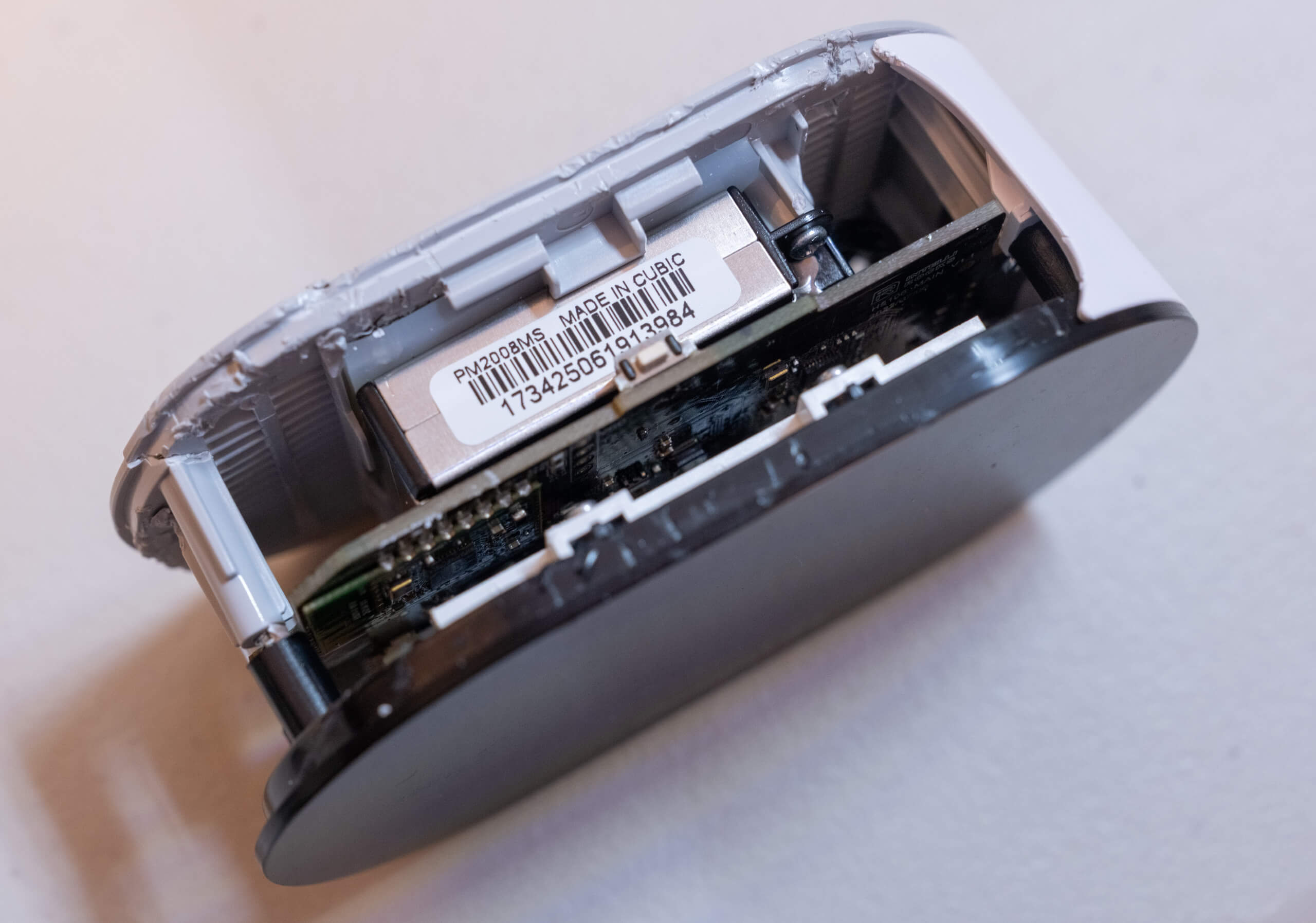
The Govee Air Quality Monitor uses the Cubic PM2008MS as its PM sensor, which was a pleasant surprise when I found out. Cubic is a known and reasonably well-regarded sensor manufacturer, and seeing one of their components inside a $35 device is not something I expected. As with most low-cost optical sensors, the PM2008MS is technically capable of measuring PM1 and PM10 alongside PM2.5, but Govee has chosen to display only PM2.5. PM10 readings from sensors like this are generally unreliable since the concentration is estimated rather than directly measured, and PM1 faces similar limitations. For this reason, showing only PM2.5 is a good call.
The stated accuracy specification for the PM2008MS is ±5 µg/m³ up to 35 µg/m³, and then ±15% of the reading up to 500 µg/m³. That’s actually a better spec at lower concentrations than what you get from some significantly more expensive devices. The Airthings View Plus, for example, uses the Cubic PM2105L, and the PM2008MS outperforms it on paper (±5 µg/m³ vs ±10 µg/m³) at the low concentrations that matter most for typical indoor use. This is particularly notable, given the View Plus retails for around $300.
Of course, specifications only tell you so much. So I ran my own comparison, placing the Govee Air Quality Monitor alongside a factory-calibrated AirGradient ONE for around a month. I want to be upfront about the limitations here: this isn’t a scientific test, and I don’t have access to a reference-grade instrument. What I do have is a well-understood sensor to compare against. The AirGradient ONE uses the Plantower PMS5003, a sensor with a well-documented performance record and a body of independent research behind it. My unit was also factory-calibrated and only a couple of months old.
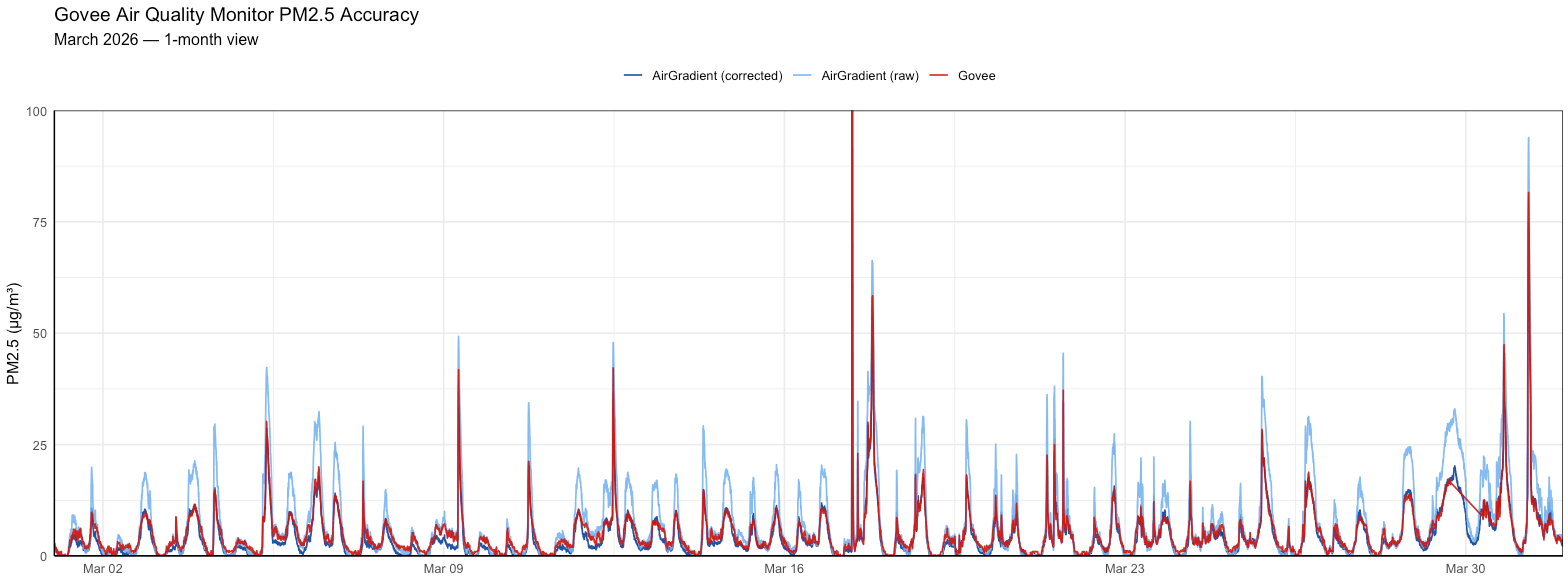
The results over my month of testing were genuinely quite impressive. At the mostly low PM concentrations typical of my office environment, the two devices tracked each other extremely closely. So closely, in fact, that before I opened up the Govee to check, I had convinced myself it must be using the same sensor. It isn’t, but the similarity in readings is striking. Anecdotally, every time I glanced at both monitors (and the PurpleAir dashboard) throughout this month of side-by-side testing, they were within 2-3 µg/m³ of each other, and often reading the exact same value.
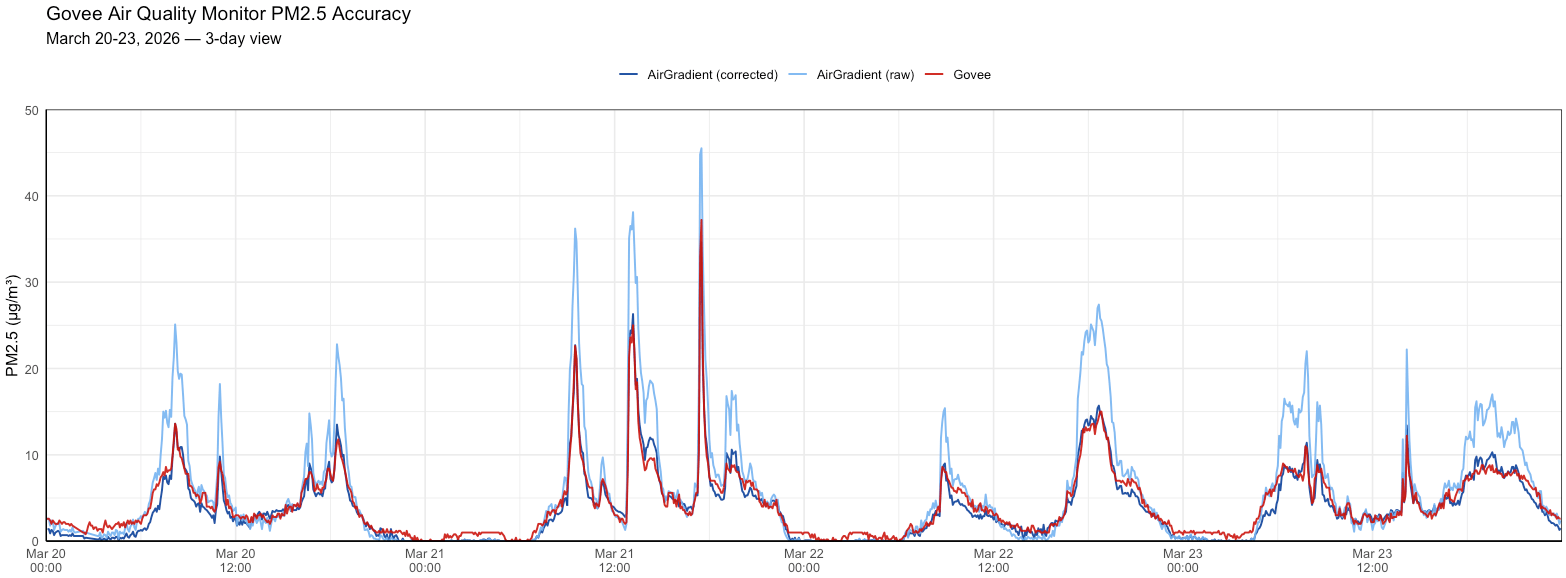
Looking more closely at the data, the Govee’s readings sit extremely close to the calibrated AirGradient output, which made me wonder whether Cubic or Govee applied a similar calibration approach to the sensor. I can’t say for certain, but the end result is that you’re essentially getting PM2.5 performance comparable to the AirGradient ONE from a device that costs a fraction of the price.
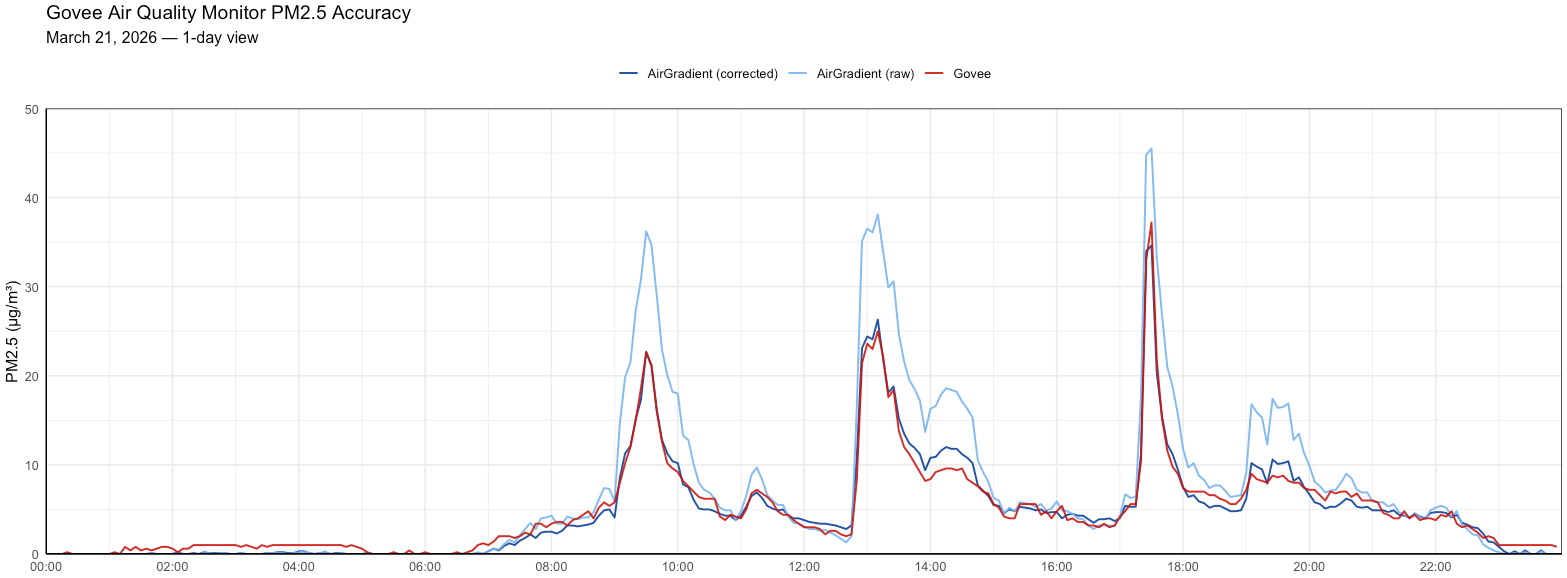
Zooming in further, you can see that the Govee occasionally hovers around 1 µg/m³ when the AirGradient records 0. It’s hard to say which is closer to the truth at those concentrations, but the difference is minimal and not something I’d read into too much.
Moving on to temperature and relative humidity, I compared the Govee against a hygrometer that came with a lab test report. It’s worth noting that the hygrometer itself carries a stated accuracy of ±3% RH and ±0.5°C, so it shouldn’t be treated as a reference baseline either, though the lab report showed it performing meaningfully better than those specifications at 25-30°C and 60-80% RH.
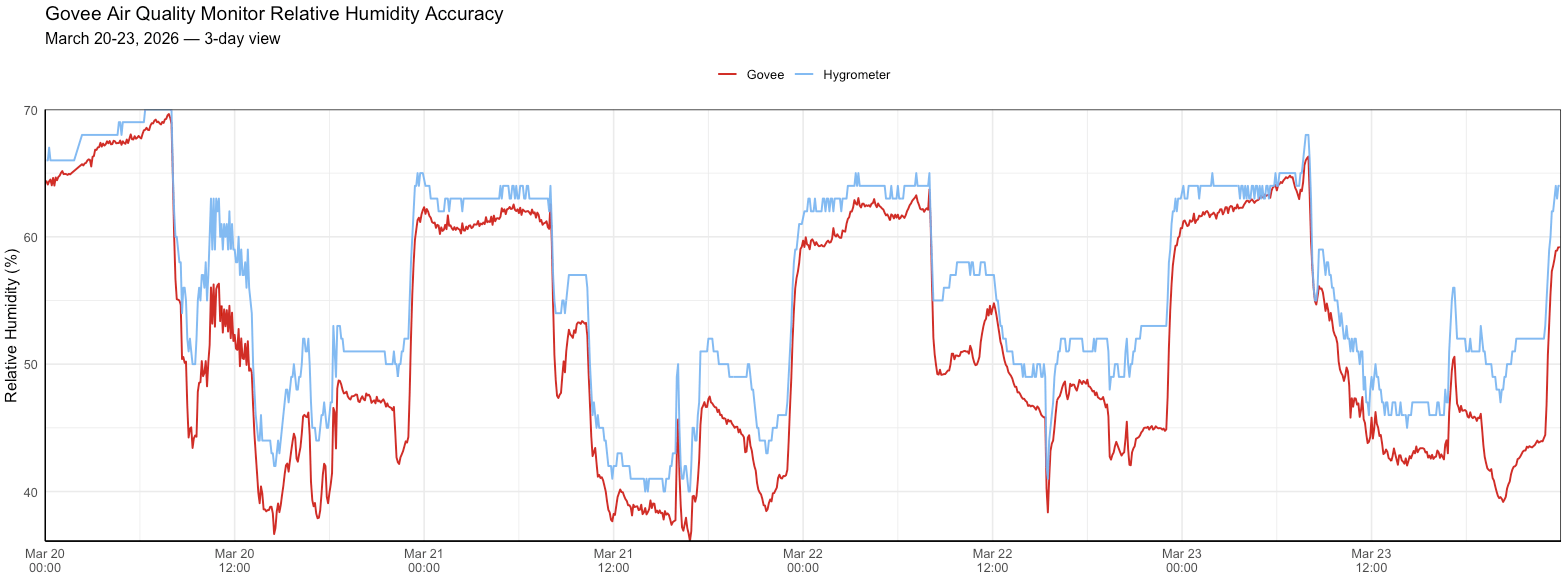
For relative humidity, the Govee was consistently within 4% of the hygrometer, and performed particularly well above 60% RH. As humidity dropped toward 40%, accuracy was somewhat lower, though still reasonable for a device at this price. Temperature performance was more interesting. When the air conditioning was running and temperatures were falling, the two devices correlated almost perfectly. As temperatures rose, a more systematic error appeared, which makes me wonder if there’s some kind of algorithmic correction applied under certain conditions. I wasn’t able to test at lower temperatures since it’s currently summer here. I would hypothesise that the Govee is more accurate at more common room temperatures like 18-25°C.
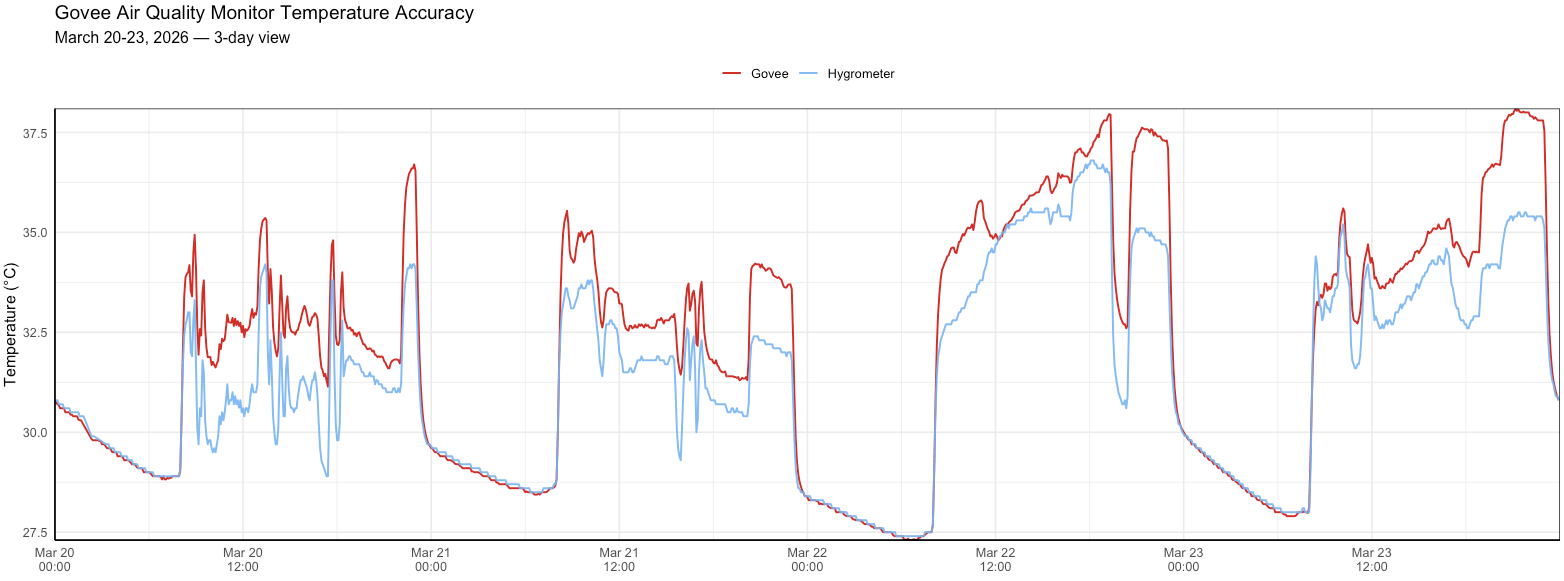
One thing that really stood out is the effort Govee put into isolating the temperature and humidity sensor from the rest of the device’s internals, as discussed in the design section. Based on these results, it looks like it seems to have paid off. The readings are meaningfully better than I’d expect from a device that hadn’t considered sensor placement at all.
Overall, I was especially impressed with the PM2.5 data from this device. Perhaps it is time to change my stance on these more affordable monitors, but I went into these tests not expecting much at all. Instead, I found comparable performance to much more expensive monitors.
BreatheSafeAir is a one-person publication. Every share and every subscriber is important to me.
I don’t have a marketing budget or a team behind me. Just a lot of test equipment and a genuine interest in helping you make sense of your air quality. If you find this useful, subscribing to my newsletter is the best free way to support the work. You’ll get information on what I’m currently testing, findings that don’t make it into the full reviews, and the kind of detail you only get from someone who thoroughly tests these devices.
Design
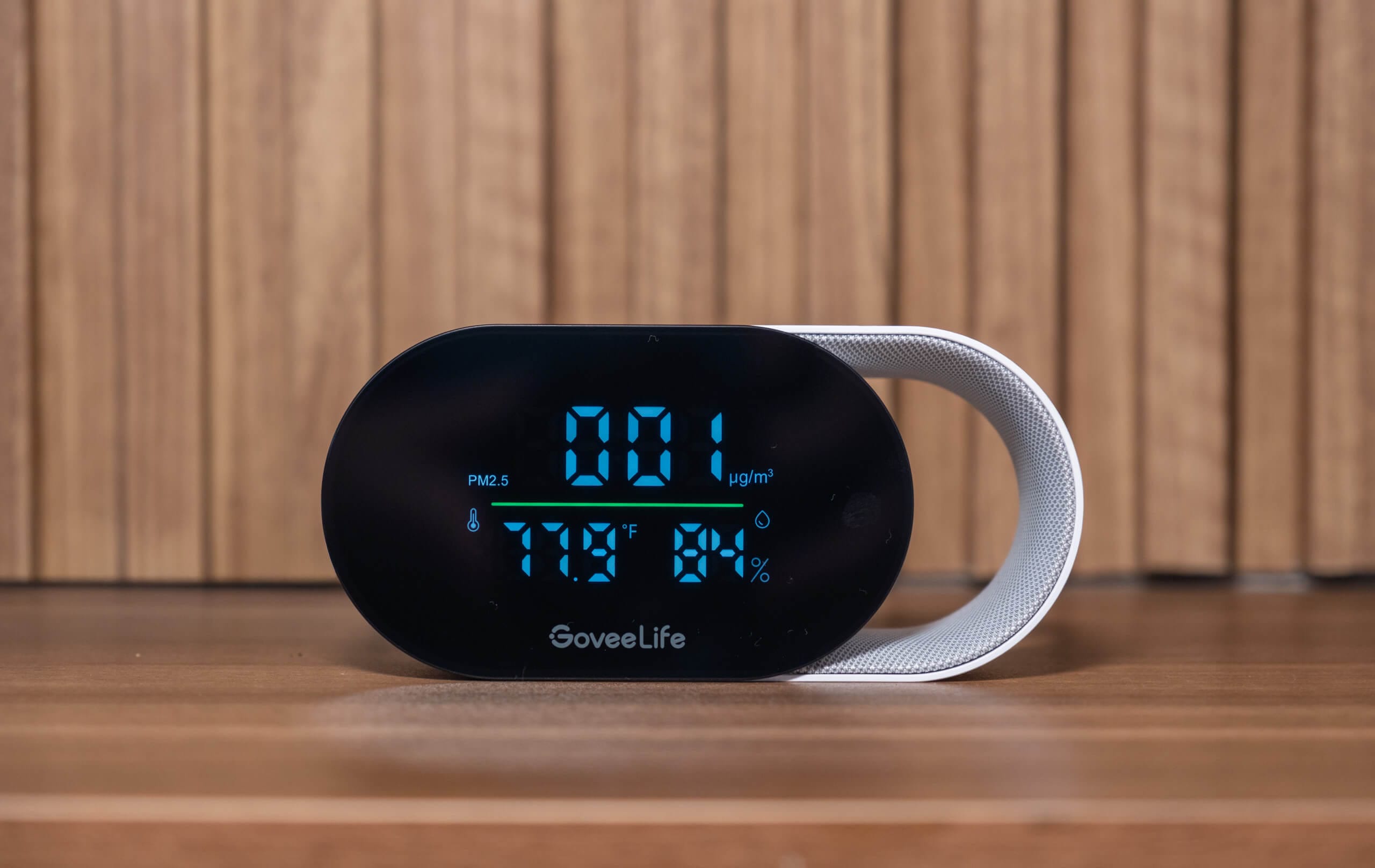
The Govee Air Quality Monitor is a fairly compact device at 13.5 x 4 x 6.4 cm and around 281 grams, so it’s not going to take up much space wherever you decide to put it. It has no internal battery, which means it’s designed to stay in one spot and run off a constant power source. For a home monitor that’s perfectly reasonable, and it’s good to see Govee using USB-C here rather than Micro USB, which some manufacturers are still shipping with even now (much to my frustration).
The front of the device is dominated by a large display that shows PM2.5, temperature, and relative humidity simultaneously. If the device is connected to Wi-Fi, you can choose to show the time in place of the PM2.5 reading, which is a nice touch if you want the monitor to double as a bedside or desk clock. There are small status icons for Wi-Fi and Bluetooth connection in the corner, and the screen is large enough to read comfortably from across a room without squinting. I check this device constantly without having to get up from my desk, despite it being located on the other side of my office.
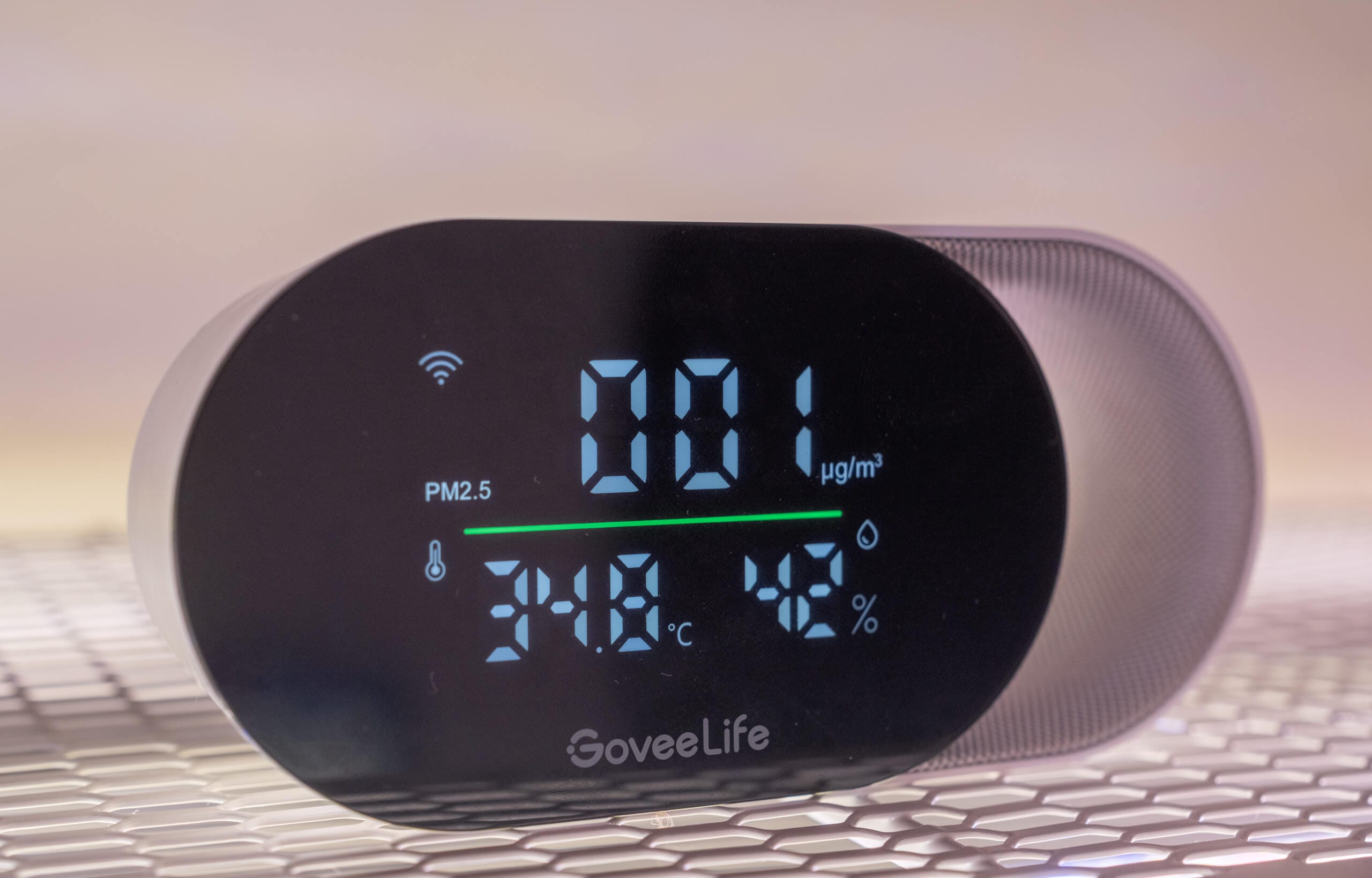
The design itself is where things get interesting. Rather than the usual rectangular slab, the Govee Air Quality Monitor has a distinctive loop on its side, finished with a soft-touch fabric that gives it a more sophisticated feel. When I first saw pictures of it online, I assumed the loop was purely cosmetic, something to differentiate it on a shelf. It turns out there’s a practical reason for it, as the temperature and relative humidity sensor is housed at the bottom of that loop, positioned as far as possible from the heat-generating components inside the device. Heat bleed from internal electronics is a well-known source of inaccuracy in temperature sensors, and the fact that Govee thought carefully about sensor placement at a $35 price point was not something I expected.
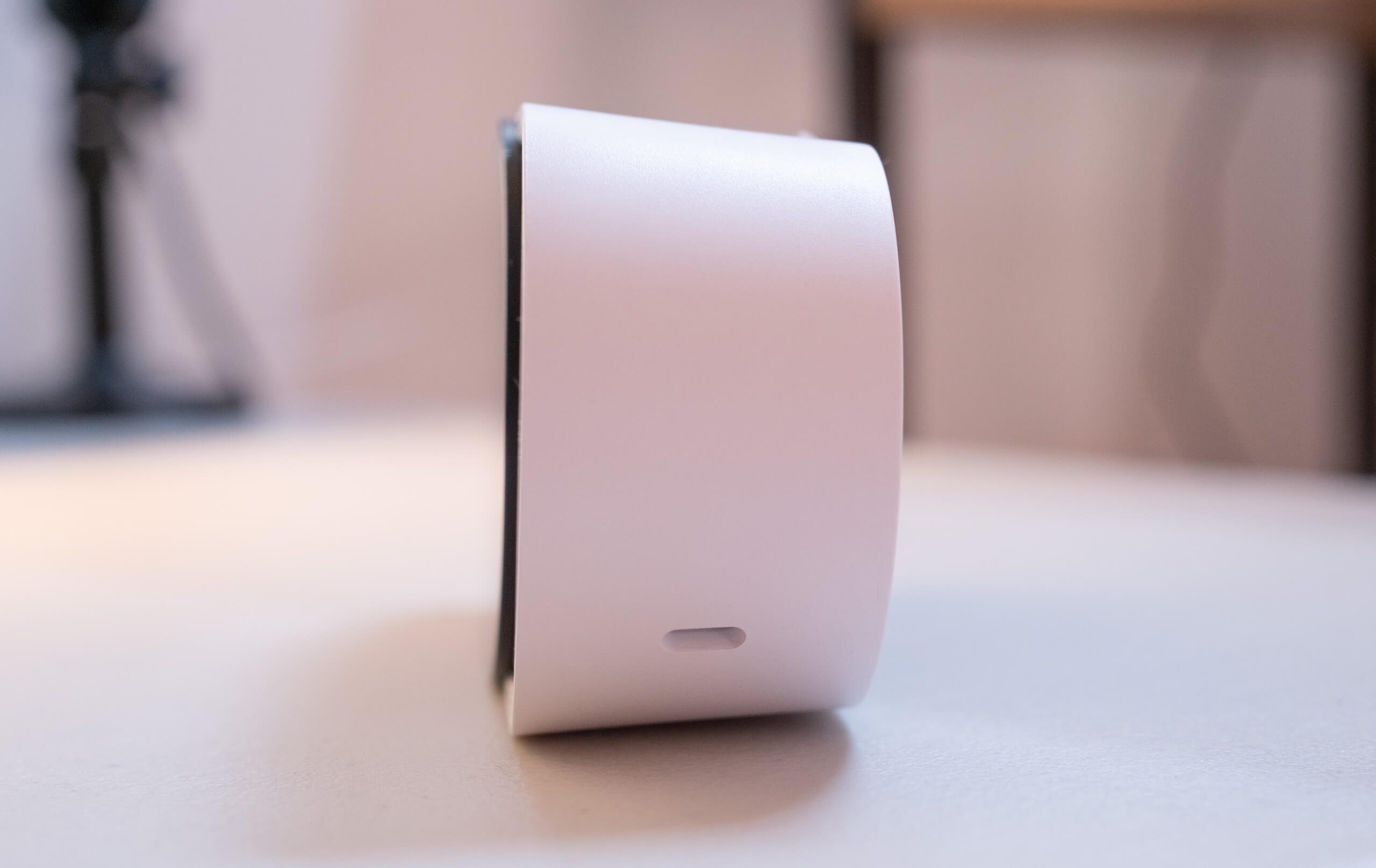
The temperature and RH sensor probe is located inside this hole.
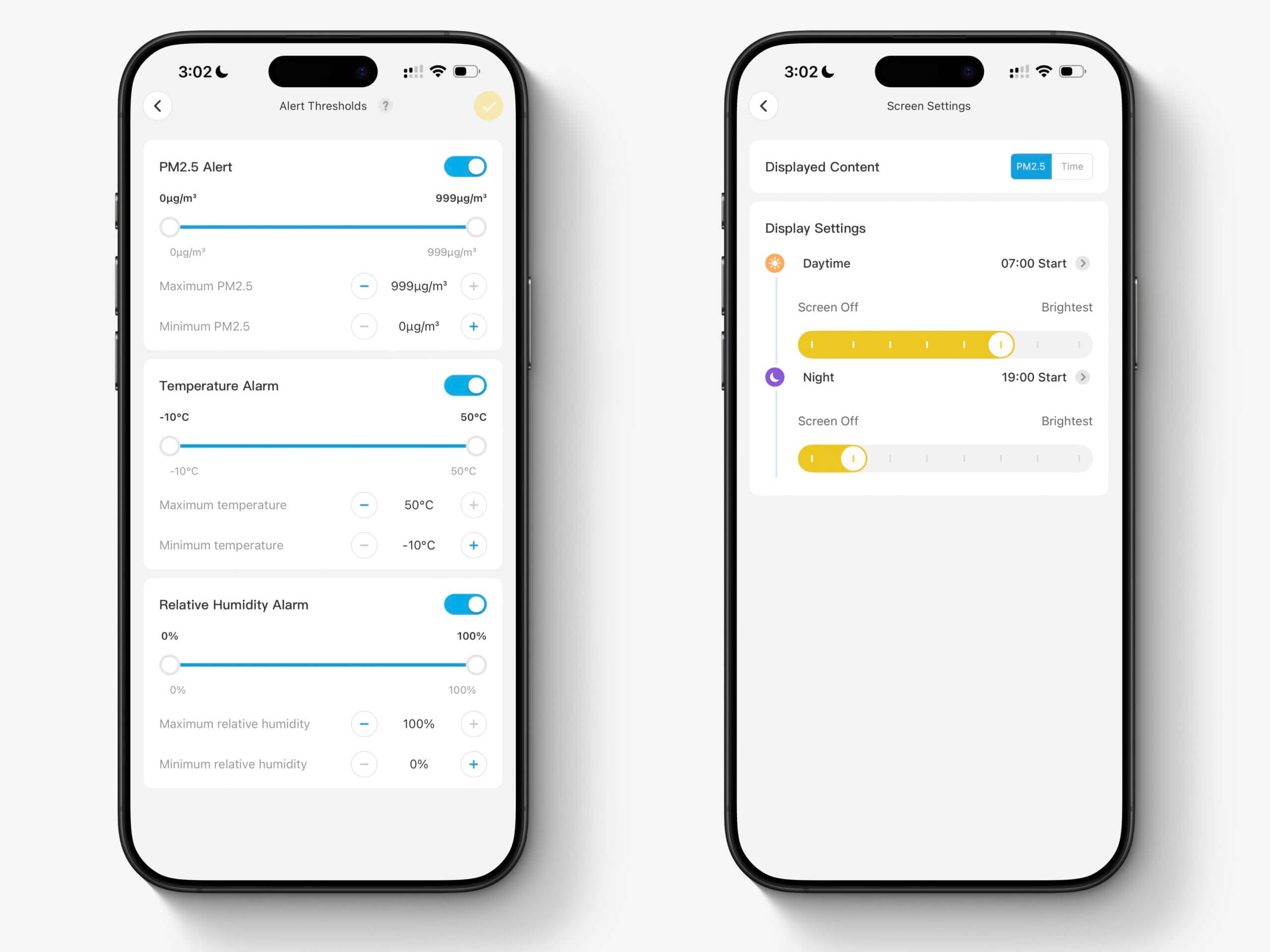
On top of the device there’s a single button that handles two functions. A short press cycles between Fahrenheit and Celsius, and a long press of three seconds switches the display between PM2.5 readings and the time. It’s worth noting that the time display only works when the device is connected to Wi-Fi or is within Bluetooth range of your phone. Everything else is handled through the app.
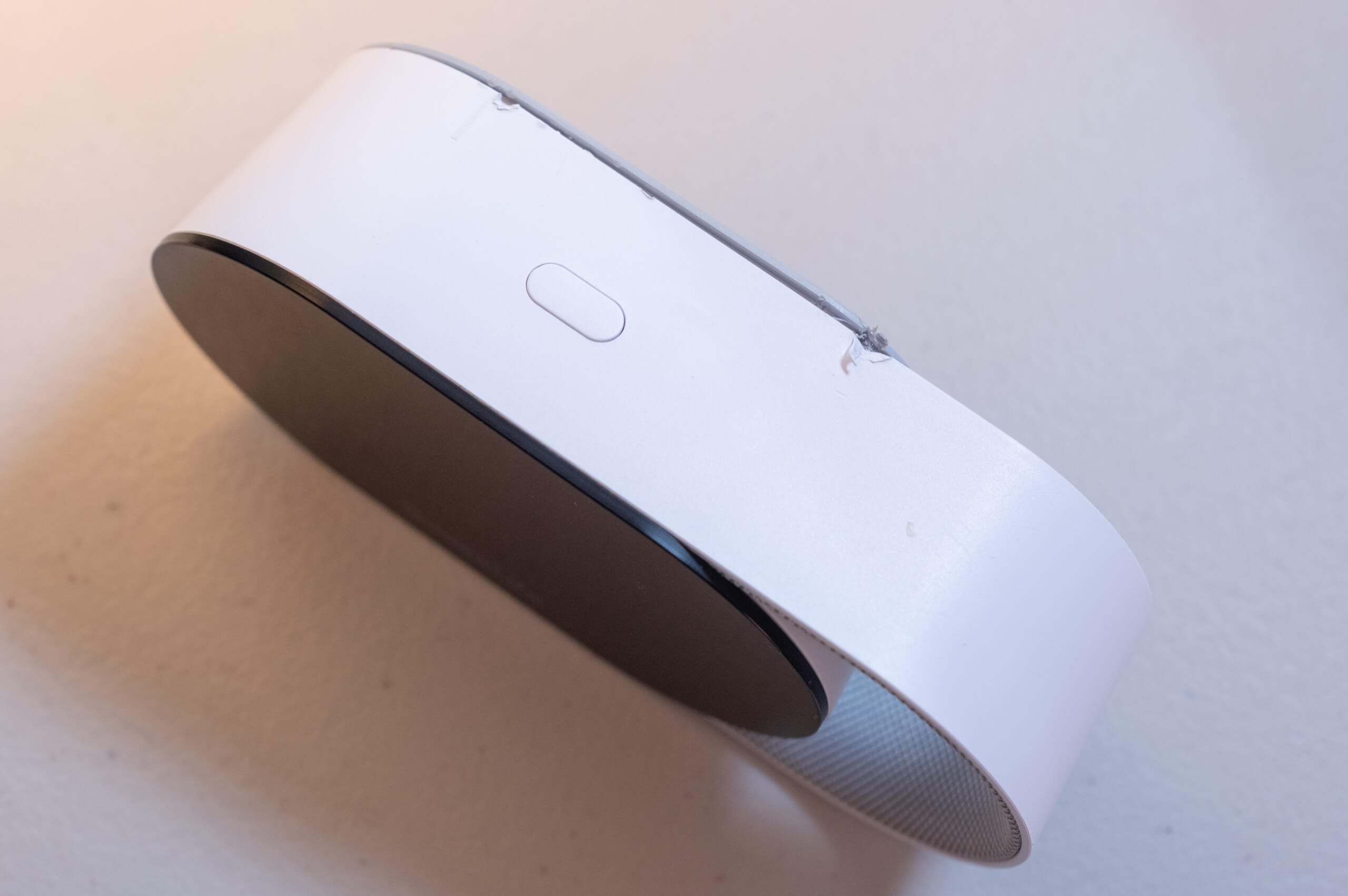
Please ignore the damage. I didn’t think to take a photo of the button until after I had opened the device to find out which PM sensor it uses.
Turning the device around, the back is largely taken up by a vented panel with a wire mesh behind it. This is where the PM sensor sits, with a small internal fan drawing air through the vent for active sampling. The mesh acts as a coarse filter to stop larger particles from getting in and interfering with the sensor’s readings. At the bottom of the back panel you’ll find the USB-C port.
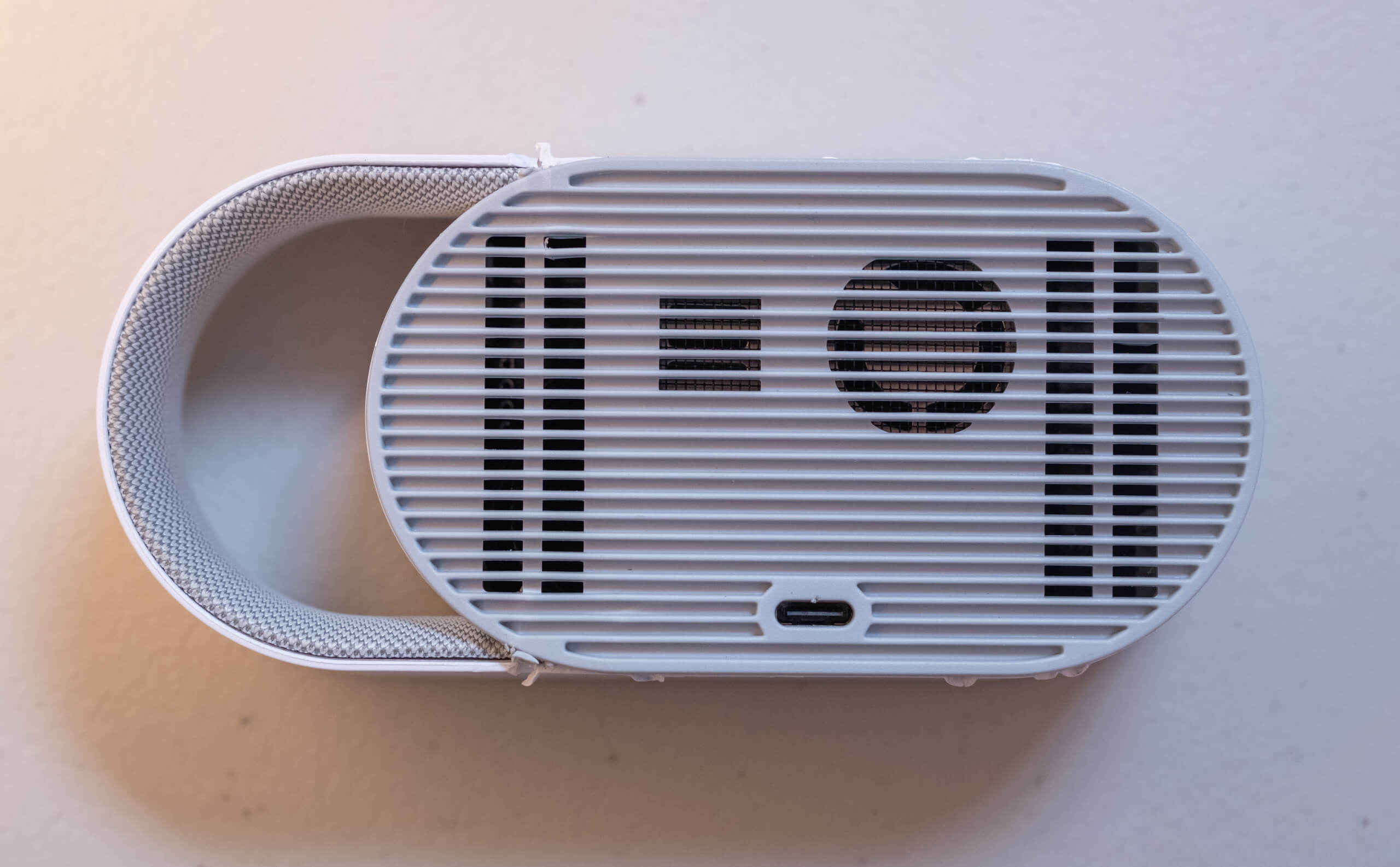
One thing worth mentioning briefly, mostly for anyone who’s curious about what’s inside: the Govee Air Quality Monitor is very difficult to disassemble. I opened mine specifically to identify the PM sensor, and it’s clearly not designed to ever be taken apart. Repairability probably isn’t a concern for most people buying a $35 monitor, but it’s worth knowing.
Overall, I’ve come to quite like the design of the Govee Air Quality Monitor. It doesn’t look like every other monitor in this category, and the loop in particular is one of those details that’s clearly well thought-out. What initially seemed like a purely aesthetic choice reflects real thought about how to get accurate readings from the sensors inside.
App & Connectivity
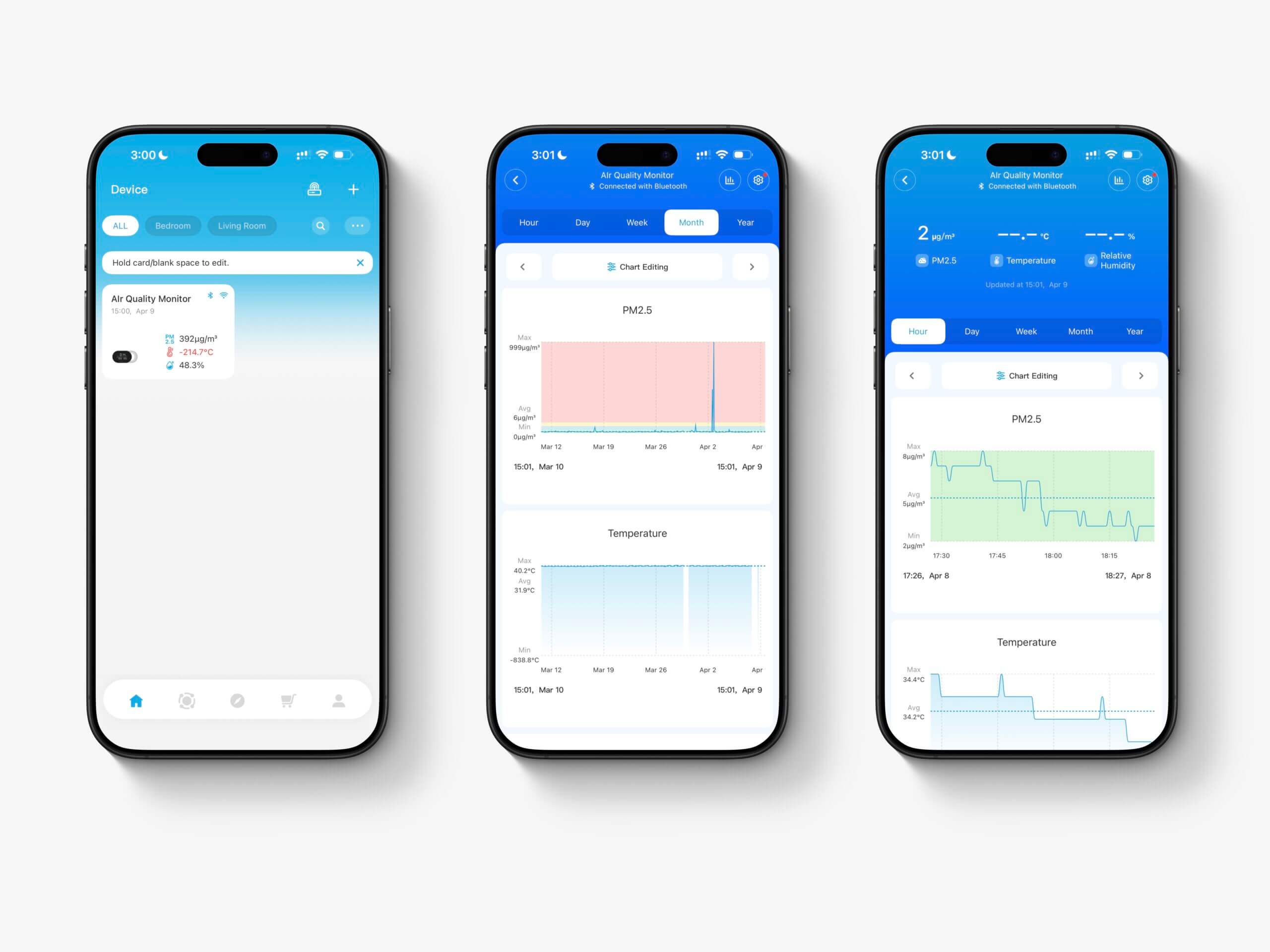
To get the most out of the Govee Air Quality Monitor, you’ll need the Govee Home app. The device connects initially via Bluetooth, and from there you can set it up on your Wi-Fi network through the app. One thing to be aware of is that the monitor only supports 2.4GHz Wi-Fi. That’s pretty standard for IoT devices even today, but it’s worth knowing if you’ve moved to a 5GHz-only network setup.
The Govee Home app is built to manage all Govee devices, not just this one, and that’s immediately obvious. There are tabs for automations, a store, a community section, account settings, and more. If the air quality monitor is the only Govee device you own, a lot of this feels like clutter. That said, I’m probably the outlier here. Most people who end up with this monitor will likely already be in the Govee ecosystem and will find the app much more useful as a result. I came at it from the opposite direction, buying the monitor for the air quality monitoring and discovering Govee’s broader ecosystem afterward. From that angle, the app feels a bit heavy. From the ecosystem angle, I can see it making a lot more sense.
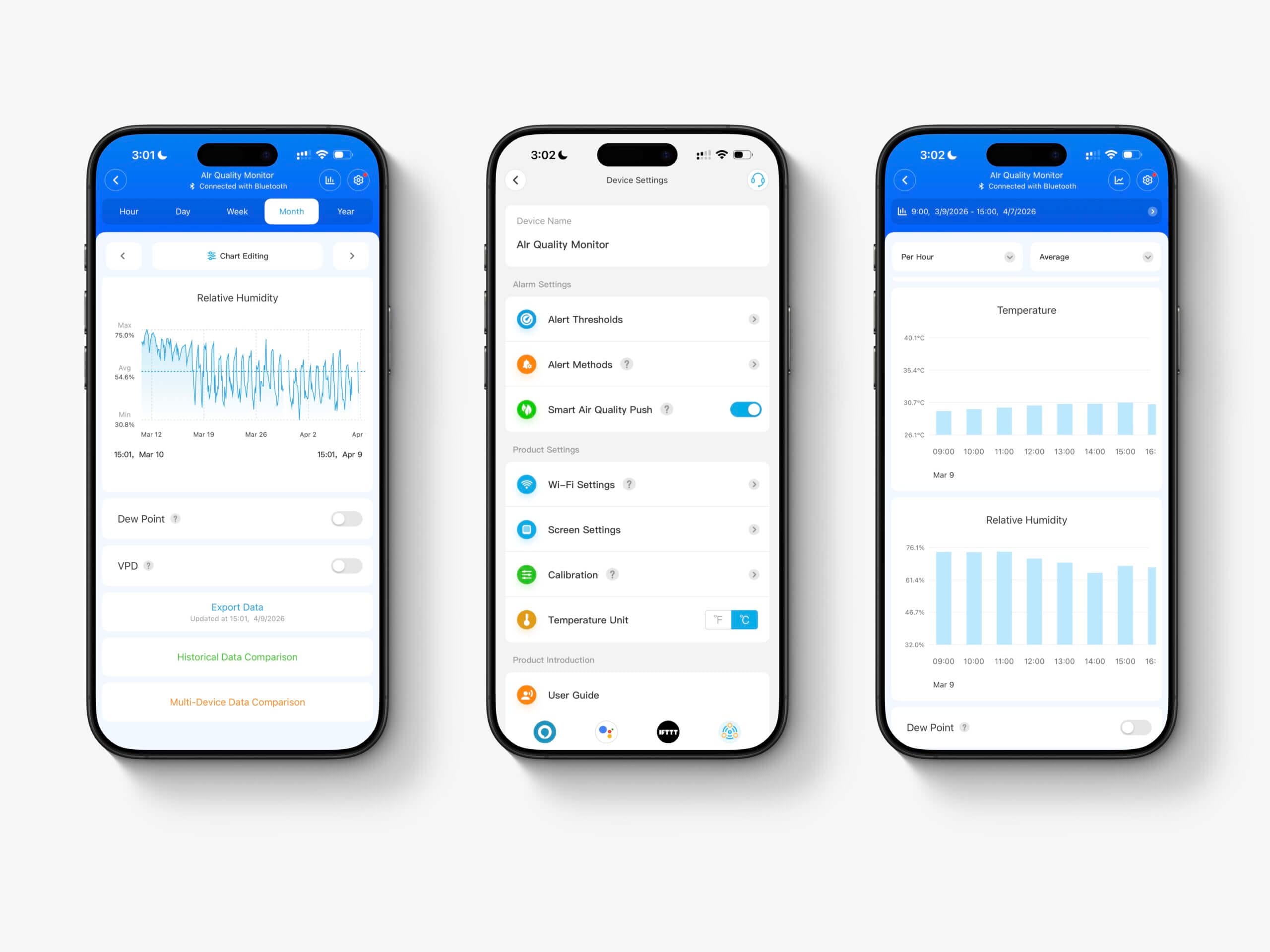
Beyond the app, the Govee Air Quality Monitor also works with Alexa and Google Home if you prefer to access your data that way. I use Alexa myself, but I’ve had consistent trouble getting PM2.5 values through it with this device. It’s something I’ve never quite managed to get working reliably. If Alexa integration is a priority for you, I’d point you toward the Amazon Smart Air Quality Monitor instead. That said, having the option is appreciated, and the flexibility to connect to different platforms is always a plus.
Back to the app itself. The main screen shows your current readings, and tapping on these will bring you to the historical data displayed as graphs. The graphs themselves are smooth and easy to navigate. You can also reorder them within the app, which is a small but welcome touch. One thing I found helpful is that the app also shows dew point and VPD alongside the measured values. Both are calculated from the temperature and relative humidity readings rather than coming from a dedicated sensor, but they’re useful figures that I’ve seen requested frequently by users of other monitors, so it’s nice to see them included here.
Where the app really surprised me was with data retention and export. I was able to export three full months of data at one-minute resolution, which is frankly remarkable for a device at any price point. For comparison, even the AirGradient only retains one-minute resolution data for around ten days. Most people probably won’t ever need to export months of raw data, but I love having that option. Even within the app, you can run some fairly useful comparisons, including historical views and multi-device comparisons, without needing to pull everything into a spreadsheet.
The device settings are also more comprehensive than I anticipated. You can set fully customisable alert thresholds for PM2.5, temperature, and humidity, choose whether alerts come through as push notifications, emails, or both, adjust screen brightness and set an on/off schedule, calibrate the temperature and humidity sensors, update the firmware, and switch Wi-Fi networks. Outside of the device settings, there are also account-wide settings for integrations and personal details.
Overall, the app is much better than I expected from an IoT company with (I assume) not much knowledge of air quality monitors. Features like user-adjustable thresholds and long-term data export at one-minute resolution aren’t things I take for granted, and I’m genuinely impressed they’re here. The app does feel a bit bloated if you’re only using it for this one device, but if you’re already in the Govee ecosystem or planning to expand into it, I think it’s a solid experience.
Pricing & Competition
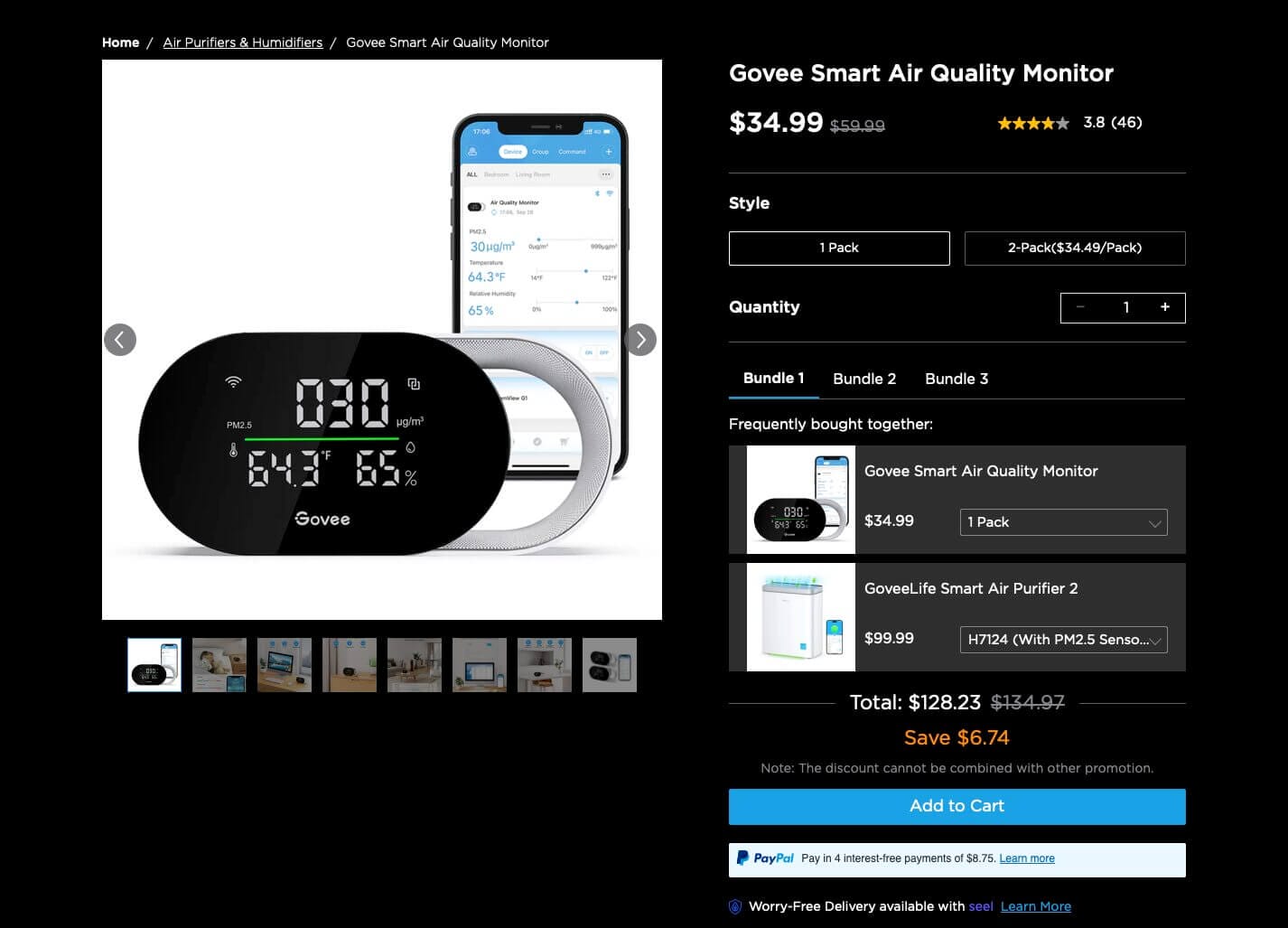
The device has a listed price of $59.99, but it seems to perpetually be on sale on at least one platform.
At $34.99, the Govee Air Quality Monitor sits in a part of the market that doesn’t have a lot of direct competition, at least not from devices I’ve personally tried. The closest comparison is probably the Temtop S1+, which comes in at around $50 and measures the same core metrics: PM2.5, temperature, and humidity. It’s a decent device, but it has quite a few flaws.
The more interesting comparisons are with IKEA monitors. The new Alpstuga comes in at $30, so it actually undercuts the Govee, and it also includes a CO2 sensor alongside PM2.5, temperature, and humidity. I haven’t tested it myself, so I can’t speak to its accuracy. However, I can say is that the Alpstuga uses Matter over Thread rather than Wi-Fi, which means you’ll need a Thread border router to get the most out of it. If you’re already running a Thread-compatible hub, that’s no problem. If you’re not, it adds a layer of setup that the Govee doesn’t require at all. Beyond connectivity, the Govee also has a significantly more developed app, with long-term data storage, export functionality, and customisable alerts that the Alpstuga currently can’t match. The Alpstuga is very intriguing, and I plan to test it properly at some point, but the two monitors are targeting somewhat different users.
Then there’s the older IKEA Vindstyrka at around $50, which trades the CO2 sensor for a VOC sensor instead. Similar thoughts apply: the feature set looks competitive on paper, but the Govee pulls ahead when it comes to the app experience and smart home flexibility.
With the Govee, you’re getting PM2.5 accuracy that I’d expect from a significantly more expensive device, paired with an app that offers a level of functionality that dedicated air quality monitor brands sometimes struggle to match. If PM2.5 is what you care about and you don’t need CO2 or VOC measurements alongside it, I think the Govee Air Quality Monitor is the best option in this price range right now.
Conclusion
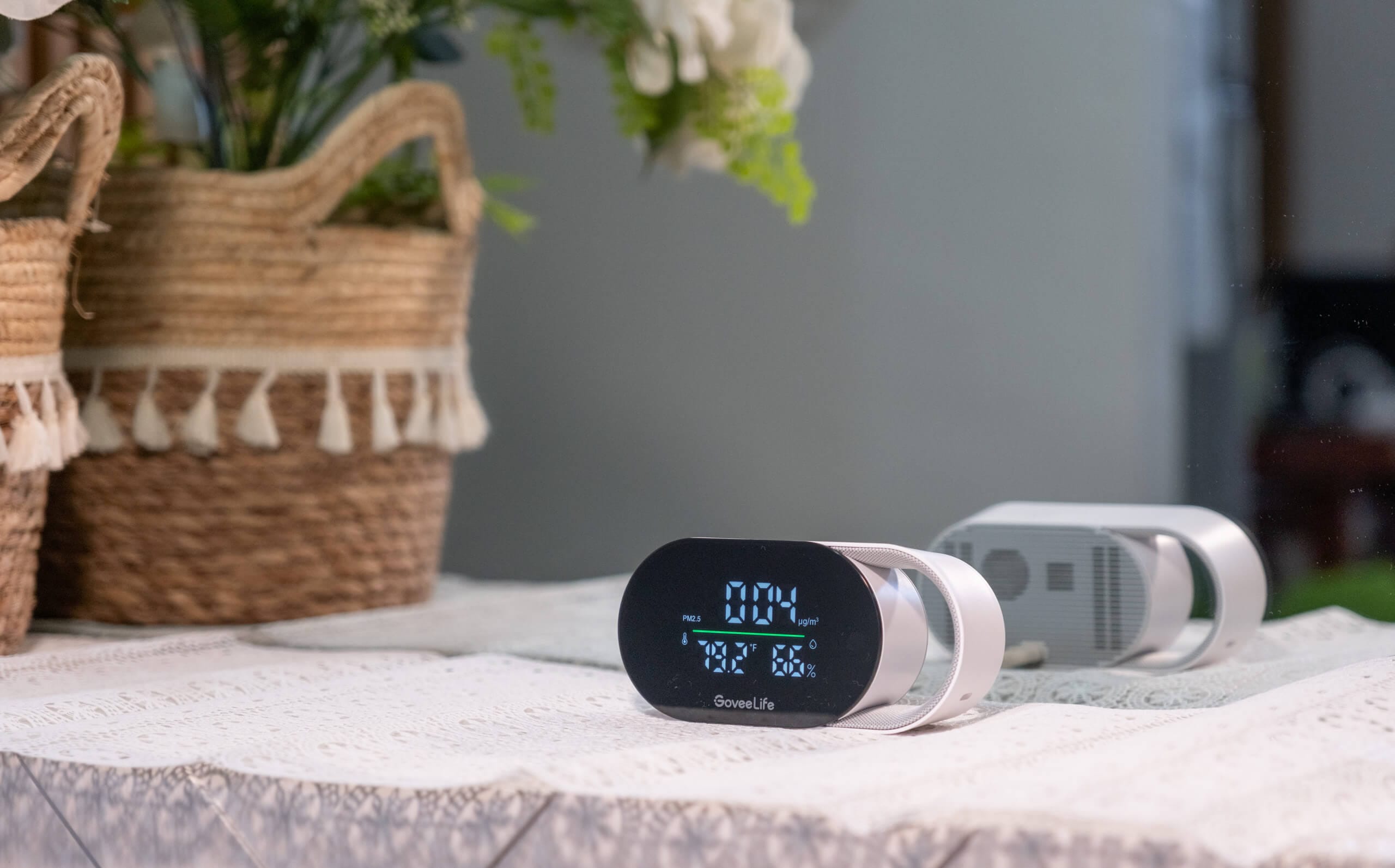
To be honest, the Govee Air Quality Monitor surprised me. I came into this review with low expectations, partly because of the price and partly because Govee isn’t a company I’d traditionally associate with serious air quality monitoring. Five months later, I find myself recommending to anyone who’s primarily looking for a low-cost PM2.5 monitor.
The PM2.5 performance is the headline. Tracking so closely to a factory-calibrated AirGradient ONE over an extended period is not something I expected from a $35 device. The temperature and humidity performance is reasonable too, with the caveat around the systematic temperature error at higher readings that I’d like to investigate further when I get the chance to test in cooler conditions.
Beyond the sensors, there are features here that caught me off guard. The ability to export three months of per-minute data is something I can’t take for granted even on dedicated air quality monitors that cost several times more. That said, the app has its rough edges, particularly if this is the only Govee device you own and you find the broader ecosystem tabs cluttering up the experience. The Alexa integration has also been unreliable for me personally, to the point where I don’t use it at all.
Still, taken as a whole, this is a well-rounded monitor at a price that makes the competition look a bit awkward. I came into this skeptical of WIRED’s verdict. Having used the device for five months, I think they got it right, even if they got there for somewhat different reasons than I did. It’s good to see another affordable yet accurate device on the market, and the Govee Air Quality Monitor has earned its place on that list.
- Accurate PM2.5 readings for the price
- Excellent data retention and export
- Thoughtful sensor placement for temp/RH
- Customisable alerts and screen settings
- USB-C powered
- App feels bloated as a standalone device
- Alexa integration unreliable for PM values
- Systematic temperature error at higher temps
Govee Air Quality Monitor FAQ
Is the Govee Air Quality Monitor accurate?
Based on my testing over several months, the PM2.5 accuracy is impressive for the price. Running it alongside a factory-calibrated AirGradient ONE, the two devices tracked each other extremely closely at typical indoor concentrations, often reading the same value. Temperature and relative humidity performance is also reasonable, with some caveats at lower humidity levels and higher temperatures.
What does the Govee Air Quality Monitor measure?
It measures PM2.5, temperature, and relative humidity. The Govee Home app also displays dew point and VPD, though these are calculated from the temperature and humidity readings rather than measured by dedicated sensors.
Does the Govee Air Quality Monitor work with smart home platforms?
It connects via Bluetooth and 2.4GHz Wi-Fi and works with Amazon Alexa and Google Home. It also integrates with other Govee smart devices, allowing automations such as triggering an air purifier when PM2.5 levels rise. In my experience, Alexa integration has been unreliable for pulling PM2.5 values specifically.
Can I export data from the Govee Air Quality Monitor?
Yes, and this is one of the device’s standout features. The Govee Home app retains a significant amount of historical data at one-minute resolution, which you can export for further analysis. This is well beyond what many dedicated air quality monitors offer at any price.
How does the Govee Air Quality Monitor compare to the IKEA Vindstyrka and Alpstuga?
The Vindstyrka is priced around $50 and includes a VOC sensor but lacks CO2. The Alpstuga is slightly cheaper at $30 and adds a CO2 sensor, but uses Matter over Thread, which requires a compatible hub. Both IKEA devices also have less developed apps and fewer data features than the Govee. If PM2.5 is your primary concern, the Govee holds up well against both.


